We announced the availability of Linux on-premises and cross-region mounting of Azure Files for the first OS distribution – Ubuntu 17.04, in April. Today, we are happy to share that more Linux distributions now include this functionality, which will allow on-premises and cross-region mounting of Azure Files.
For security reasons, connections to Azure Files shares are blocked if the communication channel isn’t encrypted while the connection attempt is not made from the same data center on which Azure File shares reside. Channel encryption is not provided if the user’s client OS doesn’t support SMB encryption, and Linux did not support this yet. We have collaborated with Linux community to implement encryption Linux CIFS. Encryption support was introduced in 4.11 kernel.
This functionality has already been backported to the following Linux distributions:
- Ubuntu from 16.04 and above
- SUSE Linux Enterprise Server 12 SP3 and above
- CoreOS Stable
- Debian 9 with jessie-backports kernel
This functionality is coming soon on the following Linux distributions:
- CentOS 7.5 (mid-2018)
- Next release of RHEL (one after 7.4)
This means that with the above version you can share data access across VMs living in different environments like on-premises, other regions in Azure or even other clouds. You can point it to Azure Files and get an SMB/CIFS share mounted on your Linux VM, or mount the same share on Windows and share data across platforms.
New getting started and diagnostic tool for Linux
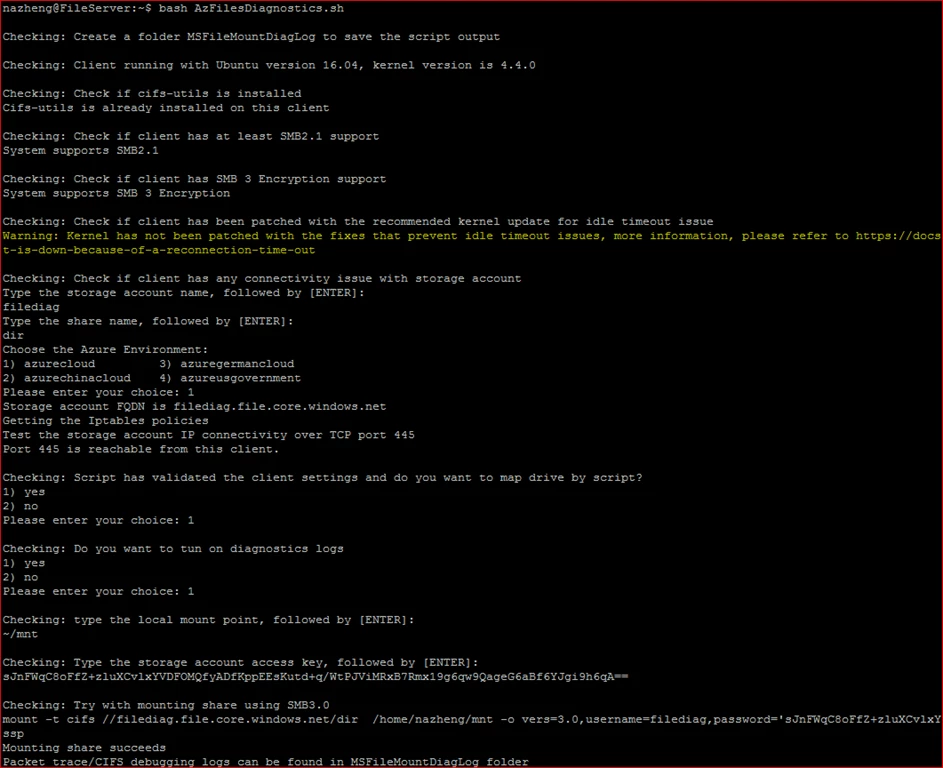
We are also making it easy for you to check if your Linux environment is correctly set up, and has all the pre-requisites to use SMB by releasing a brand new troubleshooter tool for Linux, similar to the Windows troubleshooter that we announced in June.
We published a troubleshooting for Linux guide some time ago. Today, we are releasing the Azure toubleshooter tool in order for you to rest assured that your environment is correctly set up.
You can download AzFileDiagnostics from Script Center today and simply run the following command and that’s it. The tool will tell you what needs to be done for mounting your file share. It will then mount the file share for you, if you wish to do so.
chmod +x AzFilesDiagnostics.sh
./AzFilesDiagnostics.sh
Summary and next steps
Azure is a first-class platform for Linux and open source technology. Microsoft has been constantly contributing to the Linux open source community to provide the finest experience for our Azure Linux customers and we look forward to continue doing so.
We are excited to see the tremendous adoption of Azure File Storage. You can try Azure File storage by getting started in under five minutes. Further information and detailed documentation links are provided below.
- Use Azure File on Linux
- Azure Files Storage: a frictionless cloud SMB file system for Windows and Linux
- Inside Azure File Storage
We will continue to enhance the Azure File Storage based on your feedback. If you have any comments, requests, or issues, you can use the following channels to reach out to us: