Updated on February 22, 2021: Java Message Service (JMS) 2.0 API on Azure Service Bus Premium is now generally available. For more information, see the blog post Announcing general availability for Java Message Service (JMS) 2.0 API on Azure Service Bus Premium.
Azure Service Bus simplifies enterprise messaging scenarios by leveraging familiar queue and topic subscription semantics over the industry-driven Advanced Message Queuing Protocol (AMQP). It offers customers a fully managed platform as a service (PaaS) offering with deep integrations with Azure services to provide a messaging broker with high throughput, reliable latency while ensuring high availability, secure design, and scalability as a first-class experience. We aim to offer Azure Service Bus for customer workloads on most application stacks and ecosystems.
In keeping with that vision, we’re excited to announce preview support for Java Message Service (JMS) 2.0 over AMQP in Azure Service Bus premium tier. With this, we empower customers to seamlessly lift and shift their Java and Spring workloads to Azure while also helping them modernize their application stack with best in class enterprise messaging in the cloud.
As enterprise customers look to lift and shift their workloads to Azure, they may take the opportunity to modernize their application stack by leveraging cloud-native Azure offerings. This is more appropriate for components on the data plane, storing or moving data, which benefit from moving away from an infrastructure as a service (IaaS) hosted setup to a more cloud-native PaaS setup.
With databases and data stores, the establishment of standardized APIs and protocols has paved the way for seamless migration, wherein the application is agnostic of the actual provider or implementation of this standardized API and with negligible or configuration only code changes, the applications can move from their current on-premises provider to Azure’s fully managed PaaS offering with expected behavior.
The enterprise messaging ecosystem has been largely fragmented compared to the data ecosystem until the recent AMQP 1.0 protocol standardization in 2011 that drove consistent behavior across all enterprise message brokers guaranteed by the protocol implementation. However, this still did not lead to a standardized API contract, perpetuating the fragmentation in the enterprise messaging space.
The Java Enterprise community (and by extension, Spring) has made some forward strides with the Java Message Service (JMS 1.1 and 2.0) specification to standardize the API utilized by producer and consumer applications when interacting with an enterprise messaging broker. The Apache QPID community furthered this by its implementation of the JMS API specification over AMQP. QPID-JMS, whether standalone or as part of the Spring JMS package, is the de-facto JMS implementation for most enterprise customers working with a variety of message brokers.
Connect existing applications with Azure Service Bus over AMQP
With the feature list supported with this preview (with full parity planned by general availability), Azure Service Bus supports all Java Message Service API contracts, enabling customers to bring their existing applications to Azure without rewriting the application. Here is a list of JMS features that are supported today:
- Queues.
- Topics.
- Temporary queues.
- Temporary topics.
- Subscriptions.
- Shared durable subscriptions.
- Shared non-durable subscriptions.
- Unshared durable subscriptions.
- Unshared non-durable subscriptions.
- QueueBrowser.
- TopicBrowser.
- Auto-creation of all the above entities (if they don’t already exist).
- Message selectors.
- Sending messages with delivery delay (scheduled messages).
Seamless migration from on-premises or IaaS hosted JMS provider to Azure Service Bus
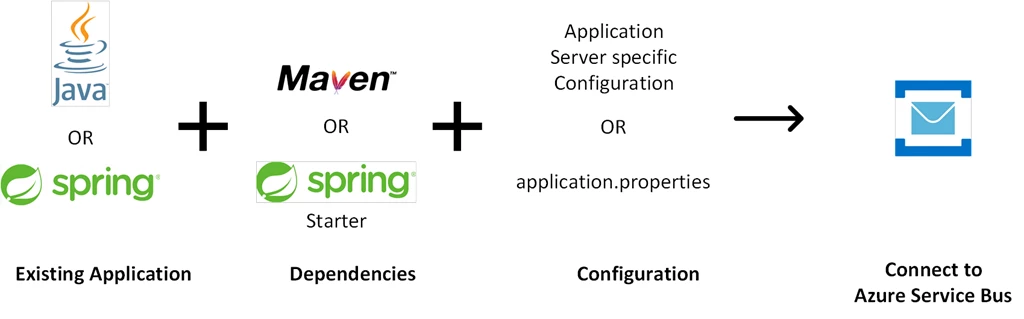
To connect an existing JMS based application with Azure Service Bus, simply add the Azure Service Bus JMS Maven package or the Azure Service Bus starter for Spring boot to the application’s pom.xml and add the Azure Service Bus connection string to the configuration parameters.
With configuration only code changes, as shown above, customers can keep their business logic agnostic of the message broker and avoid any vendor lock-in.
Simple pricing, painless deployments, and scalable resourcing
By leveraging Azure Service Bus JMS support, customers can now avoid the overhead of procuring licenses, managing an enterprise messaging broker on their own IaaS Compute, simplify cost management with a fixed price per messaging unit, and by leveraging automatic scale up and down provisioning to address variability in workloads.
Integrate with other Azure offerings to further modernize your application stack
You can also leverage Azure Service Bus integration with other Azure offerings to modernize and simplify the application stack. Here are some ways on how you can do that.
- Azure Logic Apps: Utilize Azure Logic Apps connectors for Azure Service Bus to replace various critical business workflows with a simple low-code pay-as-you-go serverless offering.
- Azure Functions: Utilize Azure Functions triggers for Azure Service Bus to replace custom applications with a simple pay-as-you-go serverless PaaS offering.
- Azure Monitor and Alerts: Utilize Azure monitor and alerts to keep an eye on the Azure Service Bus Namespace, Queue, Topics, and Subscriptions level metrics.
- Azure KeyVault: Utilize integration with Azure KeyVault to encrypt the data on the namespace with a customer-managed key.
- Virtual Networks and Private endpoints: Secure access to Azure Service Bus using Virtual network service endpoints. Connect with a cloud-hosted service via an address hosted on your private network using Private endpoints.
Get started today
Get started today by provisioning a Service Bus namespace with JMS features and migrating your existing Java and Spring applications from Apache ActiveMQ to Service Bus.