Update 2/22/2016: To respond to a common user question, right now there is no timeline on when additional modules / new versions of modules will be shipped out of box in the Automation service. If you have additional requirements besides what we currently ship globally, these modules / module versions will have to be imported as user modules. Please note the new guidance is that if the latest version of any Azure/AzureRM module is imported as a user module to an automation account, the latest versions of ALL Azure/AzureRM modules (not just the ones that ship out of the box in Azure Automation) should be imported to the automation account, to avoid any version mismatch issues that could occur now or in the future if Azure Automation later ships any additional (or newer version) Azure/AzureRM modules as global modules. Instructions for importing the Azure/AzureRM modules as user modules can be found here.
Update 2/1/2016: The below post says that the only AzureRM modules shipped out of the box in Azure Automation are AzureRM.Compute and AzureRM.profile. We are now shipping some additional AzureRM modules out of the box as well — AzureRM.Storage, Azure.Storage, AzureRM.Automation, AzureRM.Resources, and AzureRM.Sql. These modules should be available for use within your Automation account with no additional effort. If you have already imported your own version of any of these modules to your automation account, you can delete them to cause your automation account to start to use our global versions of these modules instead.
As more and more functionality of Azure is introduced via the new Azure Resource Manager management layer of Azure, we on the Azure Automation team are asked more and more for out-of-the-box support for the Azure Resource Manager cmdlets in Azure Automation, allowing all new Azure functionality to be easily automated. We’ve shown how to import the modules manually in the past, to help users unblock themselves and use Azure Resource Manager in Azure Automation, but out-of-the-box support was missing … until now. I’m excited to announce we’ve started to ship the Azure Resource Manager cmdlets in Azure Automation!
But enough talk, let’s look at a real example, shall we? Say you want to automate actions against both your Azure classic virtual machines (through Azure Service Management), and your cool new V2 virtual machines (through Azure Resource Manager) from the same runbook. That’s now incredibly simple in Azure Automation. Let’s use this PowerShell script runbook as an example:
# TODO: update to the name of the credential asset in your Automation account
$AutomationCredentialAssetName = "AzureCreds"

# Get the credential asset with access to my Azure subscription
$Cred = Get-AutomationPSCredential -Name $AutomationCredentialAssetName

# Authenticate to Azure Service Management and Azure Resource Manager
Add-AzureAccount -Credential $Cred | Out-Null
Add-AzureRmAccount -Credential $Cred | Out-Null

# Get and output Azure classic VMs
$VMs = Get-AzureVM
$VMs.Name
"`n--------------`n"

# Get and output Azure v2 VMs
$VMsv2 = Get-AzureRmVM
$VMsv2.Name
Without importing any modules myself, running this against my Azure subscription outputs:

This looks correct, given the VMs in my Azure subscription:
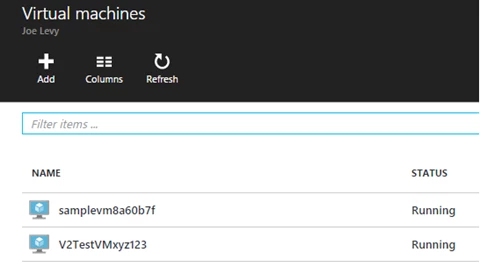

Just like the Azure Service Management cmdlets, the Azure Resource Manager cmdlets support authentication via a user principal organizational identity – you just use a slightly different cmdlet to do that authentication (Add-AzureRmAccount instead of Add-AzureAccount). The Azure Resource Manager cmdlets also support service principal authentication, however, due to a bug is not yet supported in Azure Automation.
Currently, only the AzureRM.profile and AzureRM.Compute PowerShell modules are shipped out-of-the-box as global modules in Azure Automation, but we will be introducing more and more of the Azure Resource Manager modules as global modules over the coming months. For now, if you are trying to automate management of your Azure V2 virtual machines (such as to save money by automatically shutting down VMs after business hours and automatically starting them up again right before business hours begin), you should be able to do so. You can continue to follow these instructions to manually import any additional (or newer version) Azure / Azure Resource Manager modules you need for your scenarios. Please note the new guidance is that if the latest version of any Azure/AzureRM module is imported as a user module to an automation account, the latest versions of ALL Azure/AzureRM modules (not just the ones that ship out of the box in Azure Automation) should be imported to the automation account, to avoid any version mismatch issues that could occur now or in the future if Azure Automation later ships any additional (or newer version) Azure/AzureRM modules as global modules.
Looking for specific Azure Resource Manager functionality to be available in Azure Automation? Post in the comments with the modules/functionality you’re looking for so we can better prioritize the order of modules we ship.
Just getting started with Azure Automation? Learn about the service here, and follow Azure Automation on Twitter.