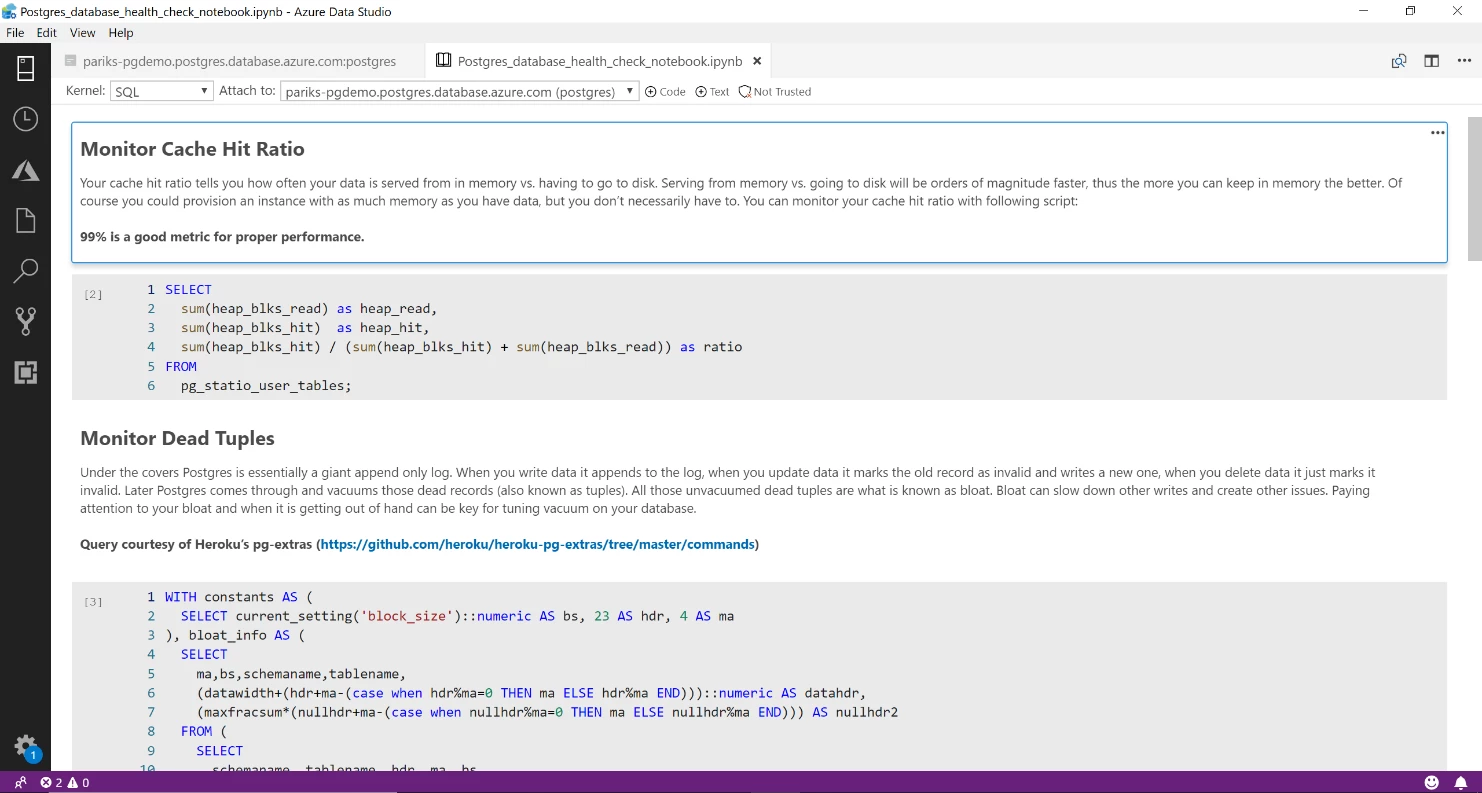
In Craig Kerstiens‘s blog post, “A health check playbook for your Postgres database” he emphasizes the need for periodic checks for your Postgres databases to ensure it’s healthy and performing well. Most Postgres database administrators and community members would usually bookmark or save such articles so they can revisit them and reuse the queries shared in the article to run checks against their databases. The common challenge with this approach is, you end up with many saved archives, and searching through them when you need it is time consuming and less productive. A better way to operationalize your health check runbooks and database scripts is by creating SQL Notebooks in Azure Data Studio. A screenshot of the notebook is below, and we have uploaded the same in our GitHub repository for anyone in the community to download or contribute to it.
The concept of interactive notebooks, although new in the SQL world, is one of the preferred ways for data scientists to record, understand, and reproduce data analysis in the Python world. The Python now called “Jupyter” notebook was first developed in 2011 by a team led by data scientist Fernando Pérez, and computational physicist Brian Granger. As Fernando Pérez said, “We built it by solving problems that we ourselves had as researchers and educators.”
The concept of recording context along with the SQL code is not new for database administrators. In most organizations, database administrators would maintain a document with operational practices along with links to the SQL scripts that need to be run and the order they need to be run in. This is to ensure data quality, consistency, and performance is maintained for end users. However, as time passes people move on, code evolves, and the documentation often becomes stale. Meanwhile, the scripts are updated by engineers as they learn, adapt, and operate, making the documentation and its context less relevant. With SQL Notebooks, the engineers updating the code tend to also update the explanatory text in front of them to explain the edits with relevant context.
As a database engineer, it makes sense to create and maintain a health check notebook where you can maintain your curated SQL scripts along with explanatory text, images, and web links to provide context to anyone reading it or using it for the first time. Notebooks help you record not just the what, but the why, which is often more important. They also make it easy to share and collaborate with the team.
With that understanding, we recorded Craig’s blog into a health check notebook which not only provides monitoring scripts but also explains why you need to run them. The notebook can be reused, updated, or enhanced by anyone in the community as needed.
How to get started with Azure Data Studio
There are even more features to discover, like Git source control integration and customized dashboards and widgets. You can start using the preview for PostgreSQL in Azure Data Studio today, check out the install instructions. To start using our preview PostgreSQL extension for Visual Studio Code, learn more on our GitHub page.
These two features are in preview and your feedback is critical to making them better and making them work for you. Share your feedback on our PostgreSQL GitHub pages for Azure Data Studio or Visual Studio Code respectively.
If you would like to follow the development and progress of SQL Notebook in Azure Data Studio, visit the Azure Data Studio GitHub page. Our engineering team is regularly going through the untriaged issues and assigning issues into different monthly milestones so you know we are working on them, and your votes on issues help us prioritize. If you have any feature requests or issues, please submit to our GitHub issues page. For any questions, feel free to comment below or tweet us @AzureDBPostgres.
Acknowledgements
Special thanks to Craig Kerstiens and Rachel Agyemang for their contributions to this posting.