Skip to main content Explore View all products (200+) Microsoft Foundry Azure Copilot GitHub Copilot Azure Kubernetes Service (AKS) Azure Cosmos DB Azure Database for PostgreSQL Azure Arc Microsoft Fabric Linux virtual machines in Azure Foundry Models Foundry Agent Service Foundry IQ Foundry Tools Foundry Control Plane Observability in Foundry Control Plane Azure OpenAI in Foundry Models Azure Speech in Foundry Tools Azure Machine Learning View all databases Azure Cosmos DB Azure DocumentDB Azure SQL Azure Database for PostgreSQL Azure Managed Redis Microsoft Fabric Azure Databricks Linux virtual machines in Azure Windows Server on Azure Azure Functions Azure Virtual Machine Scale Sets Azure API Management Azure Container Apps Azure Kubernetes Service (AKS) Azure Kubernetes Fleet Manager Azure Container Registry Azure Red Hat OpenShift Azure Container Instances Azure Container Storage Azure Arc Azure Local Microsoft Defender for Cloud Azure Monitor Microsoft Sentinel Azure Migrate View all solutions (40+) Cloud solutions for small and medium businesses Cloud migration and modernization center Data analytics for AI Azure Databases AI apps and agents Microsoft Marketplace Microsoft Sovereign Cloud AI apps and agents Responsible AI with Azure AI Infrastructure Data analytics for AI Machine learning operations (MLOps) Low-code application development on Azure Integration Services Serverless computing DevOps Migration and modernization center .NET apps migration Databases on Azure Linux on Azure Oracle on Azure SAP on the Microsoft Cloud Adaptive cloud High-performance computing (HPC) Infrastructure as a service (IaaS) Resiliency Azure Essentials Frontier Accelerate for Azure FinOps on Azure Microsoft Marketplace Azure pricing overview Create an Azure account Free Azure services Flexible purchase options Pricing calculator FinOps on Azure Maximize ROI from AI Azure savings plans Azure reservations Azure Hybrid Benefit Virtual Machines Azure SQL Microsoft Foundry Microsoft Fabric Azure Kubernetes Service (AKS) Microsoft Defender for Cloud View more Software Development Companies Microsoft Marketplace Find a partner Resources for Azure partners Get started with Azure Customer stories Analyst reports, white papers, and e-books Videos Learn more about cloud computing Documentation Explore Azure portal Developer resources Quickstart templates Resources for startups Developer community Students Azure for partners Blog Events and Webinars Learn Support Contact Sales Get started with Azure Sign in

Earlier this year, we announced a preview of built-in Jupyter notebooks for Azure Cosmos DB. These notebooks, running inside Azure Cosmos DB, are now available.
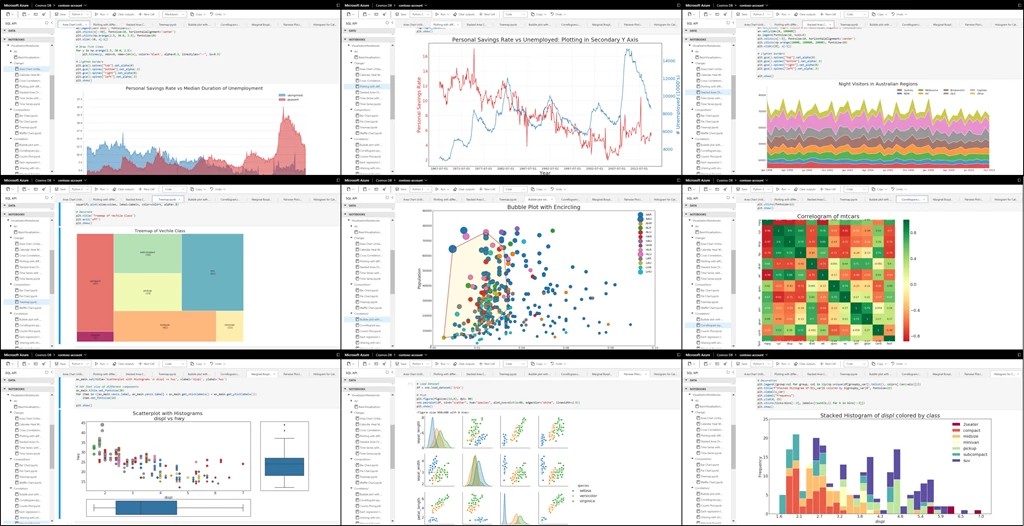
Overview of built-in Jupyter notebooks in Azure Cosmos DB.

Cosmic notebooks are available for all data models and APIs including Cassandra, MongoDB, SQL (Core), Gremlin, and Spark to enhance the developer experience in Azure Cosmos DB. These notebooks are directly integrated into the Azure Portal and your Cosmos accounts, making them convenient and easy to use. Developers, data scientists, engineers and analysts can use the familiar Jupyter notebooks experience to:

  • Interactively run queries
  • Explore and analyze data
  • Visualize data
  • Build, train, and run machine learning and AI models

In this blog post, we’ll explore how notebooks make it easy for you to work with and visualize your Azure Cosmos DB data.

Easily query your data

With notebooks, we’ve included built-in commands to make it easy to query your data for ad-hoc or exploratory analysis. From the Portal, you can use the %%sql magic command to run a SQL query against any container in your account, no configuration needed. The results are returned immediately in the notebook.
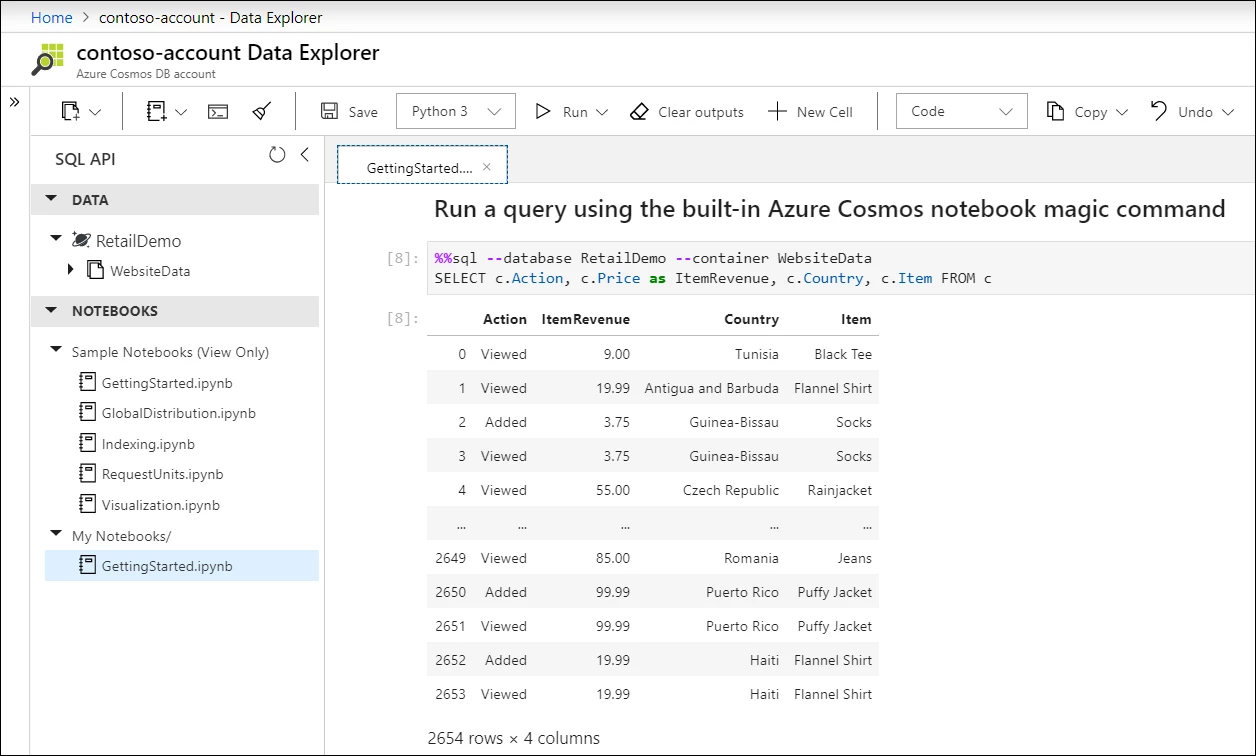
SQL query using built-in Azure Cosmos DB notebook magic command.

Improved developer productivity

We’ve also bundled in version 4 of our Azure Cosmos DB Python SDK for SQL API, which has our latest performance and usability improvements. The SDK can be used directly from notebooks without having to install any packages. You can perform any SDK operation including creating new databases, containers, importing data, and more.
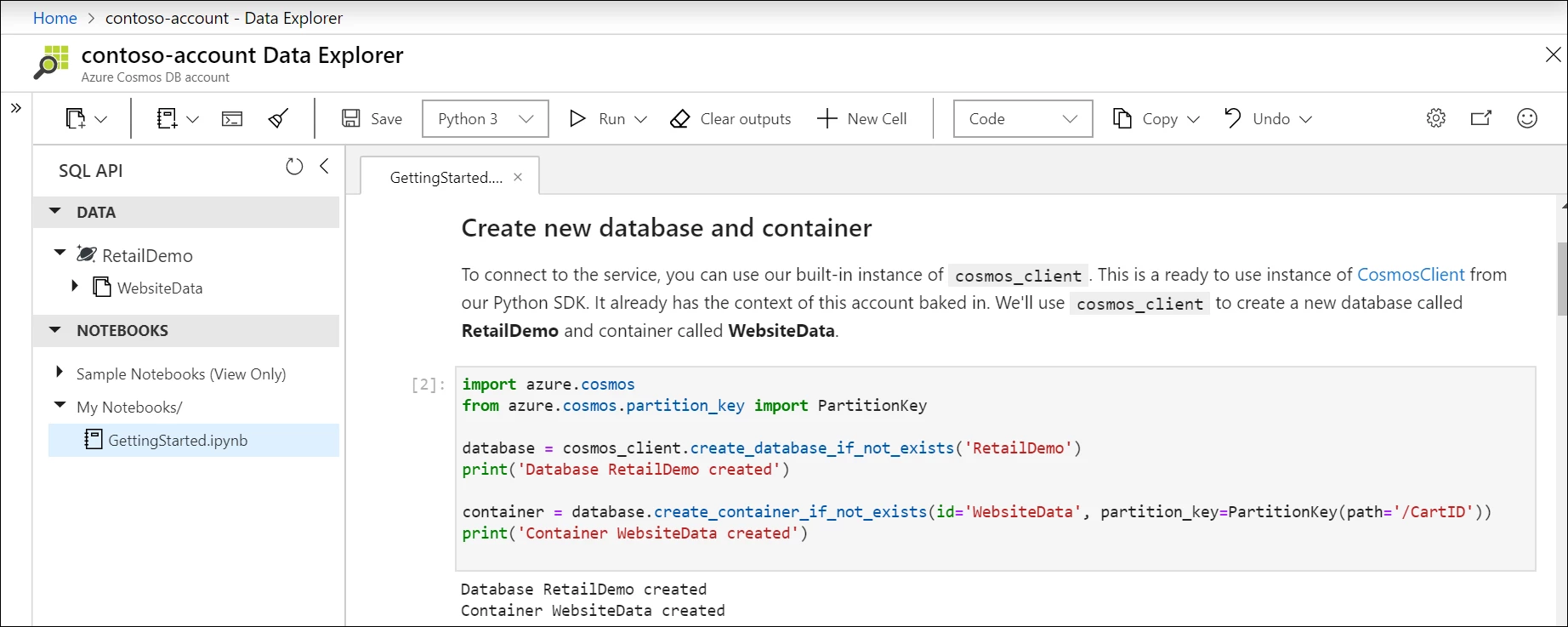
Create new database and container with built-in Python SDK in notebook.

Visualize your data

Azure Cosmos DB notebooks comes with a built-in set of packages, including Pandas, a popular Python data analysis library, Matplotlib, a Python plotting library, and more. You can customize your environment by installing any package you need.

Install custom package using pip install.

For example, to build interactive visualizations, we can install bokeh and use it to build an interactive chart of our data.
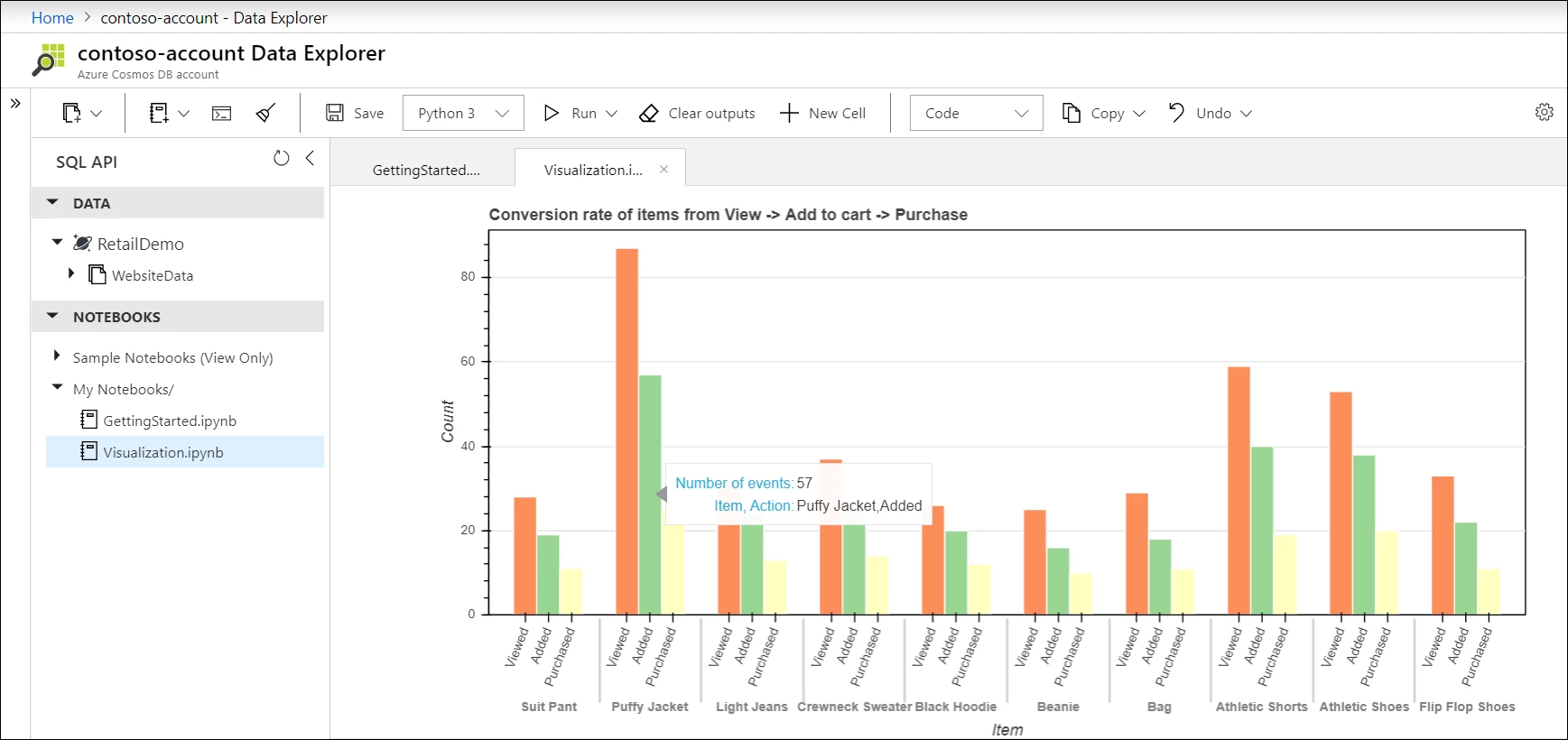
Histogram of data stored in Azure Cosmos DB, showing users who viewed, added, and purchased an item.

Users with geospatial data in Azure Cosmos DB can also use the built-in GeoPandas library, along with their visualization library of choice to more easily visualize their data.
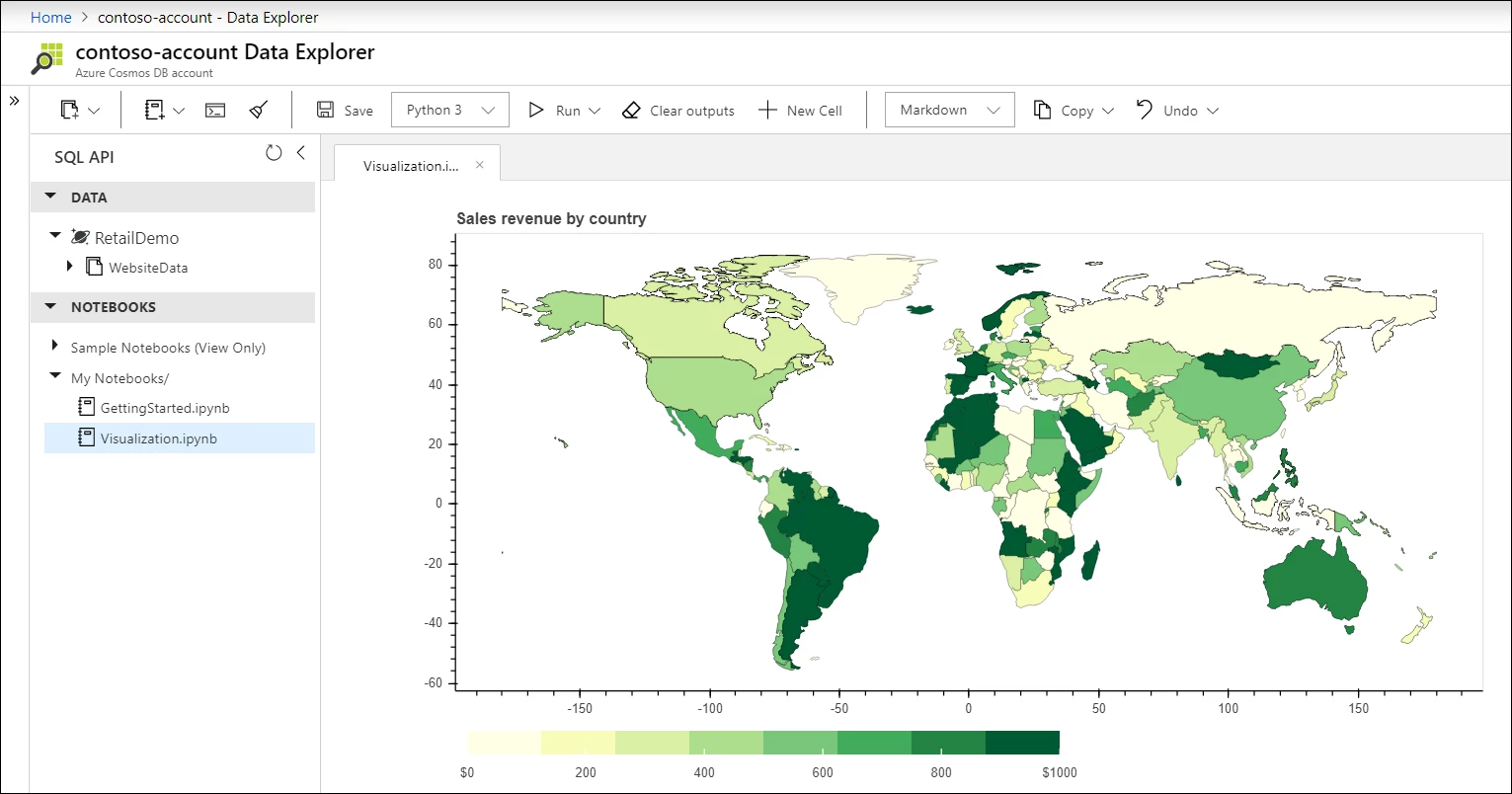
Choropleth world map of data stored in Azure Cosmos DB, showing revenue by country.

Getting started

  1. Follow our documentation to create a new Cosmos account with notebooks enabled or enable notebooks on an existing account.
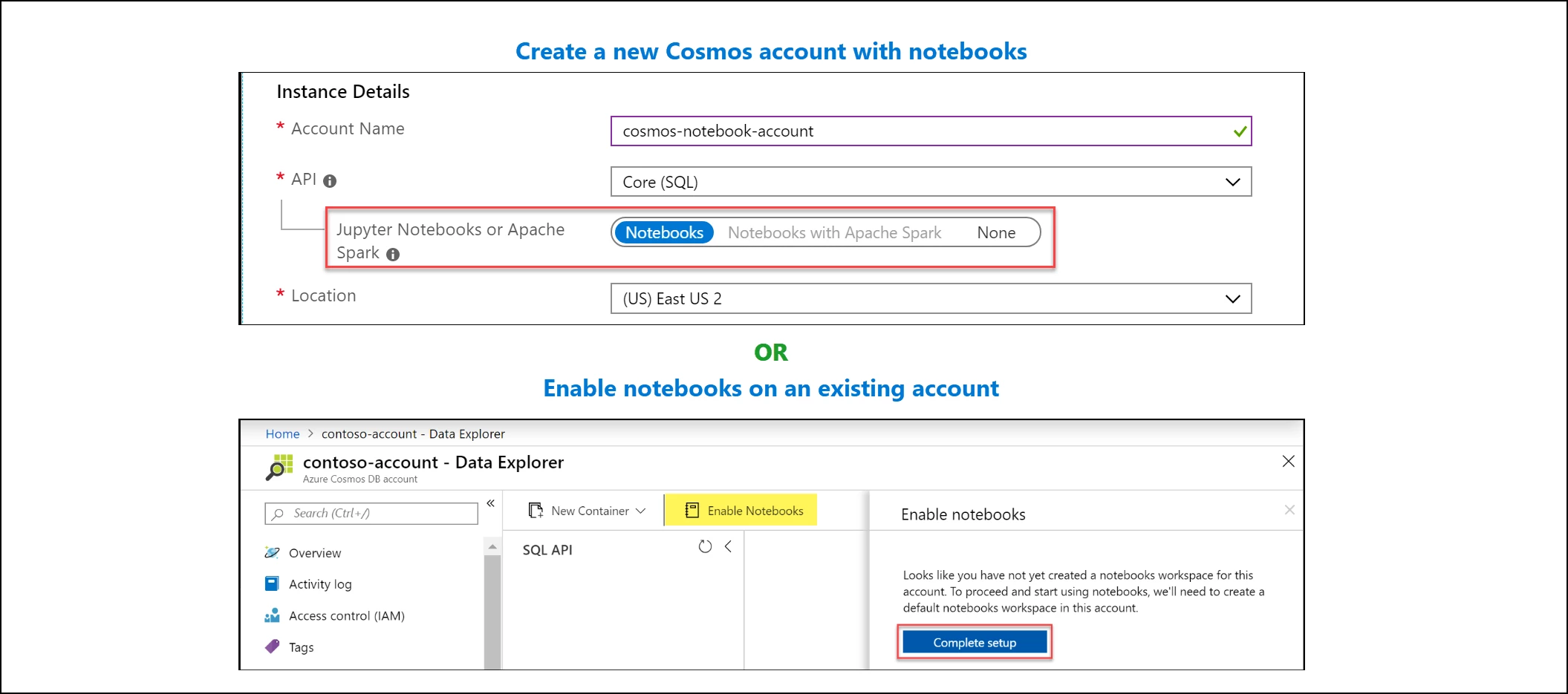
    Create account with notebooks or enable notebooks on existing account in Azure portal.
  2. Start with one of the notebooks included in the sample gallery in Azure Cosmos Explorer or Data Explorer.
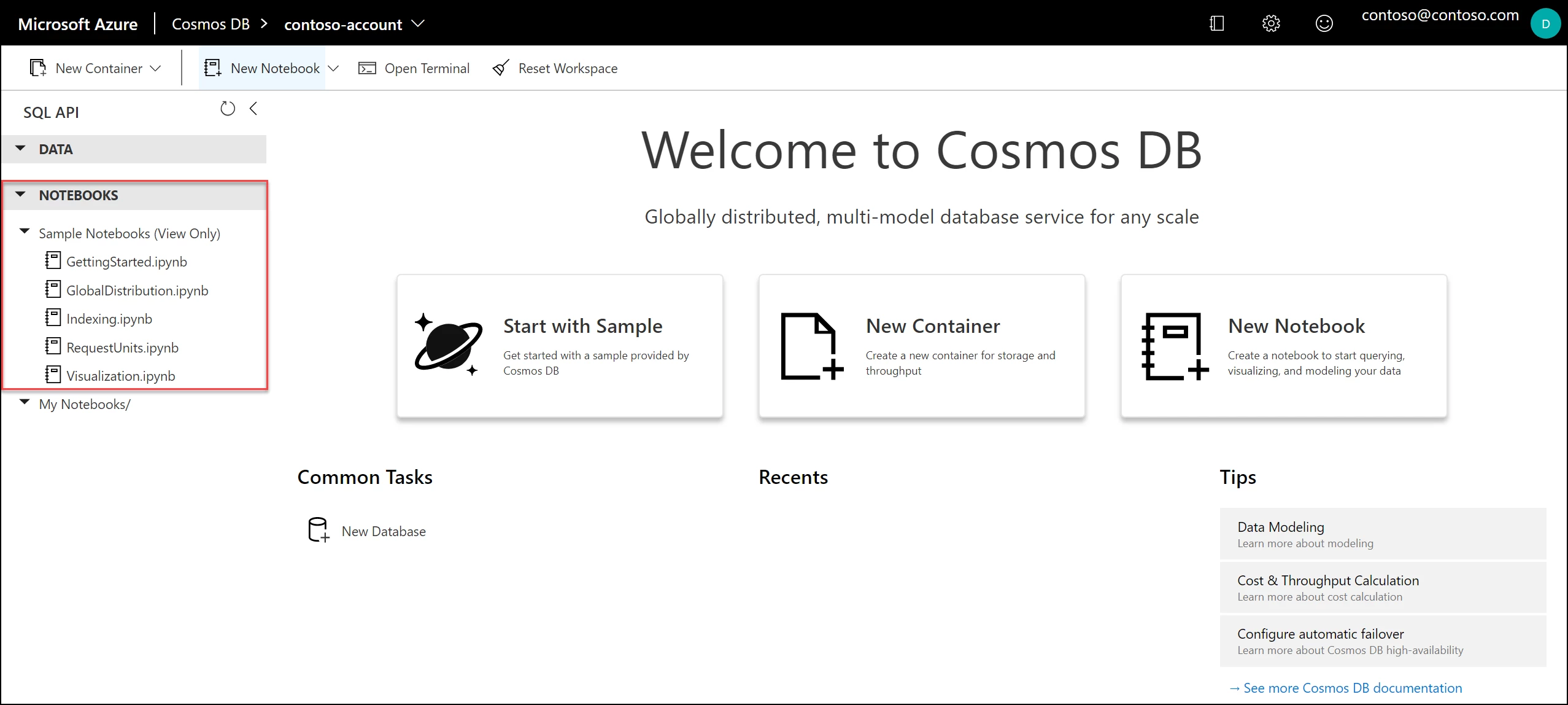
    Azure Cosmos DB notebooks sample gallery.
  3. Share your favorite notebooks with the community by sending them to the Azure Cosmos DB notebooks GitHub repo.
  4. Tag your notebooks with #CosmosDB, #CosmicNotebooks, #PoweredByCosmos on social media. We will feature the best and most popular Cosmic notebooks globally!

Stay up-to-date on the latest Azure #CosmosDB news and features by following us on Twitter or LinkedIn. We’d love to hear your feedback and see your best notebooks built with Azure Cosmos DB!


WE ARE MICROSOFT

Explore Microsoft Foundry

The future of AI starts here. Envision your next great AI app with the latest technologies. Get started with Azure.