Skip to main content Explore View all products (200+) Microsoft Foundry Azure Copilot GitHub Copilot Azure Kubernetes Service (AKS) Azure Cosmos DB Azure Database for PostgreSQL Azure Arc Microsoft Fabric Linux virtual machines in Azure Foundry Models Foundry Agent Service Foundry IQ Foundry Tools Foundry Control Plane Observability in Foundry Control Plane Azure OpenAI in Foundry Models Azure Speech in Foundry Tools Azure Machine Learning View all databases Azure Cosmos DB Azure DocumentDB Azure SQL Azure Database for PostgreSQL Azure Managed Redis Microsoft Fabric Azure Databricks Linux virtual machines in Azure Windows Server on Azure Azure Functions Azure Virtual Machine Scale Sets Azure API Management Azure Container Apps Azure Kubernetes Service (AKS) Azure Kubernetes Fleet Manager Azure Container Registry Azure Red Hat OpenShift Azure Container Instances Azure Container Storage Azure Arc Azure Local Microsoft Defender for Cloud Azure Monitor Microsoft Sentinel Azure Migrate View all solutions (40+) Cloud solutions for small and medium businesses Cloud migration and modernization center Data analytics for AI Azure Databases AI apps and agents Microsoft Marketplace Microsoft Sovereign Cloud AI apps and agents Responsible AI with Azure AI Infrastructure Data analytics for AI Machine learning operations (MLOps) Low-code application development on Azure Integration Services Serverless computing DevOps Migration and modernization center .NET apps migration Databases on Azure Linux on Azure Oracle on Azure SAP on the Microsoft Cloud Adaptive cloud High-performance computing (HPC) Infrastructure as a service (IaaS) Resiliency Azure Essentials Frontier Accelerate for Azure FinOps on Azure Microsoft Marketplace Azure pricing overview Create an Azure account Free Azure services Flexible purchase options Pricing calculator FinOps on Azure Maximize ROI from AI Azure savings plans Azure reservations Azure Hybrid Benefit Virtual Machines Azure SQL Microsoft Foundry Microsoft Fabric Azure Kubernetes Service (AKS) Microsoft Defender for Cloud View more Software Development Companies Microsoft Marketplace Find a partner Resources for Azure partners Get started with Azure Customer stories Analyst reports, white papers, and e-books Videos Learn more about cloud computing Documentation Explore Azure portal Developer resources Quickstart templates Resources for startups Developer community Students Azure for partners Blog Events and Webinars Learn Support Contact Sales Get started with Azure Sign in

After you experience a Microsoft Azure service issue, you likely need to explain what happened to your customers, management, and other stakeholders. That’s why Azure Service Health provides official incident reports and root cause analyses (RCAs) from Microsoft.

Azure Service Health helps you stay informed and take action when Azure service issues like incidents and planned maintenance affect you by providing a personalized health dashboard, customizable alerts, and expert guidance. In this blog, we’ll cover how you can use Azure Service Health’s health history to review past health issues and get official root cause analyses (RCAs) to share with your internal and external stakeholders.

Review past health issues and get official root cause analyses (RCAs)

You can see 90 days of history about past incidents, maintenance, and health advisories in Azure Service Health’s “Health history” section. This is a tailored view of the Azure Activity Log provided by Azure Monitor.
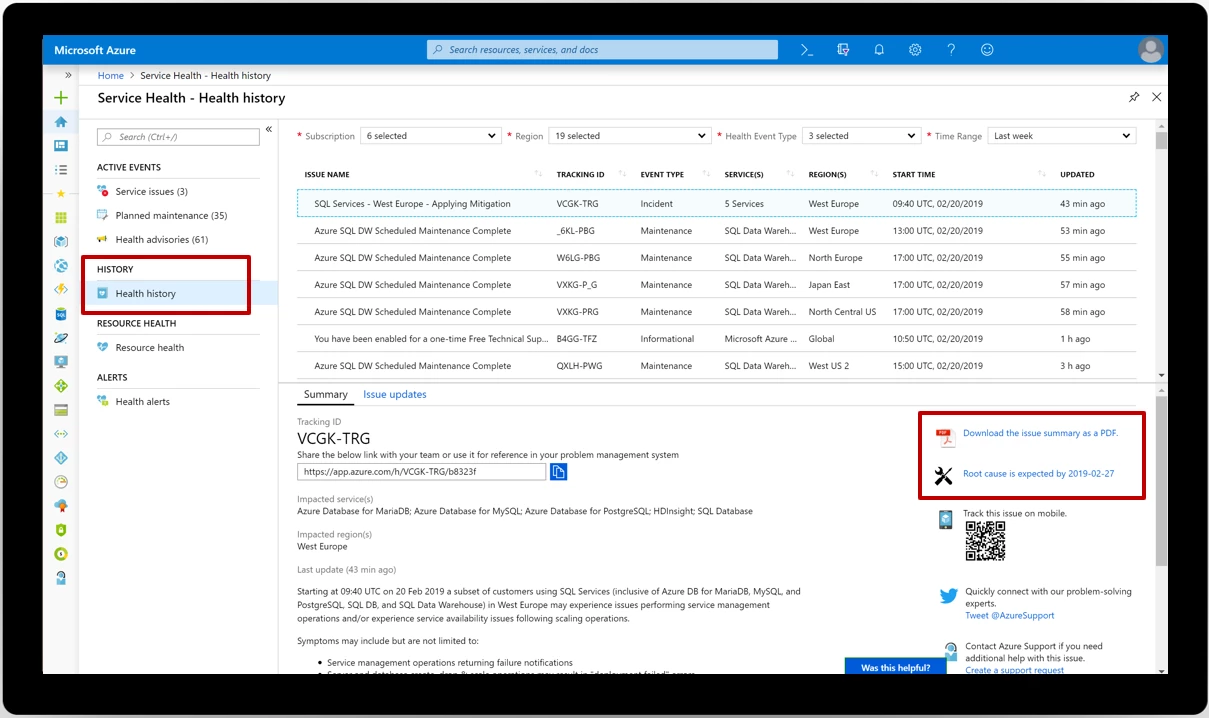
Screenshot of Service Health History

If you experienced downtime, your internal or external stakeholders might expect an official report or RCA. As soon as they become available, RCAs can be found under any incident. Meanwhile, you can download and share Microsoft’s issue summary as a PDF.

Learn more about getting downloadable explanations in the Service Health documentation.

Get started with Azure Service Health

Azure Service Health provides a large amount of information about incidents, planned maintenance, and other health advisories that could affect you. While you can always visit the dashboard in the portal, the best way to stay informed and take action is to set up Azure Service Health alerts. With alerts, as soon as we publish any health-related information, you’ll get notified on whichever channels you prefer, including email, SMS, push notification, webhook into ServiceNow, and more. We’ll also notify you when we publish RCAs.
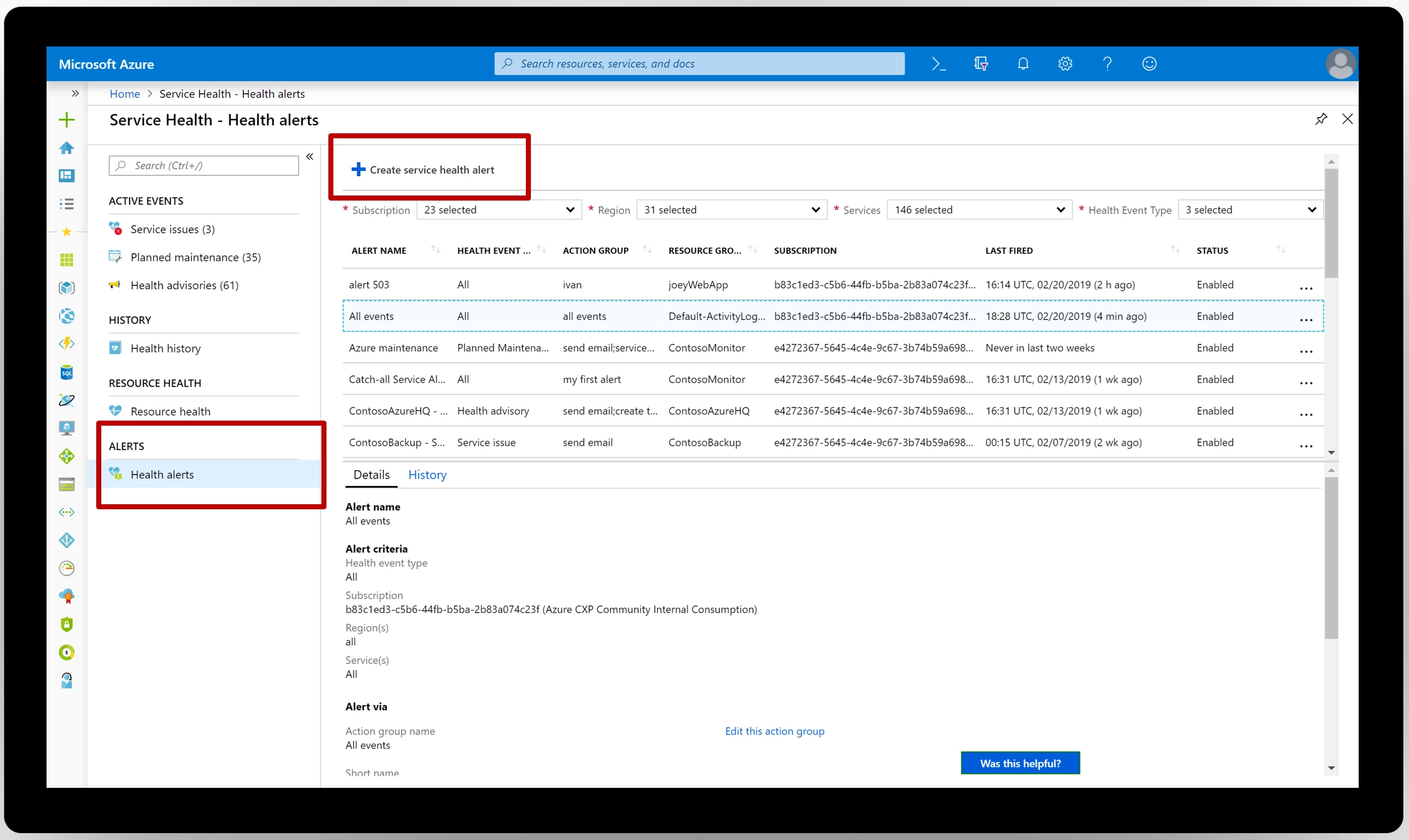
Screenshot display of the creation of a new servcice health alert

Next steps

Review your Azure Service Health dashboard and set up alerts in the Azure portal. We always welcome feedback. Email us with any questions and comments at servicehealth@microsoft.com.


WE ARE MICROSOFT

Explore Microsoft Foundry

The future of AI starts here. Envision your next great AI app with the latest technologies. Get started with Azure.