Facebook rocked the mobile development world in January by announcing Parse, a development platform beloved by hundreds of thousands of developers would be shuttered. Today, we are pleased to announce the Parse Server on Azure Managed Services, an easy way for Parse developers to continue their work and concentrate on what they love to do, write awesome mobile experiences by leveraging mobile services: Azure App Service and Notification Hubs, developer services including support for Apache Cordova, Xamarin and native iOS/Android development, and managed database services including DocumentDB.
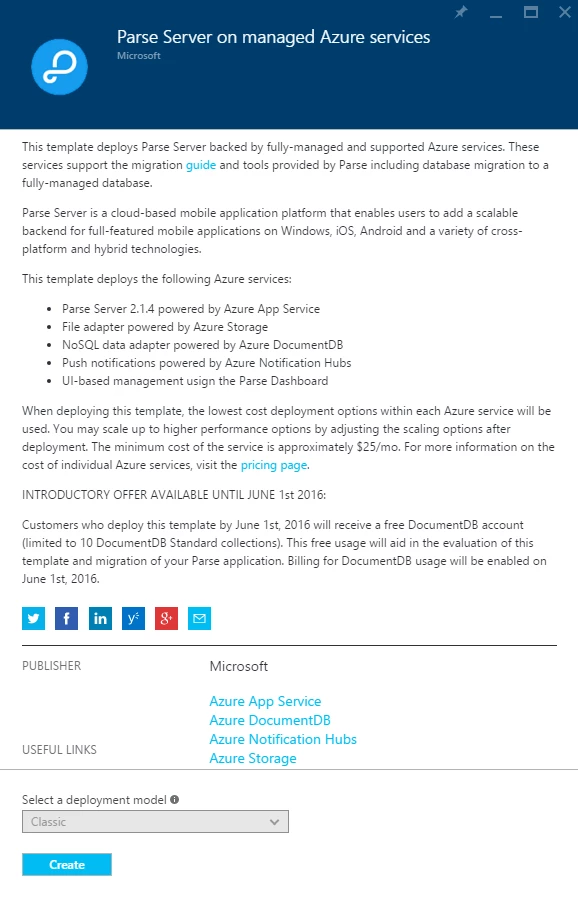
We created a Parse Server implementation that uses fully-managed Azure Services and released it on the Azure Marketplace. With this template, Parse developers will be able to easily spin up a Parse Server v2.1.4 with a suite of pre-integrated Azure services.
- Parse Server v2.1.4 powered by Azure App Service
- NoSQL Data Storage powered by Azure DocumentDB
- File Storage powered by Azure Storage
- Push Notifications powered by Azure Notification Hubs
- The Parse Dashboard integrated into the Azure Portal
These services provide a best-of-breed experience for your mobile backend going forward. You can easily scale your service to millions of users; just ask the Canadian Broadcasting Corporation about their experience with the scalability and reliability of the platform. You can move towards a DevOps mindset with our continuous deployment tools and staging environments, and get beta distribution, crash analytics and feedback using HockeyApp.
To assist with the migration of your Parse Server, we are offering an introductory DocumentDB offer especially for Parse Service customers, try out Parse Server on Azure and pay nothing for DocumentDB usage until June. To take advantage of this offer, use the Marketplace template to spin up your Parse Server. DocumentDB is a NoSQL database service that provides scalable, high performance data storage for applications. Customers like Next Games are already using DocumentDB to deliver top rated iOS and Android games like The Walking Dead: No Man’s Land.
Azure also has a free one-month trial that gives you $200 to spend on all Azure Services.
Migrating your Parse Service to Azure
Migrating your Parse Service is a three step process. First, you will set up the Parse Server using our new Marketplace Template. Then, you will migrate your data from the Parse Service to your new Azure Service. Finally, you will update your mobile clients to support the new service.
Deploying a new Parse Server
Setting up a Parse Server on Azure is easier than ever using our new Marketplace Template.
- Log on to the Azure portal.
- Click on the + NEW button in the side bar.
- Enter “Parse Server” in the Search box.
- Select the “Parse Server on managed Azure services” published by Microsoft.
- Click on Create.
- Follow the simple on-screen instructions for creating a new Parse Server.
Migrating your data
Parse already has a detailed migration guide. You will need to make your DocumentDB instance available on the Internet, then log in to your Parse account and migrate your data. You should plan to do this by the end of April since Parse announced that if you have not migrated your data by April 28, they will de-prioritize your data, which isn’t good for production apps. Detailed instructions for configuring your DocumentDB to be ready for migration can be found on our GitHub Repository.
Updating your mobile clients
At this point you will have two parse services: The old one running on the Parse Service and the new one running on Azure. You will want to update and publish new clients with the new URL and application ID. This may involve updating the Parse SDK that your client uses. To obtain the server URL and application ID, refer to the detailed instructions on our GitHub Repository.
Logging onto the Parse Dashboard
We have integrated the Parse Dashboard into our Azure portal management experience. Once you have deployed a Parse Server on Azure, the dashboard is available within the Azure portal.
Next steps
We realize your main concern will be getting the Parse Server running and migrated. Once you have your backend working, you can check out the new facilities available to you. This includes:
- Learn about the new features now available to you with Azure App Service, DocumentDB, Notification Hubs and Storage.
- Monitor your Parse Server and clients with Application Insights, and your clients with HockeyApp.
- Gain valuable user insights and engage with your users using Azure Mobile Engagement.