With the increasing benefits of cloud-based data warehouses, there has been a surge in the number of customers migrating from their traditional on-premises data warehouses to the cloud. Microsoft Azure SQL Data Warehouse (SQL DW) offers the best price to performance when compared to its cloud-based data warehouse competitors. You can either migrate Teradata stacks to Azure via Azure Marketplace and with Intellicloud on Azure or migrate to Azure Datawarehouse.
The Teradata to SQL DW migrations involve multiple steps. These steps include analyzing the existing workload, generating the relevant schema models, and performing the ETL operation. The intent of this discussed whitepaper is to provide guidance for these aforesaid migrations with emphasis on the migration workflow, the architecture, technical design considerations, and best practices.
Migration Phases
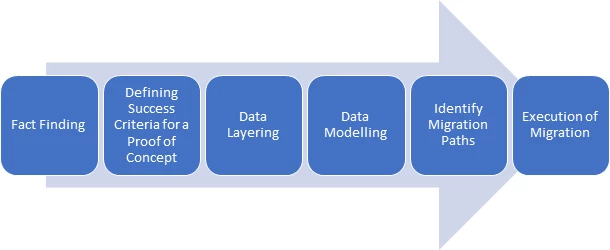
The Teradata migration should pivot on the following six areas. Though recommended, proof of concept is an alternative step. With the benefit of Azure, you can quickly provision Azure SQL Data Warehouses for your development team to start business object migration before the data is migrated and speed up the migration process.
Phase one – Fact finding
Through a question and answers session you can define what your inputs and outputs are for the migration project.
Phase two – Defining success criteria for proof of concept (POC)
Taking the answers from phase one, you identify a workload for running a POC to validate the outputs required and run the following phases as a POC.
Phase three: Data layer mapping options
This phase is about mapping the data you have in Teradata to the data layout you will create in Azure SQL Data Warehouse. Some of the common scenarios are data type mapping, date and time format, and more.
Phase four – Data modeling
Once you’ve defined the data mappings, phase four concentrates on how to tune Azure SQL Data Warehouse. This provides the best performance for the data you will be landing into it.
Phase five: Identify migration paths
What is the path of least resistance? What is the quickest path given your cloud maturity? Phase five helps describe the options open to you and then for you to decide on the path you wish to take.
Phase six: Execution of migration
Migrating your Teradata data to SQL Data Warehouse involves a series of steps. These steps are executed in three logical stages, preparation, metadata migration, and data migration.
Migration solution
To ingest data, you need a basic cloud data warehouse setup for moving data from your on-premise solution to Azure SQL Data Warehouse, and to enable the development team to build Azure Analysis Cubes once the majority of the data is loaded.
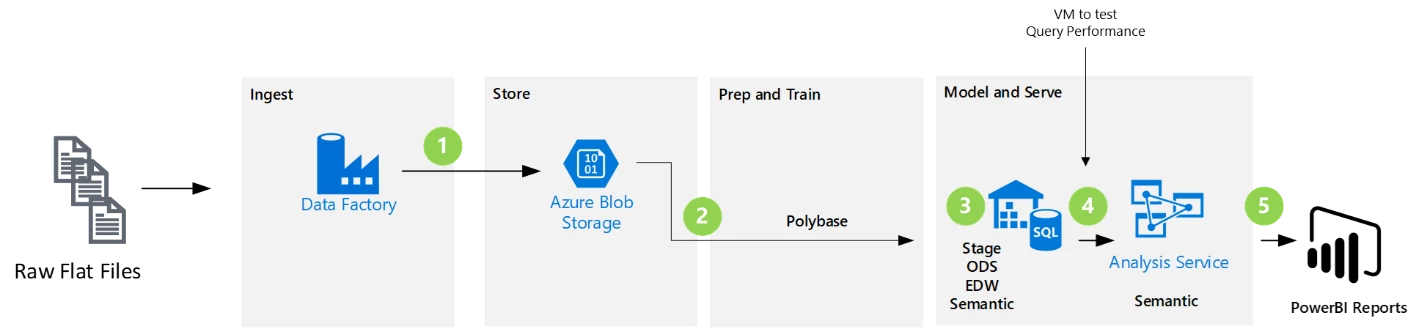
- Azure Data Factory Pipeline is used to ingest and move data through the store, prep, and train pipeline.
- Extract and load files via Polybase into the staging schema on Azure SQL DW.
- Transform data through staging, source (ODS), EDW and sematic schemas on Azure SQL DW.
- Azure Analysis services will be used as the sematic layer to serve thousands of end users and scale out Azure SQL DW concurrency.
- Build operational reports and analytical dashboards on top of Azure Analysis services to serve thousands of end users via Power BI.
For more insight into how to approach a Teradata to Azure SQL Data Warehouse migration check the following whitepaper, “Migrating from Teradata to Azure SQL Data Warehouse.”
This whitepaper is broken into sections which detail the migration phases, the preparation required for data migration including schema migration, migration of the business logic, the actual data migration approach, and testing strategy.
The scripts that would be useful for the migration are available in github under Teradata to Azure SQL DW Scripts.