In this blog we’ll discuss the concept of Structured Streaming and how a data ingestion path can be built using Azure Databricks to enable the streaming of data in near-real-time. We’ll touch on some of the analysis capabilities which can be called from directly within Databricks utilising the Text Analytics API and also discuss how Databricks can be connected directly into Power BI for further analysis and reporting. As a final step we cover how streamed data can be sent from Databricks to Cosmos DB as the persistent storage.
Structured streaming is a stream processing engine which allows express computation to be applied on streaming data (e.g. a Twitter feed). In this sense it is very similar to the way in which batch computation is executed on a static dataset. Computation is performed incrementally via the Spark SQL engine which updates the result as a continuous process as the streaming data flows in.
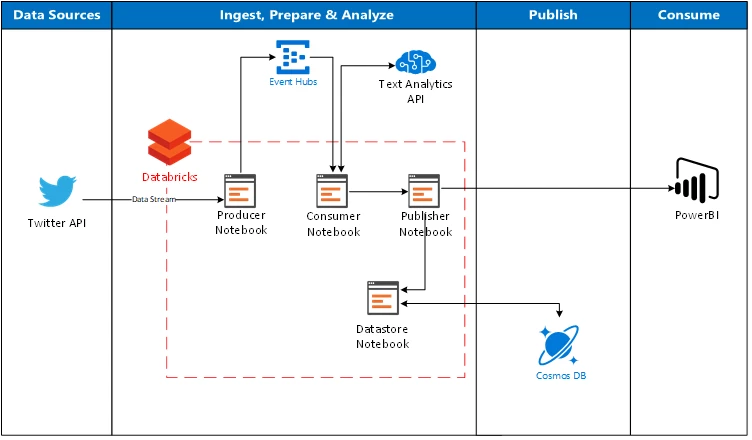
The above architecture illustrates a possible flow on how Databricks can be used directly as an ingestion path to stream data from Twitter (via Event Hubs to act as a buffer), call the Text Analytics API in Cognitive Services to apply intelligence to the data and then finally send the data directly to Power BI and Cosmos DB.
The concept of structured streaming
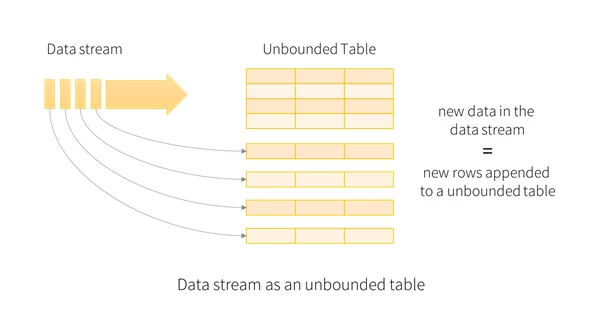
All data which arrives from the data stream is treated as an unbounded input table. For each new data within the data stream, a new row is appended to the unbounded input table. The entirety of the input isn’t stored, but the end result is equivalent to retaining the entire input and executing a batch job.
The input table allows us to define a query on itself, just as if it were a static table, which will compute a final result table written to an output sink. This batch-like query is automatically converted by Spark into a streaming execution plan via a process called incremental execution.
Incremental execution is where Spark natively calculates the state required to update the result every time a record arrives. We are able to utilize built in triggers to specify when to update the results. For each trigger that fires, Spark looks for new data within the input table and updates the result on an incremental basis.
Queries on the input table will generate the result table. For every trigger interval (e.g. every three seconds) new rows are appended to the input table, which through the process of Incremental Execution, update the result table. Each time the result table is updated, the changed results are written as an output.
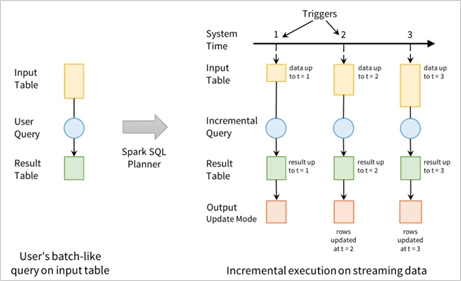
The output defines what gets written to external storage, whether this be directly into the Databricks file system, or in our example CosmosDB.
To implement this within Azure Databricks the incoming stream function is called to initiate the StreamingDataFrame based on a given input (in this example Twitter data). The stream is then processed and written as parquet format to internal Databricks file storage as shown in the below code snippet:
val streamingDataFrame = incomingStream.selectExpr("cast (body as string) AS Content")
.withColumn("body", toSentiment(%code%nbsp;"Content"))

import org.apache.spark.sql.streaming.Trigger.ProcessingTime
val result = streamingDataFrame
.writeStream.format("parquet")
.option("path", "/mnt/Data")
.option("checkpointLocation", "/mnt/sample/check")
.start()
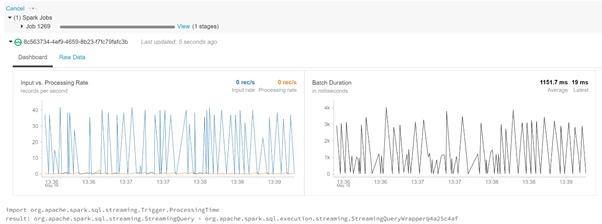
Mounting file systems within Databricks (CosmosDB)
Several different file systems can be mounted directly within Databricks such as Blob Storage, Data Lake Store and even SQL Data Warehouse. In this blog we’ll explore the connectivity capabilities between Databricks and Cosmos DB.
Fast connectivity between Apache Spark and Azure Cosmos DB accelerates the ability to solve fast moving Data Sciences problems where data can be quickly persisted and retrieved using Azure Cosmos DB. With the Spark to Cosmos DB connector, it’s possible to solve IoT scenarios, update columns when performing analytics, push-down predicate filtering, and perform advanced analytics against fast changing data against a geo-replicated managed document store with guaranteed SLAs for consistency, availability, low latency, and throughput.
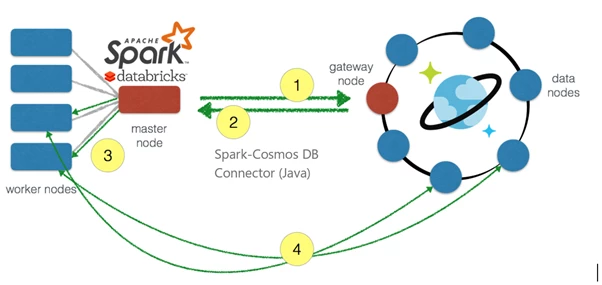
- From within Databricks, a connection is made from the Spark master node to Cosmos DB gateway node to get the partition information from Cosmos.
- The partition information is translated back to the Spark master node and distributed amongst the worker nodes.
- That information is translated back to Spark and distributed amongst the worker nodes.
- This allows the Spark worker nodes to interact directly to the Cosmos DB partitions when a query comes in. The worked nodes are able to extract the data that is needed and bring the data back to the Spark partitions within the Spark worker nodes.
Communication between Spark and Cosmos DB is significantly faster because the data movement is between the Spark worker nodes and the Cosmos DB data nodes.
Using the Azure Cosmos DB Spark connector (currently in preview) it is possible to connect directly into a Cosmos DB storage account from within Databricks, enabling Cosmos DB to act as an input source or output sink for Spark jobs as shown in the code snippet below:
import com.microsoft.azure.cosmosdb.spark.CosmosDBSpark
import com.microsoft.azure.cosmosdb.spark.config.Config

val writeConfig = Config(Map("Endpoint, MasterKey, Database, PreferredRegions, Collection, WritingBatchSize"))

import org.apache.spark.sql.SaveMode
sentimentdata.write.mode(SaveMode.Overwrite).cosmosDB(writeConfig)
Connecting Databricks to PowerBI
Microsoft Power BI is a business analytics service that provides interactive visualizations with self-service business intelligence capabilities, enabling end users to create reports and dashboards by themselves without having to depend on information technology staff or database administrators.
Azure Databricks can be used as a direct data source with Power BI, which enables the performance and technology advantages of Azure Databricks to be brought beyond data scientists and data engineers to all business users.
Power BI Desktop can be connected directly to an Azure Databricks cluster using the built-in Spark connector (Currently in preview). The connector enables the use of DirectQuery to offload processing to Databricks, which is great when you have a large amount of data that you don’t want to load into Power BI or when you want to perform near real-time analysis as discussed throughout this blog post.
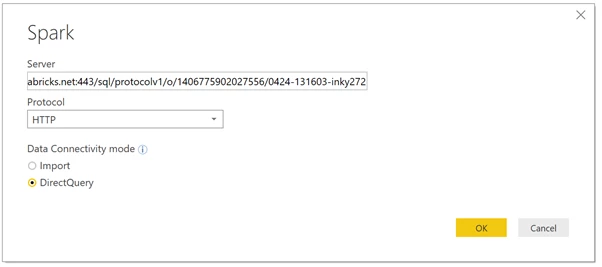
This connector utilises JDBC/ODBC connection via DirectQuery, enabling the use of a live connection into the mounted file store for the streaming data entering via Databricks. From Databricks we can set a schedule (e.g. every 5 seconds) to write the streamed data into the file store and from Power BI pull this down regularly to obtain a near-real time stream of data.
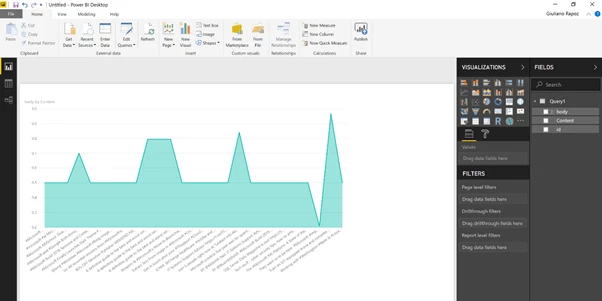
From within Power BI, various analytics and visualisations can be applied to the streamed dataset bringing it to life!
Want to have a go at building this architecture out? For more examples of Databricks see the official Azure documentation:
- Perform ETL operations in Databricks.
- Structured Streaming in Databricks.
- Stream Data from HDInsight Kafka.
Please read more on Stream Analytics with Power BI.