Conversational experiences have become the norm, whether you’re looking to track a package or to find out a store’s hours of operation. At Microsoft Build 2019, we highlighted a few customers who are building such conversational experiences using the Microsoft Bot Framework and Azure Bot Service to transform their customer experience.
- LaLiga built its own virtual assistant, which allows fans to experience and interact with LaLiga across multiple platforms.
- BMW has created the BMW Intelligent Personal Assistant to deliver conversational experiences across multiple canvases.
As users become more familiar with bots and virtual assistants, they will invariably expect more from their conversational experiences. For this reason, Bot Framework SDK and tools are designed to help developers be more productive in building conversational AI solutions. Here are some of the key announcements we made at Build 2019:
Bot Framework SDK and tools
Adaptive dialogs
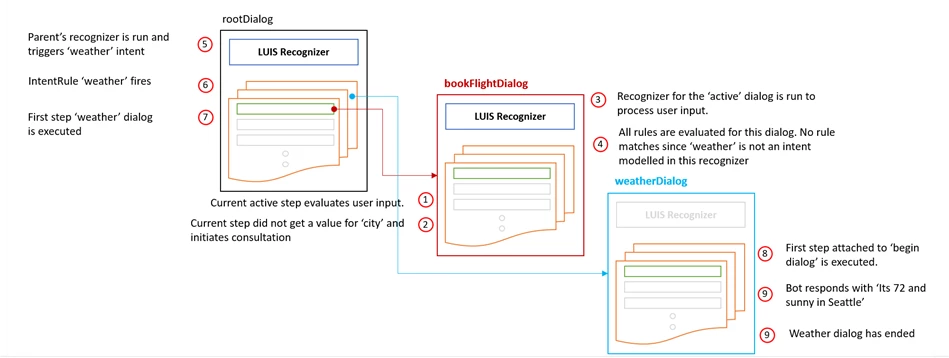
The Bot Framework SDK now supports adaptive dialogs (preview). Adaptive dialog dynamically updates conversation flow based on context and events. Developers can define actions, each of which can have a series of steps defined by the result of events happening in the conversation to dynamically adjust to context. This is especially handy when dealing with conversation context switches and interruptions in the middle of a conversation. Adaptive dialog combines input recognition, event handling, model of the conversation (dialog) and output generation into one cohesive, self-contained unit. The diagram below depicts how adaptive dialogs can allow a user to switch contexts. In this example, a user is looking to book a flight, but switches context by asking for weather related information which may influence travel plans.
You can read more about adaptive dialogs here.
Skills
Developers can compose conversational experiences by stitching together re-usable conversational capabilities, known as skills. Implemented as Bot Framework bots, skills include language models, dialogs, and cards that are reusable across applications. Current skills, available in preview, include Email, Calendar, and Points of Interest.
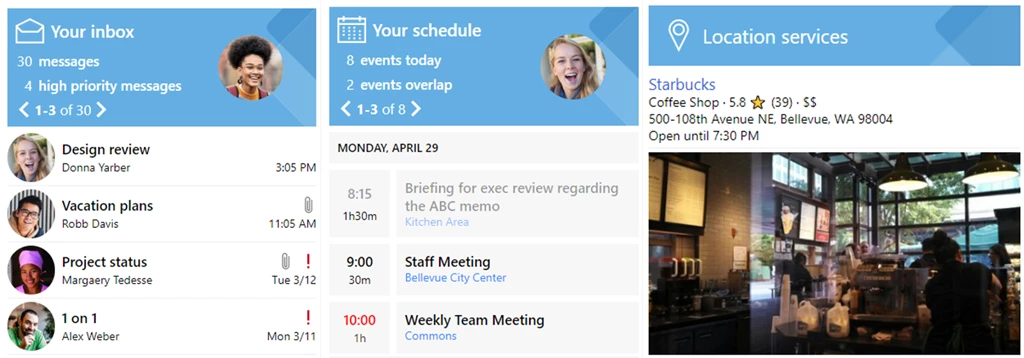
Within an enterprise using skills you can now integrate multiple sub-bots owned by different teams into a central bot, or more broadly leverage common capabilities provided by other developers. With the preview of skills, developers can create a new bot (from the Virtual Assistant template) and add/remove skills with one command line operation incorporating all dispatch and configuration changes. Get started with skill developer templates (.NET, TS).
Virtual assistant solution accelerator
The Enterprise Template is now the Virtual Assistant Template, allowing developers to build a virtual assistant with out of the box with skills, adaptive cards, typescript generator, updated conversational telemetry and PowerBI analytics, and ARM based automated Azure deployment. It also provides C# template simplified and aligned to ASP.NET MVC pattern with dependency injection. Developers who have already made use of the Enterprise Template and want to use the new capabilities can follow these steps to get started quickly.
Emulator
The Bot Framework Emulator has released a preview of the new Bot Inspector feature: a way to debug and test your Bot Framework SDK v4 bots on channels like Microsoft Teams, Slack, Cortana, Facebook Messenger, Skype, etc. As you have the conversation, messages will be mirrored to the Bot Framework Emulator where you can inspect the message data that the bot received. Additionally, a snapshot of the bot state for any given turn between the channel and the bot is rendered as well. You can inspect this data by clicking on the “Bot State” element in the conversation mirror. Read more about Bot Inspector.
Language generation (preview)
Streamlines the creation of smart and dynamic bot responses by constructing meaningful, variable, and grammatically correct responses that a bot can send back to the user. Visit the GitHub repo for more details.
QnA Maker
Easily handle multi-turn conversation
With QnA Maker, you can now handle a predefined set of multi-turn question and answer flows. For example, you can configure QnA Maker to help troubleshoot a product with a customer by preconfiguring a set of questions and follow up question prompts to lead users to specific answers. QnA Maker supports extraction of hierarchical QnA pairs from a URL, .pdf, or .docx files. Read more about QnA Maker multi-turn in our docs, check out the latest samples, and watch a short video.
Simplified deployment
We’ve simplified the process of deploying a bot. Using a pre-defined bot framework v4 template, you can create a bot from any published QnA Maker knowledge base. Not only can you now create a complex QnA Maker knowledge base in minutes, but you can now deploy it to supported channels like Teams, Skype, or Slack in minutes.
Language Understanding (LUIS)
Language Understanding has added several features that let developers extract more detailed information from text, so users can now build more intelligent solutions with less effort.
Roles for any entity type
We have extended roles to all entity types, which allows the same entities to be classified with different subtypes based on context.
New visual analytics dashboard
There’s now a more detailed, visually-rich, comprehensive analytics dashboard. It’s user-friendly design highlights common issues most users face when designing applications by providing simple explanations on how to resolve them to help users gain more insight into their models’ quality, potential data problems, and guidance to adopt best practices.
Dynamic lists
Data is ever-changing and different from one end-user to another. Developers now have more granular control of what they can do with Language Understanding, including being able to identify and update models at runtime through dynamic lists and external entities. Dynamic lists are used to append to list entities at prediction time, permitting user-specific information to get matched exactly.
Read more about the new Language Understanding features, available through our new v3 API, in our docs. Customers like BMW, Accenture, Vodafone, and LaLiga are using Azure to build sophisticated bots faster and find new ways to connect with their customers.
Get started
With these enhancements, we are delivering value across the entire Microsoft Bot Framework SDKs and tools, Language Understanding, and QnA maker in order to help developers become more productive in building a variety of conversational experiences.
We look forward to seeing what conversational experiences you will build for your customers. Get started today!