This blog post is the fourth and final installment of The Economics of Agent Optimization, which shares the strategies, capabilities, and proof points that can help you optimize agent costs and run AI as a managed investment system on Microsoft Foundry. The first post set out the three decisions that systems rest on, the second post took the request at runtime, and the third post took the workflow over time. This post takes the decision that never stops running: governing the spend.
AI agents are moving from isolated pilots into an enterprise estate. They work across teams, connect to data and tools, and make decisions with varying degrees of autonomy. For IT leaders, that creates a broader operating question: how do you govern a agentic system that can grow and act faster than traditional applications?
AI agent governance starts with knowing which agents exist, who owns them, what they can access, and which policies apply. It is often discussed in terms of security, compliance, and lifecycle management. It is also fundamental to cost optimization. Without consistent governance, each team makes its own choices about models, tools, capacity, and limits—and small inefficiencies multiply across every agent and every turn.
Good governance makes consumption visible, attributable, and bounded. IT needs to see which agents and teams are driving usage. Finance needs budgets and cost allocation it can trust, without discovering an unexpected increase after the invoice closes. Developers need controls that can respond at the speed agents run.
That last requirement exposes an important distinction. Traditional cost management tools can track spending and alert on actual or forecasted costs, but they typically operate on billing data rather than in the request path. An agent caught in a retry loop does not wait for the next budget evaluation.
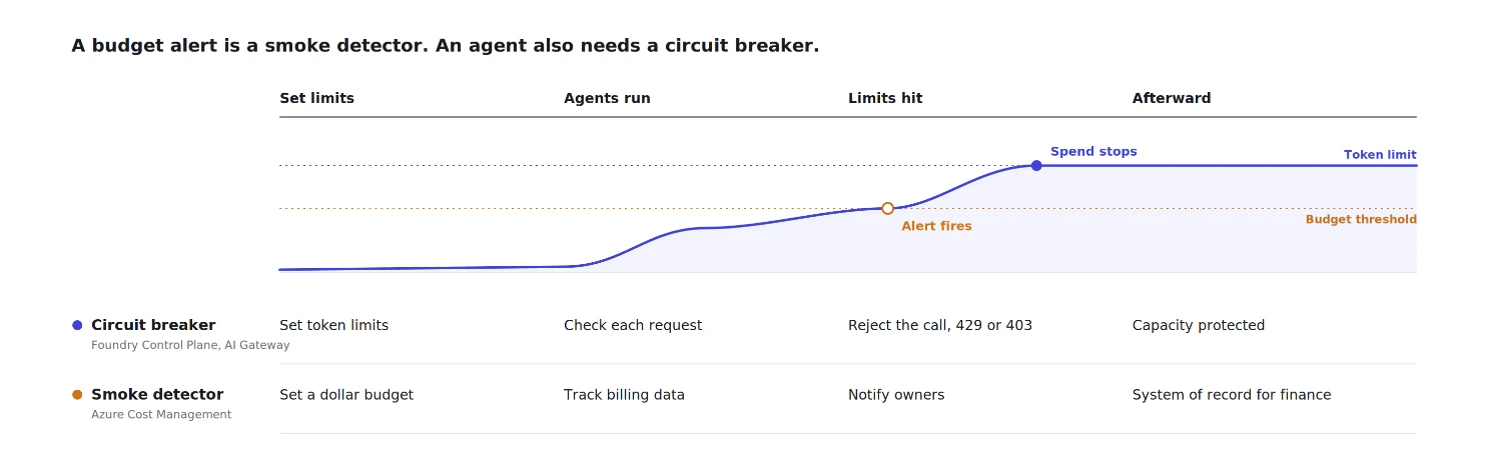
A budget alert is a smoke detector. An agent also needs a circuit breaker. Effective cost governance therefore depends on three things: seeing the spend, bounding it, and proving the return.

See the spend where it starts
AI costs become difficult to manage when they arrive as one aggregate number. One deployment may serve several agents; one agent may use several models and tools; and one outcome may require many turns. By the time that appears on an invoice, the business context has disappeared.
Cost management capabilities in Foundry brings that context closer to the systems creating it. Teams can see estimated costs across projects, inspect cost and token usage for individual agents, and monitor model costs. These estimates support operating decisions; Microsoft Cost Management and invoiced charges remain the system of record for financial reconciliation.
Foundry also supports project-level cost attribution. Every Foundry project is automatically associated with a project tag on its underlying usage. FinOps teams can filter Cost Analysis by that tag to allocate spending to the business unit, team, or workload that incurred it. This capability is currently in preview for models sold by Microsoft Azure, including Azure OpenAI.
At the gateway, Azure API Management’s AI Gateway can emit token metrics by API, product, user, subscription, gateway, and backend. Tracing in Foundry captures tool usage, retries, latency, token consumption, and costs for an agent run.
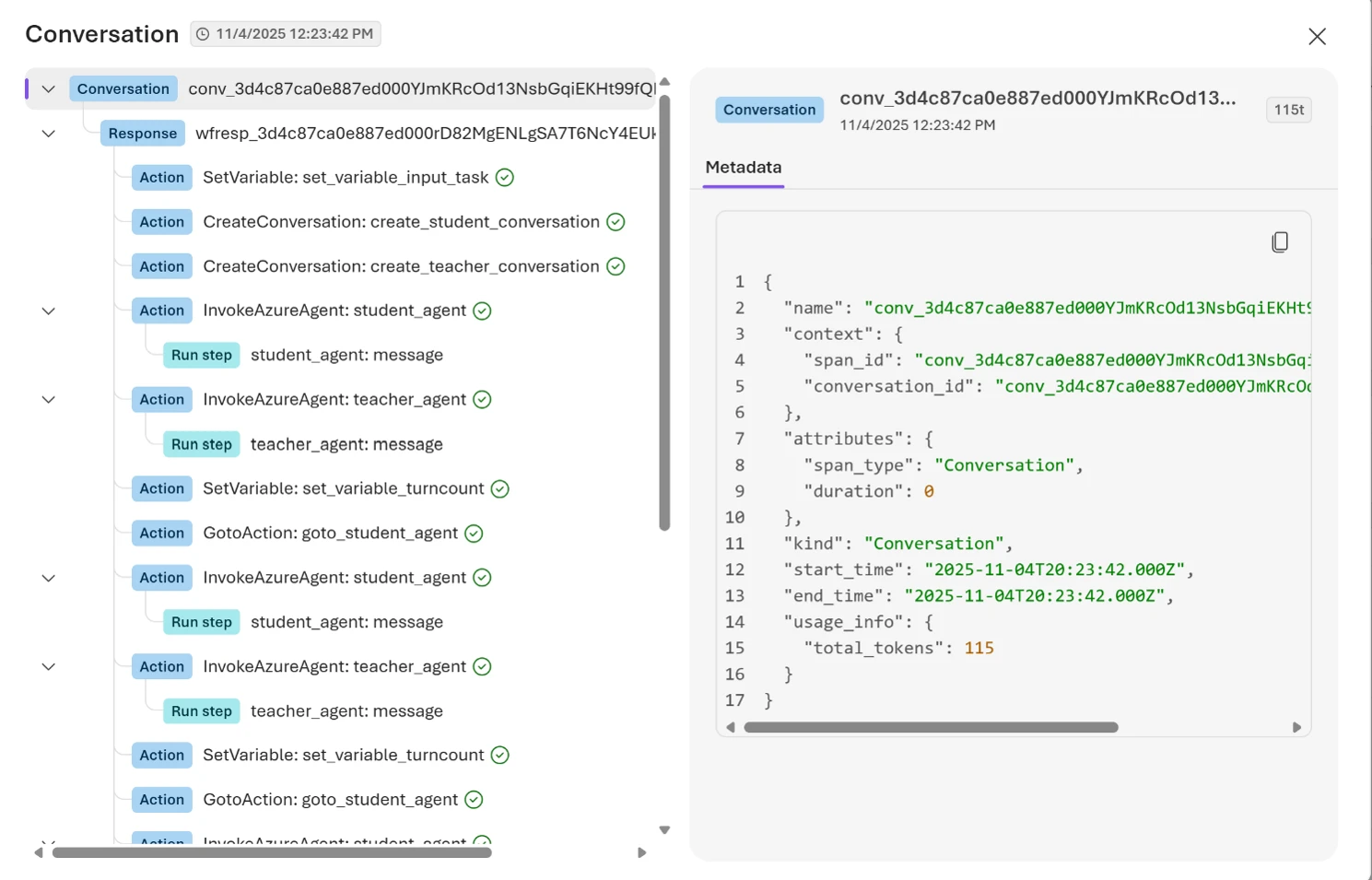
Together, observability signals explain not only how much an agent consumed, but why:
- Traces reveal model calls, tool invocations, retries, latency, and token usage.
- Monitoring surfaces production trends and anomalies.
- Evaluations measure quality, safety, groundedness, and task completion. Run continuously, they give teams evidence to test whether a smaller model still meets their quality bar rather than defaulting to the largest one. Safety evaluators can also flag issues such as prompt injection, sensitive data leakage, and harmful content before they reach production, where remediation can be costly.
Viewed together, these signals help teams understand whether rising costs are driven by customer demand, inefficient agent behavior, quality regressions, or architectural issues.
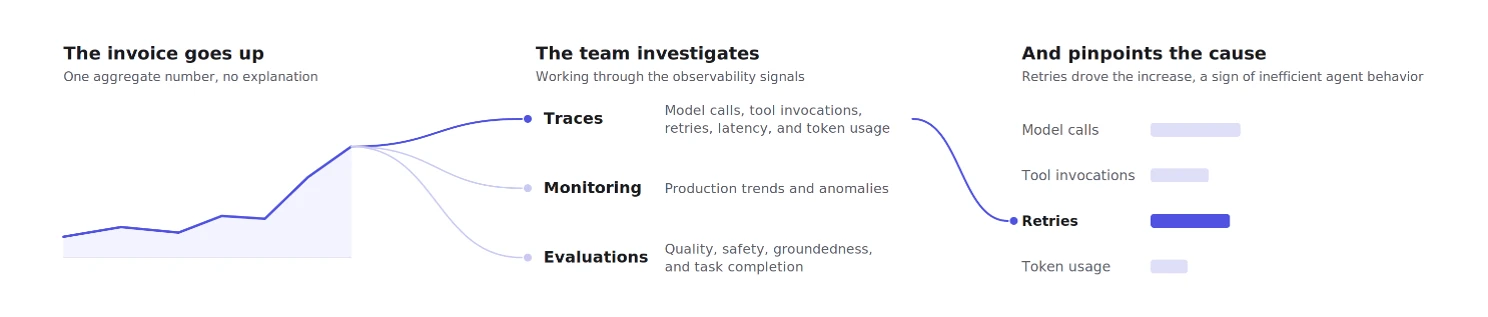
That context turns cost data into actionable governance. Before teams can set limits or measure ROI, they need to understand how agents behave in production.
Set spend limits at every layer
Visibility tells you where the money went. Limits determine whether it can keep going. There are three layers to the control system, each working at a different scope and speed:
1. Enforce limits in Foundry
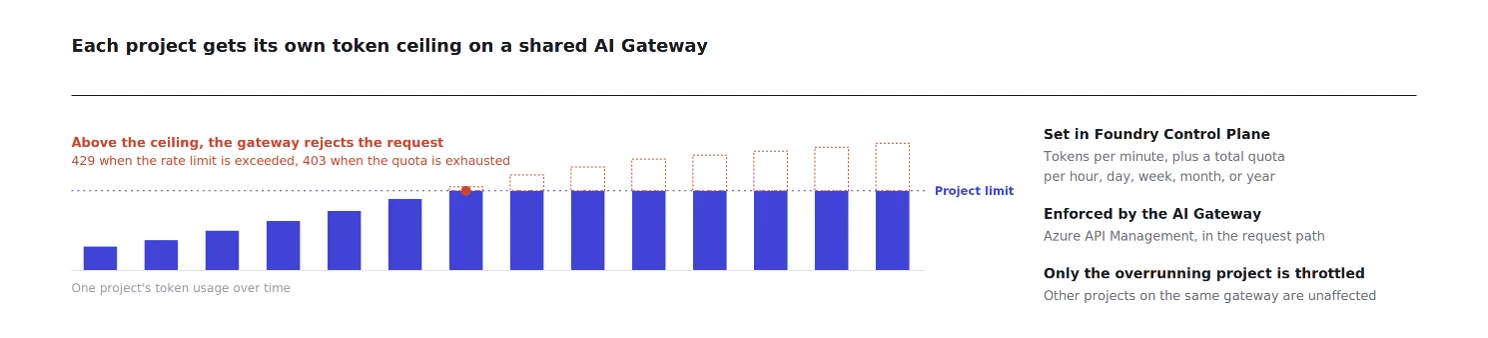
With AI Gateway configured, Foundry Control Plane can enforce tokens-per-minute rate limits and total token quotas for model deployments at the project scope. A request that exceeds the rate limit receives a 429 Too Many Requests response. A caller that exhausts its token quota receives a 403 Forbidden response.
Unlike a cost alert, enforcement happens in the request path. Teams can contain one project’s consumption before it monopolizes shared capacity and establish different boundaries for different projects. Quotas can operate over hourly, daily, weekly, monthly, or yearly periods. Teams can configure the Azure API Management-backed gateway and manage its token limits through Foundry Control Plane.
2. Apply policy across models and providers
For controls spanning projects or model providers, the llm-token-limit policy limits consumption per key using a rate, a cumulative quota, or both. The key can represent a subscription, application, team, customer, workload identity, or another business boundary.
AI Gateway applies the same governance model across OpenAI-compatible APIs, the Anthropic Messages API, as well as MCP servers and agent-to-agent APIs. Backend load balancing can prioritize provisioned capacity before spilling over to pay-as-you-go deployments, while circuit breakers can temporarily stop sending requests to a failing or throttled backend.
Like any distributed limit, these controls have boundaries. Counters are maintained independently at each gateway, and concurrent requests can create a small temporary overage because final token consumption is known only after responses return. The goal is to replace unbounded consumption with a predictable operating boundary.
3. Use financial budgets for accountability and escalation
Microsoft Cost Management budgets serve a different purpose from token limits. They use Azure billing data, including actual prices, credits, and purchasing commitments, to give finance and IT an authoritative view of what the organization has spent and is forecast to spend.
Teams can set budget thresholds and notify owners when actual or forecasted costs approach them. They can also connect a budget to an Azure Monitor action group, which can invoke a customer-designed workflow such as opening a ticket, notifying an operations team, or starting a Logic App or automation runbook. Cost anomaly detection provides another warning when spending departs from its historical pattern.
These are valuable accountability and escalation tools, but they are not instant spending caps. They respond to billing data after consumption occurs. Token limits operate earlier, in the path of each model request, where they can reject new calls after a rate limit or quota is reached. Organizations need both: token limits to contain consumption as agents run, and financial budgets to keep owners accountable and prevent finance from being surprised.
Today, these two layers use different units. The platform enforces consumption in tokens, while finance plans and allocates investment in dollars. Because token prices vary by model and offer, a token quota does not translate into one stable dollar amount.
We are actively working to close that gap with future capabilities in Microsoft Foundry and the AI Gateway in Azure API Management that bring dollar-denominated budgets, finer-grained attribution, and policy-driven controls closer to where agents run.
Measure the value the agent creates
Putting a ceiling on consumption solves only half of the governance problem.
While cost controls can help organizations manage spending, they do not answer a more important question: is the agent delivering enough business value to justify that investment?
The least expensive agent is not necessarily the best investment. An agent that costs more but resolves substantially more cases may deserve additional capacity. An inexpensive agent that rarely completes its task may not. Governance therefore needs a second unit alongside tokens and dollars: business outcomes.
This is ultimately an ROI problem. Organizations want to understand whether their agents are creating more value than they cost. However, connecting business outcomes to the underlying cost of running an agent can be difficult.
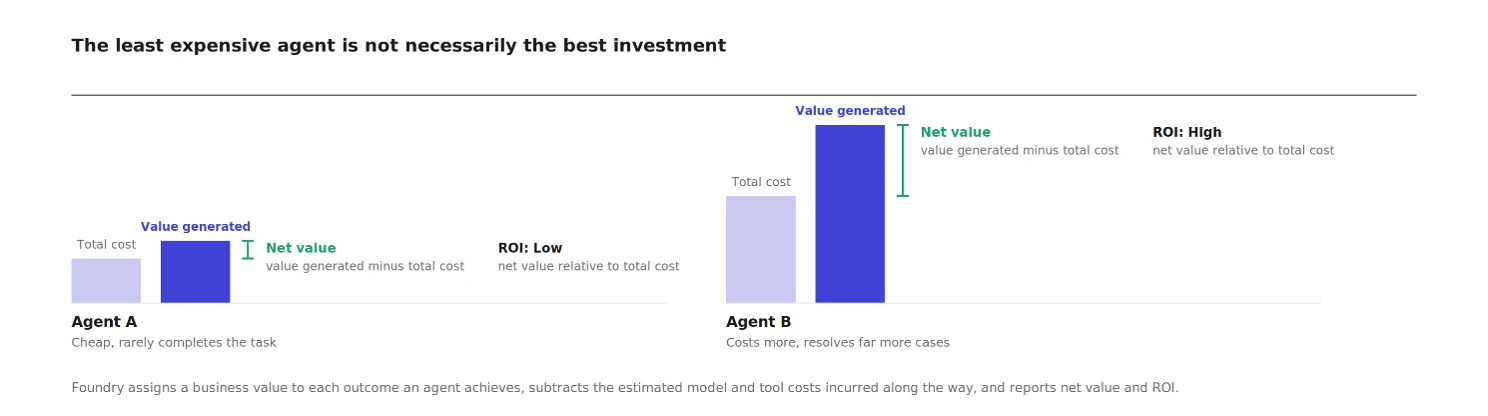
ROI for agents in Foundry, currently in private preview, helps organizations connect agent costs to business outcomes. Teams define the outcomes they want to track, such as successful task completion, customer satisfaction, or case deflection. They then assign a business value to those outcomes and define how success should be measured. Foundry tracks which outcomes an agent achieves, and the model and tool costs incurred along the way, calculating:
- Value generated: The total value attributed to successful business outcomes.
- Total cost: The model and tool costs incurred to achieve those outcomes.
- Net value: The value remaining after costs are subtracted.
- ROI: The return generated relative to the investment required.
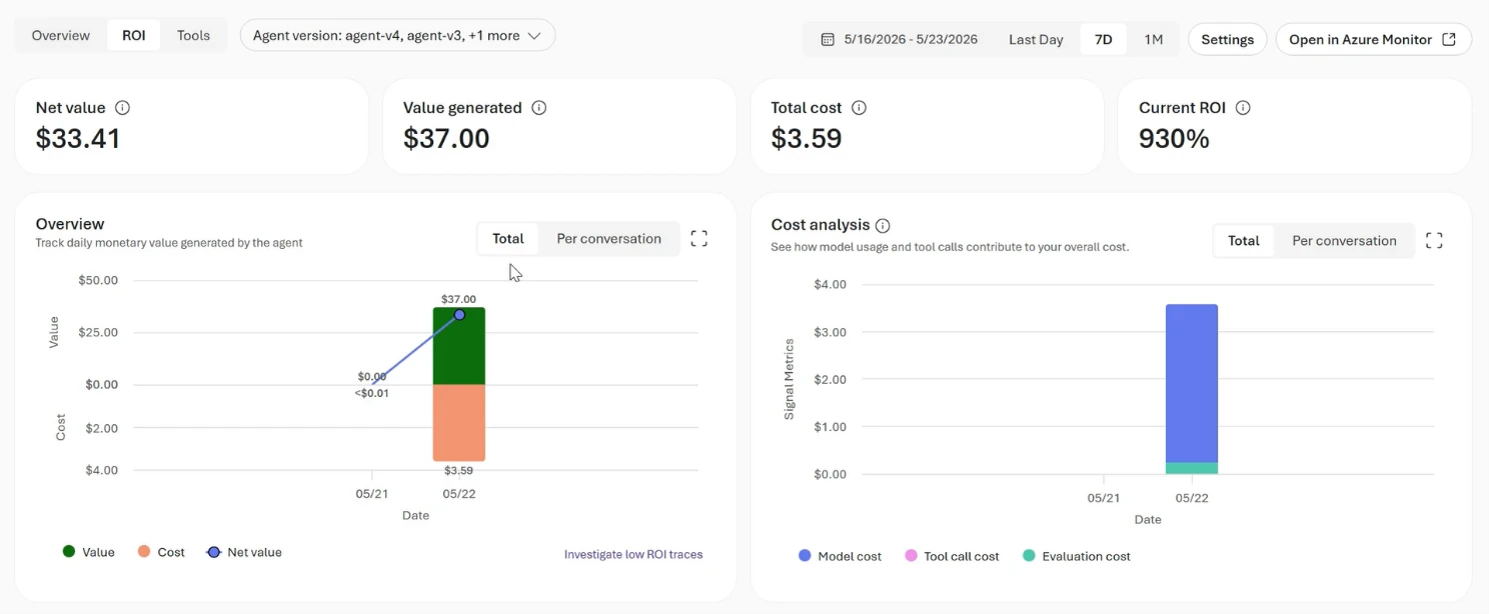
The dashboard shows daily trends and separates models from tool costs. Teams can compare agent versions using average value per conversation, pass rate, and improvement percentage. That makes optimization decisions defensible in business terms: not merely “the new version uses fewer tokens,” but “the new version produces more net value.”
The ROI feature also connects the business view to engineering evidence. Teams can inspect the lowest-ROI conversations and traces to find an oversized model, repetitive tool calls, or a workflow consuming tokens without producing meaningful outcomes. Because ROI is connected to observability data, teams can move directly from a business metric to the traces, evaluations, and operational signals that explain what is driving cost, quality, and business outcomes.
A low-ROI trace can point to a request that should be routed differently, context that should be removed, or an agent configuration that should be optimized. The same telemetry used to improve quality and efficiency can now help organizations answer the question the business ultimately asks: is this agent worth what it costs?
Run AI as one managed investment system
Together, the four posts in this series describe one optimization system operating at three speeds. At runtime, model routing, deployment choices, and caching right-size each request. Over days and weeks, context engineering, memory, tools, and agent optimization improve the workflow. Continuously, governance attributes consumption, enforces limits, and measures whether the portfolio is creating value.
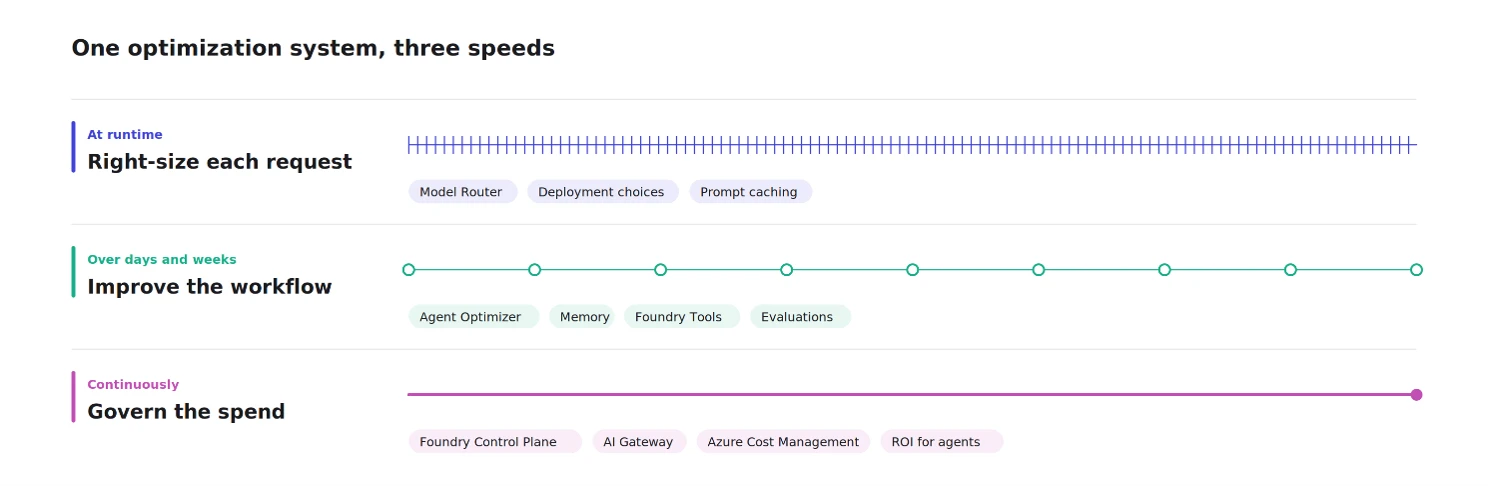
The same evidence connects every layer, and answers different questions:
- Traces show what an agent did on a run, exposing expensive requests and inefficient context.
- Evaluations show whether the output was good, protecting quality as configurations change.
- Cost attribution shows where the money went, pointing to the project, agent, or model to intervene on.
- ROI shows whether the work was worth it, telling leaders whether to optimize an agent, give it more capacity, or retire it.
Cost is only one part of a much bigger governance story, and it helps to be clear about who owns which part.
- Foundry is built for developers creating agents. It’s where developers build, test, and optimize, and Foundry Control Plane gives them an operating view of everything they’ve shipped, from cost trends and anomalies to token usage and lifecycle controls, with Azure Policy, Microsoft Defender, and Microsoft Purview woven in so compliance and security aren’t an afterthought.
- Microsoft Agent 365 is built for the people responsible for the entire enterprise estate. IT administrators and security teams use it to discover, inventory, secure, and manage every agent in the tenant, whether it came out of Foundry, Microsoft 365, or a partner platform, and to extend the same identity, access, and data protections to agents that they already apply to people.
The FinOps capabilities we’ve covered in this series live on the Foundry side of that line, giving developers and platform teams the levers to keep spend predictable, while IT and security govern the estate around them in Agent 365.
Agent optimization isn’t about driving the cost of every request to zero. It’s about running agents with the same discipline you’d apply to any other serious investment, and that is what Foundry is built for: helping developers build and manage agents that are efficient by design, contained as they scale, and accountable for the value they create.
Get started
If you’re governing agents today, start by making their consumption visible and attributable. Identify which agents and teams are driving usage, apply request-time limits to contain unexpected consumption, and pair those controls with financial budgets and alerts. Then connect cost to business outcomes so you can decide which agents to optimize, scale, or retire.
- Enforce token limits for model deployments in Microsoft Foundry.
- Plan, monitor, and allocate AI costs in Microsoft Foundry costs.
- Create budgets and alerts in Cost Management.
- Explore AI Gateway governance capabilities in Azure API Management.
- Learn about observability and ROI for agents in Foundry.
Microsoft Foundry
The enterprise AI platform to build, ground, and govern AI apps and agents at scale.

Did you miss these posts in The Economics of Agent Optimization series?