This blog post is the third of a four-part series called The Economics of Agent Optimization, which shares the strategies, capabilities, and proof points to help you optimize agent costs and run AI as a managed investment system on Microsoft Foundry. The first post set out the three decisions that systems rest on. The second post took the request at runtime. This post takes the next one: making each agent cheaper over time as it learns what works.
Every agent has a mechanism that determines what its model sees on each turn. In many production systems, that choice was set during prototyping and never revisited, even though it often drives the largest share of operating cost and contributes to disappointing answers.
This is also the part of an agent that can improve on its own. The model remains as capable as when you selected it, and instructions change only when someone rewrites them. But what an agent knows, can access, and remembers, grows as it runs—making it the key to improving performance while lowering cost over time. Managing that process is called context engineering.
Why the context window sets what an agent costs
A model has no memory of its own. On each turn, its context window supplies everything it can use: instructions, available tools, retrieved documents, and conversation history. When the turn ends, that context disappears and must be sent again on the next one.
That cost is manageable for a chatbot answering one question. For an agent working across many turns toward one outcome, it is often the largest expense. Because the context window is paid for every turn, unnecessary content is billed repeatedly.
The less visible cost is quality. More context does not guarantee better answers: a relevant fact buried in 40 pages is harder to use, and a long tool list makes the wrong choice more likely. Each mistake adds more turns—and more cost—to recover.
That makes context worth a leader’s attention. Most cost reductions involve a tradeoff: a cheaper model may reduce quality, and shorter instructions may weaken an answer. By contrast, removing unnecessary context can lower costs without reducing quality, making it an easier optimization for teams to support.
What context engineering means in practice
That is what context engineering does: it decides what enters the context window on each turn, so the agent gets what this request needs rather than everything it might ever need. As a one-time choice, it is a design decision. Practiced continuously, it is how an agent improves, because every turn reveals what it actually used. Four questions cover the work, and teams usually take them in this order.
What should the agent know?
Many teams begin with broad searches that insert entire documents into the prompt. This approach is easy to build but costly to run, and it forces the model to find the one relevant detail amid everything else.
Foundry IQ replaces that with a managed knowledge layer. A knowledge base points at sources across Work IQ, Fabric IQ, Web IQ, Microsoft Azure Blob Storage, SharePoint, OneLake, and Azure SQL. When an agent submits a query, Foundry IQ decomposes it into subqueries, searches connected sources in parallel, semantically reranks the results, and returns grounded passages with citations. This narrows what enters the model’s context to the most relevant evidence while preserving traceability to the source.
Two features make this knowledge layer reusable across agents and governable at scale. A single knowledge base can serve multiple agents. Indexed sources can refresh incrementally on a configured indexer schedule, while remote sources are queried on demand. At query time, Foundry IQ can run under the caller’s Microsoft Entra identity, synchronize access-control lists for supported sources, and honor Microsoft Purview sensitivity labels, so the agent retrieves only content the caller is authorized to access.
Our internal evaluations showed that Foundry IQ knowledge bases improved evidence recall by up to 54% on the BrowseComp-Plus benchmark while reducing retrieval token costs by 34%. The gains came from agentic retrieval, semantic reranking, improved answer synthesis, and more efficient token use.
What should the agent be able to reach?
Tool overhead is easy to miss: adding one may take a single line of code, but its full description occupies the prompt. Every tool attached to an agent has that description sent to the model on every turn, needed or not, and enterprise agents pick up tools quickly as they connect to more systems.
Toolboxes in Foundry give an agent one managed Model Context Protocol (MCP) endpoint for built-in tools like web search, code interpreter, and file search alongside custom MCP servers, OpenAPI 3.0 and 3.1 APIs, and A2A agents. Foundry manages authentication, access policies, and tool versions in one place, rather than configuring each integration separately for every agent. Once a new toolbox version is tested and promoted, connected agents can use it without code changes or redeployment.
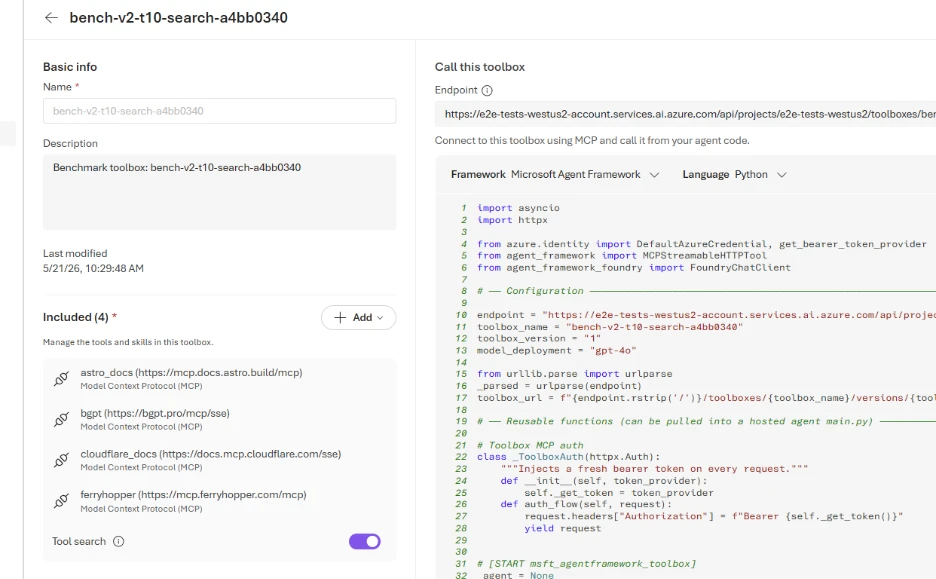
Toolboxes organize your tools. The tool search capability inside Toolbox is what stops you paying for all of them. Instead of the full list, the model gets two things: a way to describe what it needs in plain language, and a way to call whatever comes back. The cost of the tool list stays flat, however large the toolbox grows. In internal benchmarking against a public, open-source tool-retrieval dataset, Toolboxes in Foundry reduced average input-token consumption around 97% for large tool libraries—directly lowering inference costs for customers building agents.1
Foundry also notices which tools each toolbox uses most and puts those within easy reach, so the common path gets faster and cheaper the longer the agent runs. Accuracy improves alongside cost, because a short, well-matched list means fewer wrong calls and fewer turns spent recovering.
How should the agent do the work?
Knowledge and tools cover what an agent can find and do. Neither covers how your company expects the work to be done: the escalation path a support agent follows; the checklist a code review applies. That guidance usually lives in the agent’s instructions. As a result, the same procedures may be copied across multiple agents and included in every request, even when they are not relevant.
A skill turns that guidance into a named, reusable procedure. Skills are stored centrally in Foundry and made available to agents through a toolbox. Instead of embedding a copy of the procedure in each agent, the toolbox references the centrally managed skill. When your organization improves a procedure, you can publish a new version and set it as the default. Every agent using that skill can then follow the updated procedure without code changes or redeployment. To minimize context usage, the agent initially sees only each skill’s name and short description. It loads the full instructions only when the skill is relevant. This makes it practical to offer a large library of detailed procedures without adding unnecessary content to every interaction.
What should the agent remember?
Agents need continuity, but they do not need to carry every detail from every interaction. Repeatedly sending an entire conversation to the model adds cost and consumes context, even when only a few details remain useful.
Memory in Foundry Agent Service helps agents retain important context without replaying entire conversations. It supports three types of memory:
- Session memory for the current conversation.
- User memory for preferences and facts that persist across sessions.
- Procedural memory for learned workflows and task execution patterns.
This allows a returning customer to pick up where they left off, while enabling an agent to consistently follow proven processes without being re-instructed each time.
Together, these capabilities help an agent continue a customer interaction, personalize future responses, and improve how reliably it completes recurring tasks. Procedural memory complements centrally managed skills: a skill defines the organization’s approved procedure, while procedural memory helps an agent learn from its own task execution. In Microsoft’s evaluations, enabling procedural memory produced about a 5% improvement on STATE-Bench and Tau-Bench. Organizations can also control memory through user-level isolation, retention settings, and time-to-live policies that determine what is stored and when it expires.
Why context engineering becomes a system
Any team can assemble knowledge retrieval, tools, procedural guidance, and memory. The challenge is making them work together, under one set of permissions, and keeping them current as the organization changes.
Foundry brings these pieces into a single system. Knowledge, tools, skills, and memory can be managed through shared infrastructure rather than separate products, while permissions are enforced where data is retrieved, so agents inherit the access controls already applied to enterprise content. Foundry IQ extends that model across enterprise knowledge, business data, and organizational context, while remaining compatible with frameworks such as Microsoft Agent Framework, LangGraph, GitHub Copilot SDK, and Claude Agent SDK.
The result is that context improves without requiring agents to be rebuilt. Knowledge bases refresh as source systems change. Skills evolve as policies evolve. Memory accumulates what matters about users and successful workflows. Tool search adapts to the capabilities people actually use. Agent optimizer in Foundry Agent Service then closes the loop by analyzing agent behavior and generating improved instructions, skills, tool descriptions, and model configurations.
That is the larger goal of context engineering: not simply reducing prompt size or retrieval costs, but creating agents that improve with use. When the knowledge they draw from, the tools they discover, the procedures they follow, and the memories they retain all become better over time, an agent can become both more capable and more efficient without starting over.
Get started
If you’re building agents today, start by examining what enters the context window on every turn. Look at the documents being retrieved, the tools being exposed, the instructions being repeated, and the conversation history being carried forward. In many cases, improving those inputs has a larger impact on cost and quality than changing models.
- Ground an agent in enterprise data with Foundry IQ: Connect a Foundry IQ knowledge base to an agent.
- Give an agent one endpoint for its tools, and turn on tool search: Enable tool search in a toolbox.
- Add memory so an agent carries context across sessions: Create and use memory in Foundry Agent Service.
- Start building in Microsoft Foundry.
Microsoft Foundry
The enterprise AI platform to build, ground, and govern AI apps and agents at scale

Did you miss these posts in The Economics of Agent Optimization series?
- AI cost management: From AI pilots to measurable ROI
- AI cost optimization: How to lower AI spend
- AI agent governance: How to measure AI value and ROI
1 Command Line, Tool search: Finding the right tool at the right time, July 29, 2026.