We recently announced a new solution, Backup Explorer, to enable you as a backup administrator to perform real-time monitoring of your backups, helping you achieve increased efficiency in your day-to-day operations.
But what if you could also be proactive in the way you manage your backup estate? What if there was a way to unlock the latent power of your backup metadata to make more informed business decisions?
For instance, any business would be well-served following a systematic way of forecasting backup usage. Often, this involves analyzing how backup storage has increased over time for a given tenant, subscription, resource group, or for individual workloads. Such analysis requires the paired ability to aggregate data over a long period of time and present it in a way that allows the reader to quickly derive insights.
Today, we are pleased to announce the public preview of Backup Reports. Leveraging Azure Monitor Logs and Azure Workbooks, Backup Reports serve as a one-stop destination for tracking usage, auditing of backups and restores, and identifying key trends at different levels of granularity.
With our reports, you can answer questions including ‘Which Backup Item(s) consume the most storage?’, ‘Which machines have had consistently misbehaving backups?’, ‘What are the main causes of backup job failure?’, and many more.
Key benefits
- Boundary-less reporting: Backup Reports work across multiple workload types that are supported by Azure Backup. This includes Azure workloads such as Azure Virtual Machines, SQL in Azure Virtual Machines, SAP HANA/ASE in Azure Virtual Machines, as well as on-premises workloads including Data Protection Manager (DPM), Azure Backup Server, and Azure Backup Agent. The reports can aggregate information across multiple vaults, subscriptions, and regions. If you are an Azure Lighthouse user with delegated access to your customers’ subscriptions/Log Analytics workspaces, you can also view reporting data across all your tenants within a single pane of glass.
- Rich slicing, dicing, and drill-down capabilities: Backup Reports offers a range of filters and visualization experiences that enable you, as a backup administrator, to easily scope down your analysis and derive valuable insights. You can also slice and dice on backup item-specific properties, such as the backup item type, protection state, and more.
- Native Azure-based experience: Backup Reports can be viewed right on the Azure portal without the need to purchase any additional software licenses. This native integration also makes it possible to seamlessly navigate to (and from) the individual dashboards for backup items and vaults and take action.
Note, Backup Reports will start showing data for Azure file share backup for each region once Azure file share backup becomes generally available.
Getting started
To start using Backup Reports, you will first need to configure your vaults to send diagnostics data to Log Analytics. To make this task easier, we have provided a built-in Azure Policy that auto-enables Log Analytics diagnostics for all vaults in a chosen scope.
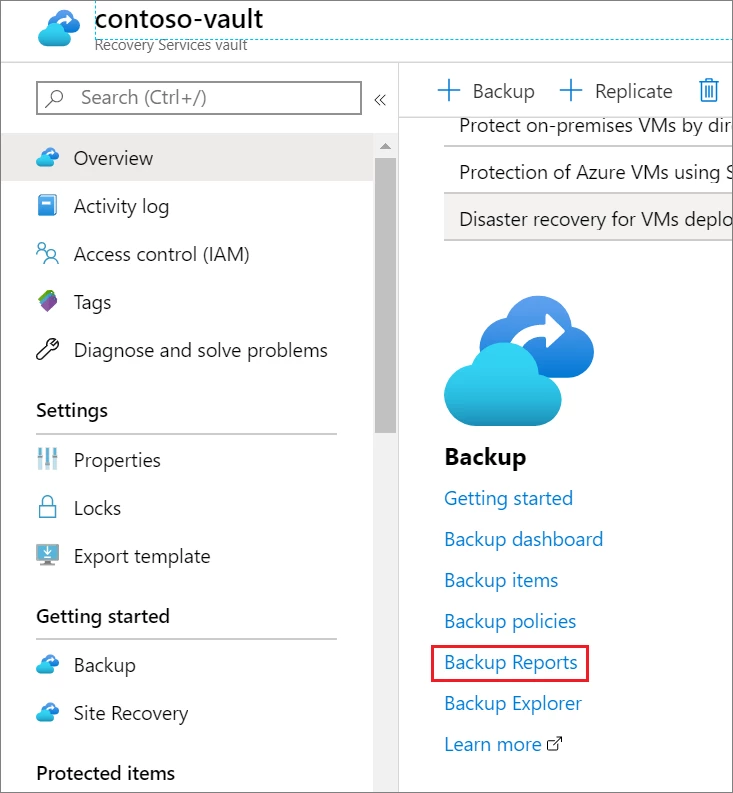
Once all your vaults have been configured to send data to Log Analytics, you can simply navigate to any vault and click on the Backup Reports menu item.
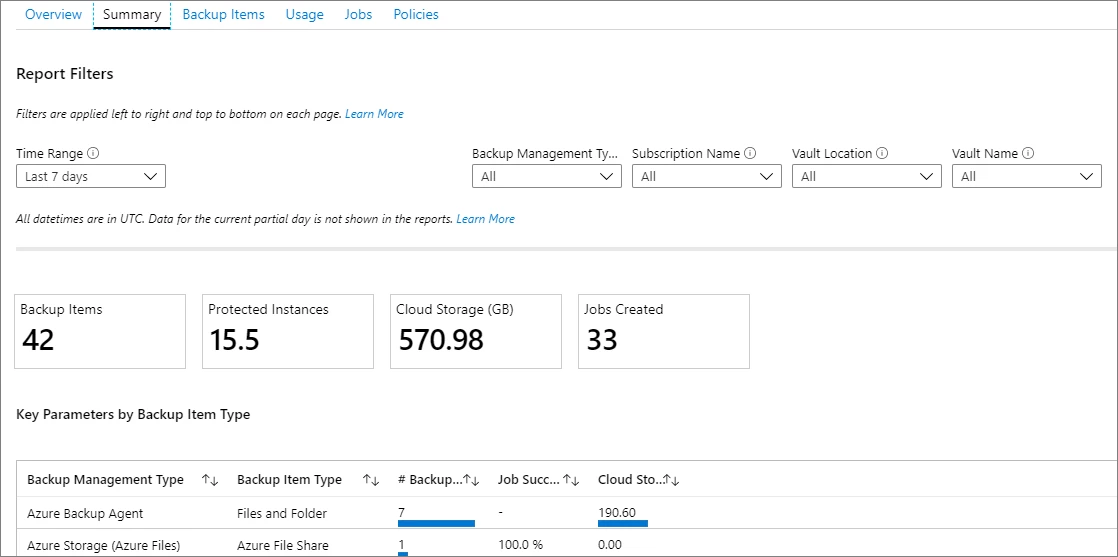
This opens a report that will aggregate data across your entire backup estate. Simply select one or more LA Workspaces to view data and you’ll be ready to go.
Next steps
- Read the Backup Reports Documentation to learn how to make the most of your reports.
- New to Azure Backup? Sign up for a free Azure trial subscription.
- Need help? Reach out to Azure Backup forum for support or browse Azure Backup documentation.
- Follow us on Twitter @AzureBackup for the latest news and updates.