Today we are excited to announce the public preview of Azure Premium Blob Storage. Premium Blob Storage is a new performance tier in Azure Blob Storage, complimenting the existing Hot, Cool, and Archive tiers. Premium Blob Storage is ideal for workloads with high transactions rates or requires very fast access times, such as IoT, Telemetry, AI and scenarios with humans in the loop such as interactive video editing, web content, online transactions, and more.
Our testing shows that both average and 99th percentile server latency is significantly lower than our Hot access tier, providing faster and more consistent response times for both read and write across a range of object sizes. Your application should be deployed to compute instances in the same Azure region as the storage account to realize low latency End-to-End. For more details see, “Premium Blob Storage – a new level of performance.”
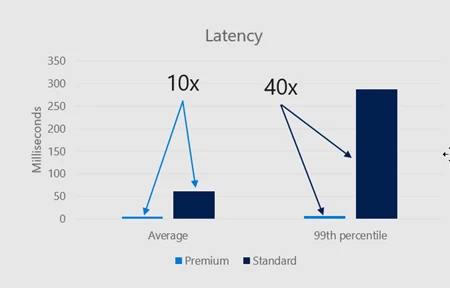
Figure 1 – Latency comparison of Premium and Standard Blob Storage
Premium Blob Storage is available with Locally-Redundant Storage (LRS), Zone-Redundant Storage (ZRS) in select regions, and comes with High-Throughput Block Blobs (HTBB), which provides very high and instantaneous write throughput when ingesting block blobs larger than 256KB.
You can store block blobs and append blobs in Premium Blob Storage. To use Premium Blob Storage you provision a new ‘Block Blob’ storage account in your subscription (see below for details) and start creating containers and blobs using the existing Blob Service REST API and/or any existing tools such as AzCopy or Azure Storage Explorer.
Pricing and region availability
Premium Blob Storage has higher data storage cost, but lower transaction cost compared to data stored in the regular Hot tier. This makes it cost effective and can be less expensive for workloads with very high transaction rates. Check out the pricing page and this blog post for more details.
Premium Blob Storage public preview is available in US East, US East 2, US Central, US West, US West 2, North Europe, West Europe, Japan East, Australia East, Korea Central, and Southeast Asia regions.
Object tiering
At present data stored in Premium cannot be tiered to Hot, Cool or Archive access tiers. We are working on supporting object tiering in the future. To move data, you can synchronously copy blobs from using the new PutBlockFromURL API (sample code) or AzCopy v10, which supports this API. PutBlockFromURL synchronously copies data server side, which means that the data has finished copying when the call completes, and all data movement happens inside Azure Storage.
How to create a storage account (Azure portal)
To create a block blob storage account using the Azure Portal navigate to the ‘Create storage account’ blade and fill it in:
- In Location choose one of the supported regions
- In Performance choose Premium
- In Account Kind choose Block Blob Storage (preview)
Example below:
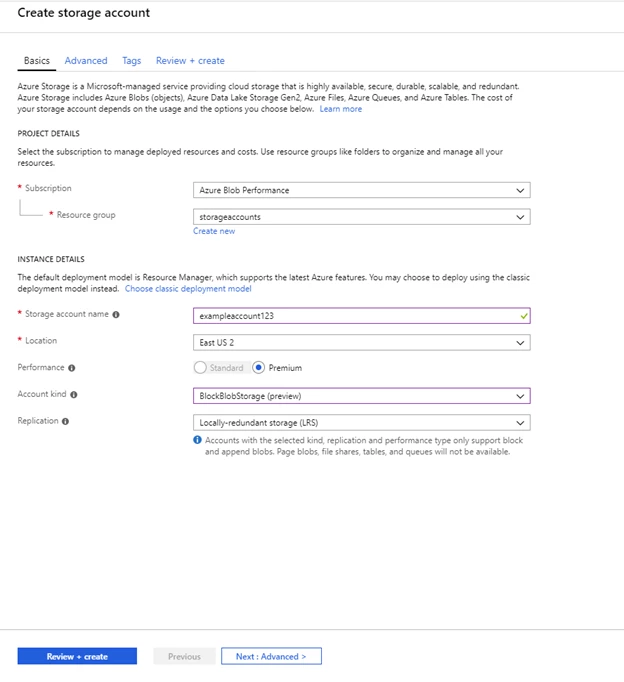
Once you have created the account, you can manage the Premium Blob Storage account, including generating SAS tokes, review metrics, and more.
How to create a storage account (PowerShell)
To create a block blob account, you must first install the PowerShell AzureRm.Storage preview module.
Step 1: Ensure that you have the latest version of PowerShellGet installed.
Install-Module PowerShellGet –Repository PSGallery –Force
Step 2: Open a new PowerShell console and install AzureRm.Storage module.
Install-Module Az.Storage –Repository PSGallery -RequiredVersion 1.1.1-preview –AllowPrerelease –AllowClobber –Force
Step 3: Open a new PowerShell console and login with your Azure account.
Connect-AzAccount
Once the PowerShell preview module is in place you can create a block blob storage account:
New-AzStorageAccount -ResourceGroupName -Name -Location -Kind "BlockBlobStorage" -SkuName "Premium_LRS"
How to create a storage account (Azure CLI)
To create a block blob account, you must first install Azure CLI v. 2.0.46 or higher, then
Step 1: Login to your subscription
az login
Step 2: Add the storage-preview extension
az extension add -n storage-preview
Step 3: Create storage account
az storage account create --location --name --resource-group --kind "BlockBlobStorage" --sku "Premium_LRS"
Feedback
We would love to get your feedback at premiumblobfeedback@microsoft.com.
Conclusion
We are very excited about being able to deliver Azure Blob Storage with low and consistent latency with Premium Blob Storage and look forward to hearing your feedback. To learn more about Blob Storage please visit our product page. Also, feel free to follow my Twitter for more updates.