Updated on July 17, 2020: Server-side encryption with customer-managed keys is now generally available. For more information, see the blog post Announcing server-side encryption with customer-managed keys for Azure Managed Disks.
Today we’re introducing the preview for server-side encryption (SSE) with customer-managed keys (CMK) for Azure Managed Disks. Azure customers already benefit from server-side encryption with platform managed keys (PMK) for Azure Managed Disks enabled by default. Customers also benefit from Azure disk encryption (ADE) that leverages the BitLocker feature of Windows and the DM-Crypt feature of Linux to encrypt Managed Disks with customer managed keys within the guest virtual machine.
Server-side encryption with customer-managed keys improves on platform managed keys by giving you control of the encryption keys to meet your compliance needs. It improves on Azure disk encryption by enabling you to use any OS types and images for your virtual machines by encrypting data in the storage service. Server-side encryption with customer-managed keys is integrated with Azure Key Vault (AKV) that provides highly available and scalable, secure storage for RSA cryptographic keys backed by hardware security modules (HSMs). You can either import your RSA keys to Azure Key Vault or generate new RSA keys in Azure Key Vault.
Azure Storage handles the encryption and decryption in a fully transparent fashion using envelope encryption. It encrypts data using an Advanced Encryption Standard (AES) 256 based data encryption key which is in turn protected using your keys stored in Azure Key Vault. You have full control of your keys, and Azure Managed Disks uses system-assigned managed identity in your Azure Active Directory for accessing keys in Azure Key Vault. A user with required permissions in Azure Key Vault must first grant permissions before Azure Managed Disks can access the keys. You can prevent Azure Managed Disks from accessing your keys by either disabling your keys or by revoking access controls for your keys. Moreover, you can track the key usage through Azure Key Vault monitoring to ensure that only Azure Managed Disks or other trusted Azure services are accessing your keys.
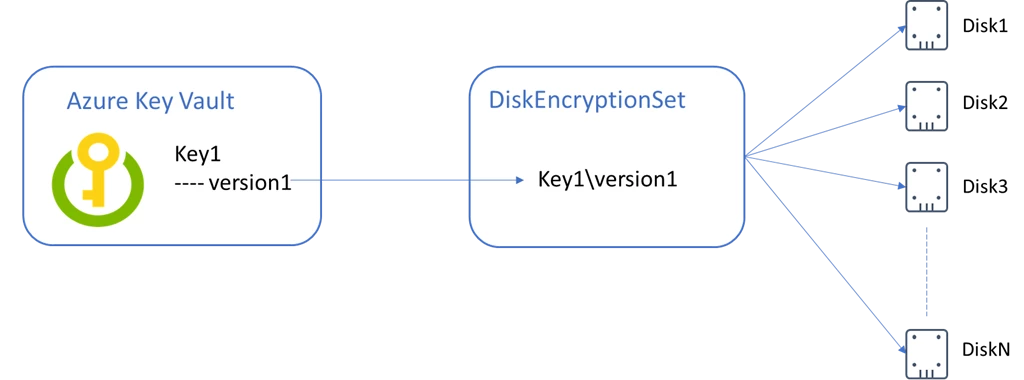
To enable customer-managed keys for Azure Managed Disks, you must first create an instance of a new resource type called DiskEncryptionSet, which represents a customer-managed key. You must associate your disks, snapshots, and images with a DiskEncryptionSet to encrypt them with customer-managed keys. There is no restriction on the number of resources that can be associated with the same DiskEncryptionSet.
Availability
Server-side encryption customer-managed keys are available for Standard HDD, Standard SSD, and Premium SSD Managed Disks. You can now perform the following operations in the West Central US region via Azure Compute Rest API version 2019-07-01:
- Create a virtual machine from an Azure Marketplace image with OS disk encrypted with server-side encryption with customer-managed keys.
- Create a custom image encrypted with server-side encryption with customer-managed keys.
- Create a virtual machine from a custom image with OS disk encrypted with server-side encryption with customer-managed keys.
- Create data disks encrypted with server-side encryption with customer-managed keys.
- Create snapshots encrypted with server-side encryption with customer-managed keys.
We’re going to add support for Azure SDKs and other regions soon.
Getting Started
Please email AzureDisks@microsoft.com to get access to the preview.
Review the server-side encryption with customer-managed keys for Managed Disks preview documentation to learn how to do the following:
- Create a virtual machine from an Azure marketplace image with disks encrypted with server-side encryption with customer-managed keys
- Create a virtual machine from a custom image with disks encrypted with server-side encryption with customer-managed keys
- Create an empty managed disk encrypted with server-side encryption with customer-managed keys and attach it to a virtual machine
- Create a new custom image encrypted with server-side encryption with customer-managed keys from a virtual machine with disks encrypted with server-side encryption with customer-managed keys.