Earlier this week, Corey Sanders announced preview of a new Azure Backup capability to backup SQL workloads running in Azure Virtual Machines in his post about why you should bet on azure for your infrastructure needs today and in the future. In this blog, we will elaborate on how this enterprise backup provides a new breakthrough in backup that differentiates Azure from any other public cloud. This workload backup capability is built as an infrastructure-less, Pay as You Go (PAYG) service that leverages native SQL backup and restore APIs to provide a comprehensive solution to backup SQL servers running in Azure IaaS VMs.
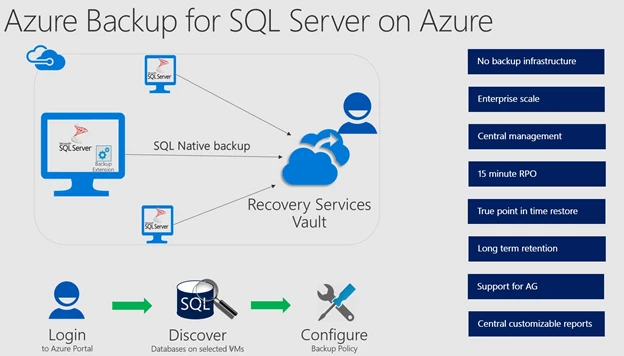
Key benefits
- Zero-infrastructure backup: Freedom from managing backup infrastructure (e.g. backup server, agents or backup storage) or writing complex backup scripts.
- Centrally manage and monitor all backups using Recovery Services Vault:
- Create policies to specify the backup schedule and retention for both short-term and long-term retention needs using Grandfather-father-son style retention schemes. Re-use these policies across multiple databases across servers.
- Configure email notification for any backup or restore failure.
- Monitor the backup jobs using Recovery Services Vault dashboard for all workloads including Azure IaaS VMs, Azure Files and SQL server databases.
- Restore to any time, up to a specific second: Restore databases to any date and time up to a specific second. Azure Backup provides a graphical overview of the recovery point availability for the selected date, which will help users choose the right recovery time. In the backend, the solution will figure out the appropriate full, differential and series of log backup chain corresponding to the selected time that need to be restored.
- 15-minute Recovery Point Objective (RPO): Configure transaction log backup every 15 minutes to meet the backup SLAs needs of the organization.
- PAYG Service: No upfront payment is needed. Billing is based on consumption each month.
- Native SQL API integration: Azure Backup uses native SQL APIs such that customers get the benefit of SQL backup compression, full fidelity backup and restore including full, differential and log backups. Customers can monitor their backup jobs using SSMS.
- Support for Always On Availability Group: Azure Backup protects databases in an Availability Group such that data protection continues seamlessly even post failover while honoring the Availability Group backup preference.
Get started
The video below walks you through various steps on how to configure backup for your SQL Servers running in IaaS VM. You can refer to documentation for more details.
Upcoming planned enhancements
Below are some of the key features planned for general availability and we plan to stage them through the rest of the year. Please follow us on @AzureBackup and look out for a twitter poll shortly to share your feedback on them.
- Central customizable backup reports using Power BI.
- Central customizable monitoring using OMS Log Analytics.
- Automatically protection future added databases (auto-protect).
- Support for PowerShell and Azure CLI.
Additional resources
- Want more details about this feature? Check out Azure Backup for SQL Server documentation.
- This features comes with a new pricing model, check out the pricing for this feature.
- Check different SQL backup options from Microsoft and choose the right solution based on your requirements.
- Need help? Reach out to Azure Backup forum for support or browse Azure Backup documentation.
- Tell us how we can improve Azure Backup by contributing new ideas and voting up existing ones.
- New to Azure Backup, sign up for a free Azure trial subscription.