This blog is co-authored by Arpan Shah, SVP of Oracle Databases and Muneer Mirza, VP of Multicloud at Oracle Cloud Infrastructure (OCI).
Today at Microsoft Ignite, we’re bringing agentic AI into the flow of enterprise work. Our new integrations let AI agents reason across Oracle’s business-critical data—from finance and supply chain to HR and customer operations—and the work context Microsoft Work IQ understands across meetings, email, documents, and Teams. Customers can access this combined intelligence through Excel, Teams, and Microsoft Copilot. Built on Oracle AI Database@Azure, the integrations help businesses turn trusted enterprise data into insights and actions, with the choice, security, and performance mission-critical workloads demand.
With Oracle AI Database@Azure, Oracle and Microsoft have helped customers modernize critical workloads to improve application performance and unlock more value from their enterprise data, by bringing databases closer to applications and connecting enterprise data with Microsoft AI. Oracle AI Database@Azure now spans 33 Azure regions, more than on any other hyperscaler, delivering the performance and flexibility customers need.
At Oracle AI World 2026, we announced new capabilities for Oracle AI Database@Azure including FedRAMP Class D certification coming soon for US Government and public-sector workloads, and Proximity Placement Groups (PPGs) that enable customers to place their database closer to applications—resulting in approximately 50% lower VM-to-Exadata network round-trip latency than deployments without PPG alignment. Now, at Microsoft Ignite 2026, we’re building on that momentum.
For IT operations: Monitoring and trust at every layer
Today, we’re announcing limited preview of Azure Workload Center for Oracle, bringing each workload’s architecture, resources, and dependencies together through a construct called a Workload Virtual Instance (WVI). This significantly reduces the complexity and resources required to manage solutions at the individual component level. Integrations across the Workload Virtual Instance, Azure Monitor Health Models, and the Microsoft Azure Copilot Run Oracle agent connect monitoring signals across application, database, and infrastructure layers.
This operational visibility is complemented by agent access controls: Oracle AI Database@Azure supports Microsoft Entra authentication and Oracle Deep Data Security, helping agents stay within users’ existing permissions while database calls run through the managed model context protocol (MCP) server and activity remains auditable across your Oracle database estate.
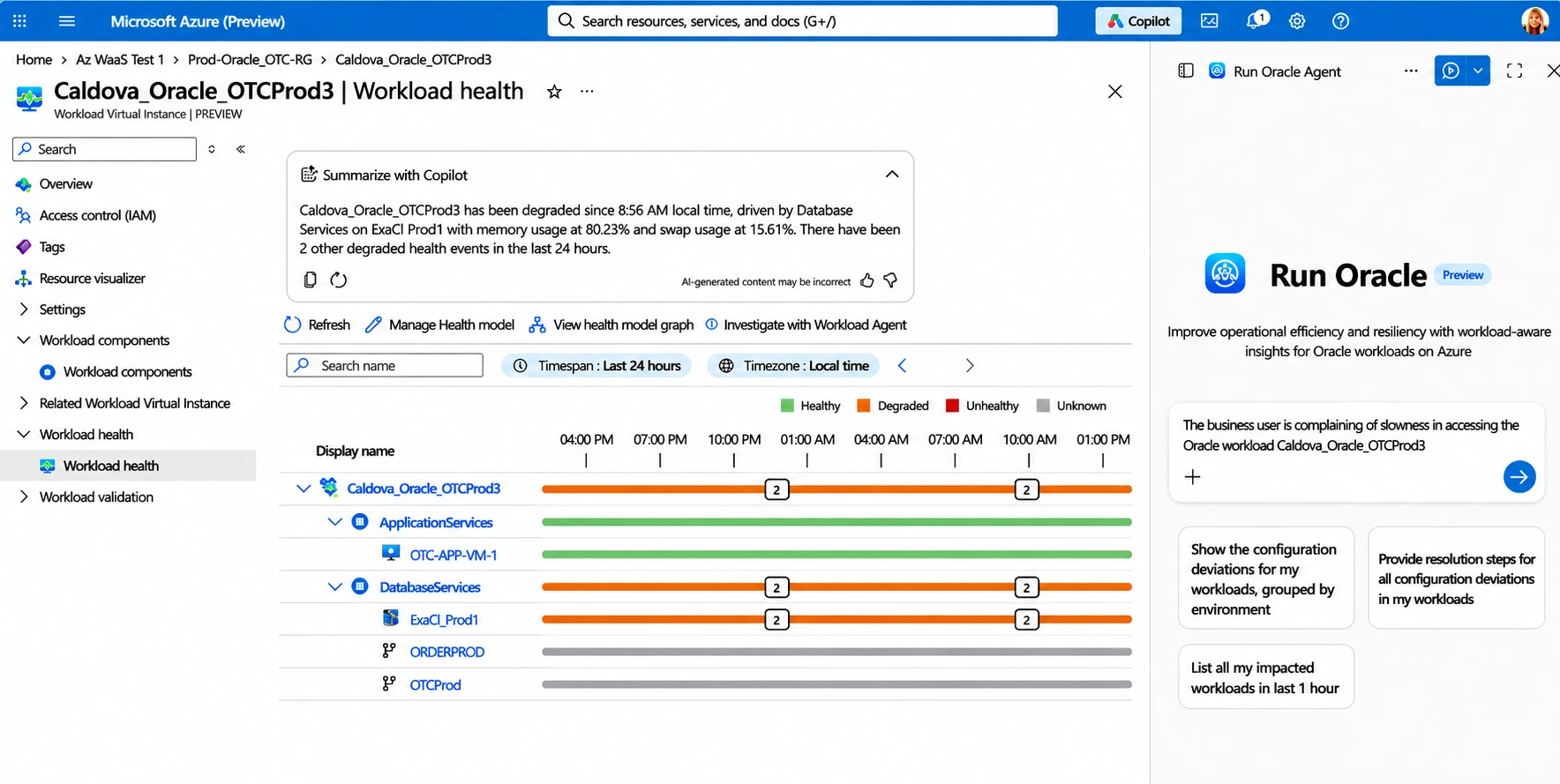
For example, after business users report poor performance from an order processing application, an admin must quickly diagnose and fix the problem. The admin signs in with their existing Microsoft Entra identity and uses Azure Workload Center for Oracle to get a unified view of workload health including signals across the infrastructure, database, and application layers while Copilot provides a summary highlighting where to focus.
The admin uses a natural-language prompt to initiate a coordinated investigation involving multiple agents, each with Oracle data access limited by their identify profile. Database calls from the agents run through the managed MCP server, and every action is captured for audit. Working together, the agents synthesize their findings into a single operational conclusion for the admin.
For end users: Oracle data in the flow of work
Business users need insights from Oracle data, but they often need assistance from someone more technical to extract, format, and deliver it.
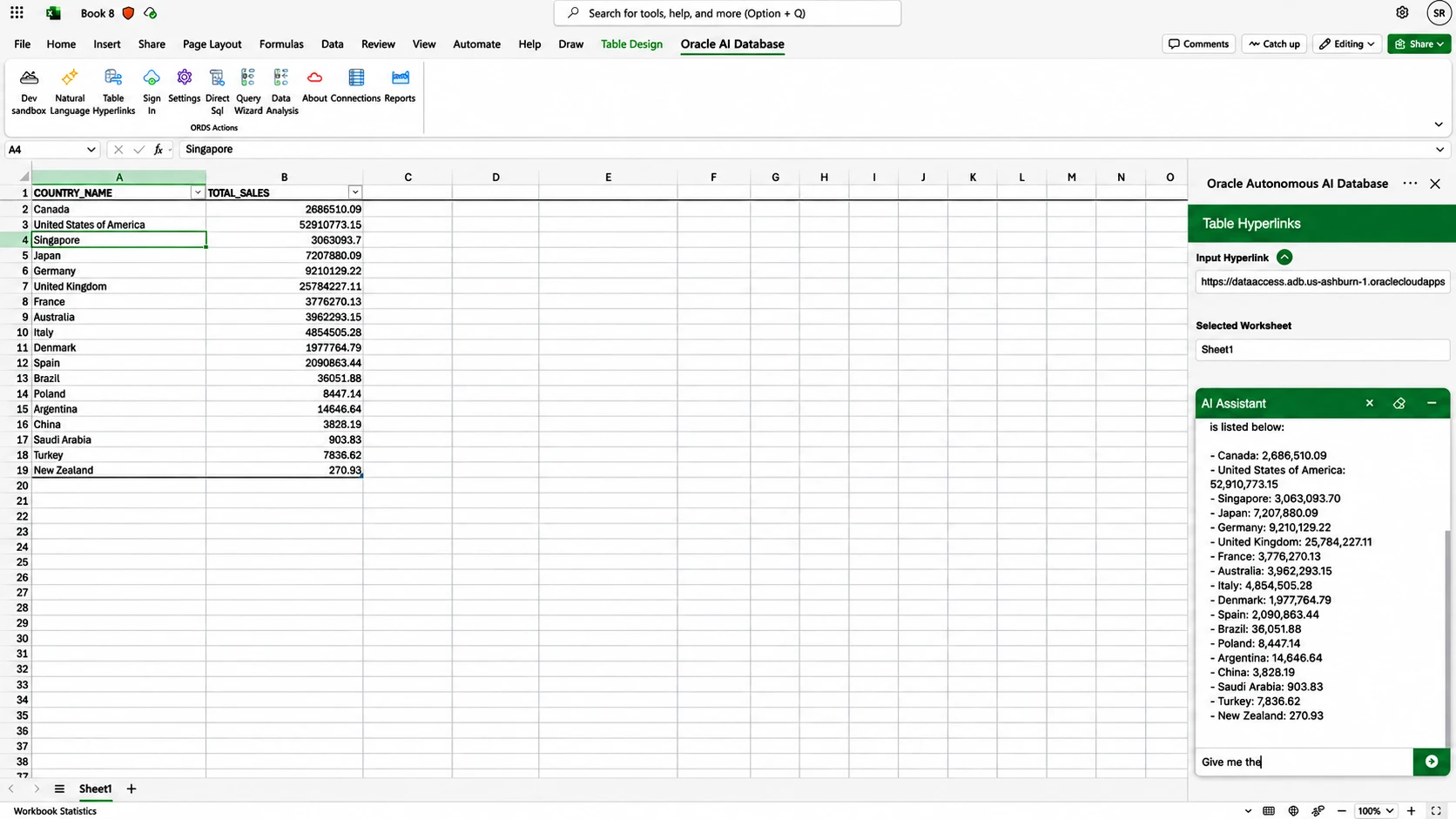
The new Oracle AI Database plug-in for Excel, available today, lets users connect Excel directly to Oracle Database, pull trusted data into the worksheet, and reason over it with Copilot without leaving the spreadsheet. No export, no manual preparation, no ticket to IT.
Together, Microsoft and Oracle are bringing intelligence to the workflows that run the business: giving analysts, planners and controllers the power to understand margin changes, analyze shifts in demand, resolve reconciliation issues, and act on supply chain disruptions. Copilot analyzes Oracle transaction data and enriches it with context from Work IQ, drawn from meetings, email, documents and Teams, to identify exceptions, draft an explanation, and prepare a governed action plan for review. Rather than another dashboard, or disconnected chatbot, this is AI in the flow of work, grounded in systems of record maintained in Oracle AI Database.
For developers: Build trusted agents quickly, from prototype to production
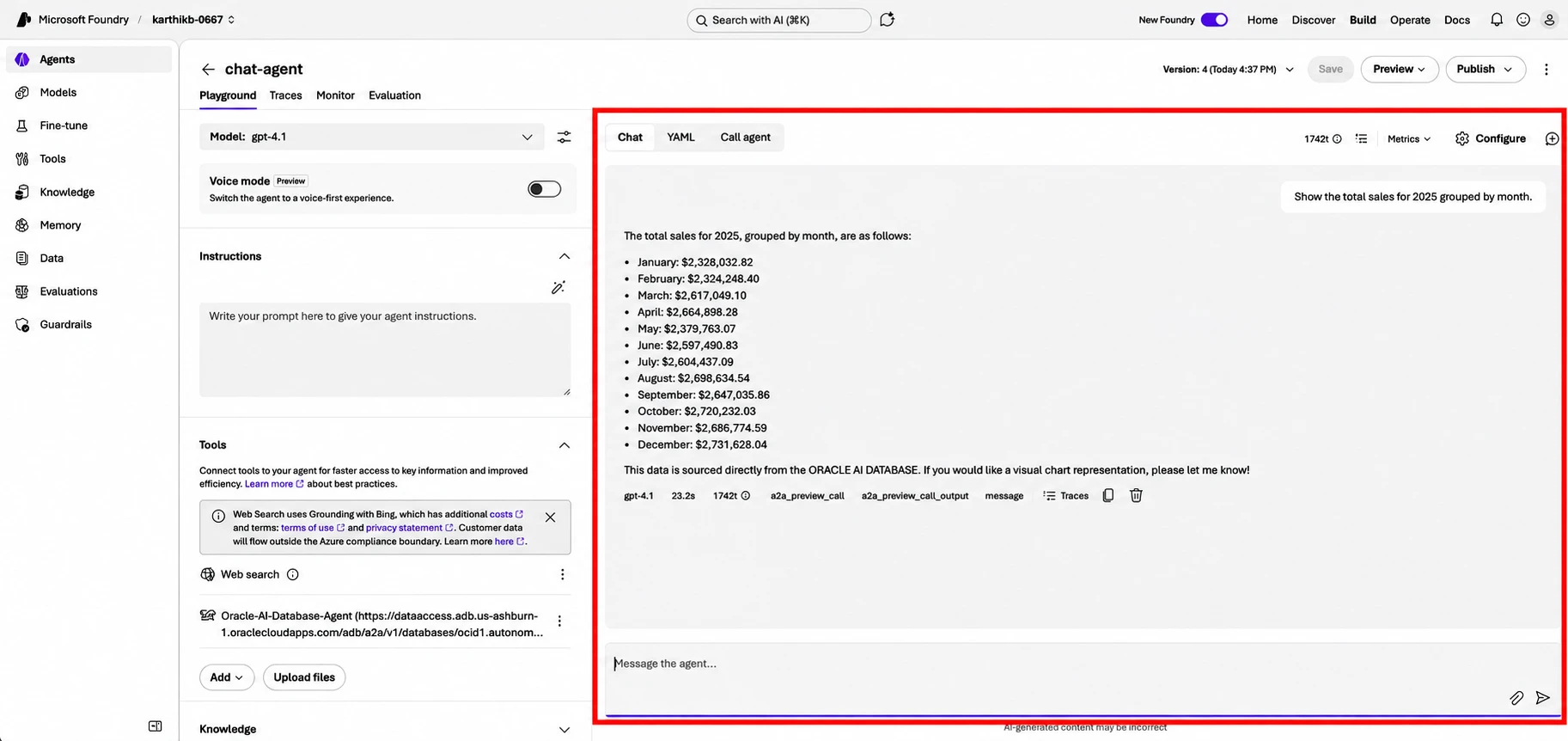
Pilots are easy; production is hard. Real processes span multiple data sources, call for several specialized agents, and demand answers a business can stand behind. Developers can build agents that connect to Oracle AI Database using Microsoft Foundry with Managed Model Context Protocol (MCP) servers and A2A protocol.
MCP servers enable governed access from Azure agents to Oracle AI Database, whether it runs in Oracle Cloud Infrastructure or as Oracle AI Database@Azure, through approved SQL and PL/SQL operations, tools, and predefined reports. Application roles determine which tools each user or group can use, so agents never reach beyond what IT has sanctioned, and AI comes to the data rather than the data being copied out to AI. These integrations make Oracle AI Database a first-class source of knowledge, memory, and data for agents built in Microsoft Foundry.
For example, a developer builds a sales intelligence application involving an agent retrieving account and order data from Oracle AI Database through MCP, a product agent identifying cross-sell opportunities, and a finance agent weighing in on account health. Through coordinated activity across these agents, the sales intelligence team receives a concise sales brief through an API.
In another scenario, a customer service agent, grounded through Foundry IQ, can answer questions about a policy or an account with supporting citations, and recall the customer history from Oracle-backed memory, retrieve similar past interactions, and responds with context.
Experience it all at Microsoft Ignite
Visit Oracle booth #6163 at Microsoft Ignite to see demos, attend an in-booth theater session, and meet with an Oracle specialist to discuss your specific requirements.
Register for Microsoft’s Breakout session BRK435 on combining workload intelligence and AI-ops. Check out Oracle’s event resource page to learn more and be sure to register for the Oracle Theater session THRSP1082 for more information on Azure Workload Center for Oracle.
Oracle on Azure
Migrate Oracle workloads and unlock AI-powered innovation with Azure services.