We are excited to announce the general availability (GA) of Windows Server System State Backup to Azure with the Azure Backup agent. We previewed the direct offsite of Windows Server System State to Azure using the Azure Backup agent earlier this year. This was a key addition to Azure Backup agent’s existing capability of backing up files and folders directly to Azure. With this GA release, the Azure Backup agent has full production support for protecting Windows File Servers, Active Directory, and IIS Web servers hosted on Windows Server 2016 all the way back to Windows Server 2008 R2. Backing up your Windows Server System State to Azure gives you a simple, secure and cost-effective way of protecting Windows Servers and enabling the recovery of dynamic OS and application configuration from Azure in the event of an IT disaster.
New features
- Flexible backup schedule and retention policy for System State
Now you can configure daily backups for System State at your preferred time directly from the Azure backup agent console. You can also set retention ranges for your daily, weekly and monthly system state backups. These options put you in control of managing your data. - Automation at scale with PowerShell
Full PowerShell support for configuration, backup and recovery of System State so that you can automate protection of Windows Server files and configuration at scale.
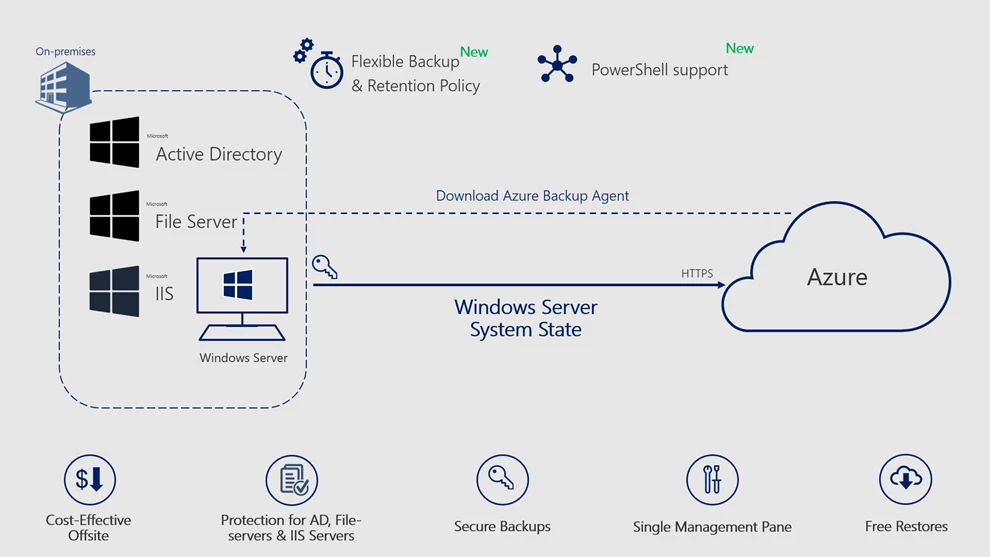
Benefits of System State Backup with Azure Backup
- Comprehensive protection for Active Directory, File-Servers and IIS Web servers
System State fully encapsulates Active Directory, which is the most important database in any organization and allows for targeted domain-controller recoveries. In addition, critical cluster information of File Servers and the IIS Web Server Metabase is fully contained in the Windows System State. - Centralized management in Azure
Once it is backed up, all information related to System State backups across your Windows Servers is available in the Azure portal. You can also configure notifications directly from the Azure portal so you get notified of a failed backup and you can take corrective steps. You can also generate reports using Microsoft Power BI. - Cost-effective and secure offsite storage for Windows Server
With pay-as-you-go Azure storage, Azure Backup eliminates on-premises infrastructure by directly backing up your Windows Server System State to Azure. Azure Backup also encrypts your backups at the source using a key that only you have access to. Additionally, enhanced security features built into Azure Backup ensure that your critical system state backups remain secure from ransomware, corruptions, and deletions. - Free restores
With Azure Backup, you can restore System State files from Azure without any egress charges.
Getting started
Follow the four simple steps below to start protecting Windows Servers using Azure Backup.
- Create an Azure Recovery Services Vault in the Azure portal
- Download the latest version of the Azure Backup Agent to your on-premises Windows Servers from the Azure Portal
- Install and Register the Agent to your Recovery Services Vault in Azure
- Start protecting Windows Server System State and other Files and Folders directly to Azure!
Related links and additional content
- New to Azure Backup, sign up for a free Azure trial subscription
- Need help? Reach out to Azure Backup forum for support or browse Azure Backup documentation
- Tell us how we can improve Azure Backup by contributing new ideas and voting up existing ones
- Follow us on Twitter @MSHybridCloud for the latest news and updates
- Connect with us at the Azure Tech Community