One of the key endeavors of the cloud-first approach of Azure Backup is to empower enterprises to recover from security attacks, corruptions, disasters, or data loss situations quickly, securely, and reliably. Restoring servers efficiently in the wake of evolving IT threats involves going beyond recovering data alone from backups. Our customers have expressed varying degrees of complexity in how their operating systems and applications are configured. Restoring this dynamic configuration captured in the form of the Windows Server System State, in addition to data, with minimum infrastructure, forms a critical component of disaster recovery.
Today we are extending the data backup capabilities of the Azure Backup agent to enable customers to perform comprehensive, secure, and reliable Windows Server recoveries. We are excited to preview the support for backing up Windows Server System State directly to Azure with Azure Backup.
Azure Backup will now integrate with the Windows Server Backup feature that is available natively on every Windows Server and provide seamless and secure backups of your Windows Server System State directly to Azure without the need to provision any on-premises infrastructure.
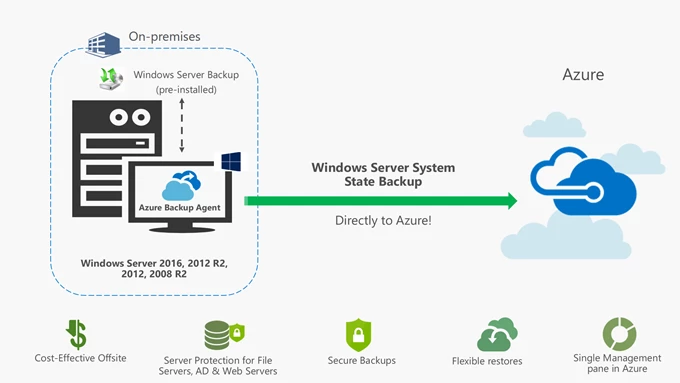
Value proposition
- Comprehensive Protection for Active Directory, File-Servers and IIS Web servers: Active Directory (AD) is the most critical database of any organization and therefore requires a backup strategy that allows for reliable recoveries during critical scenarios. System State of a domain-controller server captures the Active Directory and files that are required for domain-controller synchronization and allow for targeted Active Directory protection and restores.
On a File Server, System State captures important file-cluster configurations and policies that protect files from unauthorized access. Combined with file-folder backup, the backup of System State with Azure Backup agent provides the ability to comprehensively recover File Servers.
On an IIS Web Server, System state captures the IIS Metabase that contains crucial configuration information about the server, the site and even files and folders and therefore is the recommended option to restore Web Servers. - Cost-Effective Offsite for Disaster Recovery: System State for most Windows Servers is less than 50 GBs in size. For that size, at $5 a month and pay-as-you-go Azure storage, Azure Backup eliminates all infrastructure and licensing costs, and enables you to protect your Windows Server System State for reliable restores. No need to provision local hard-drives, or offsite storage, or employ additional tools or servers to manage system state backups and ensure their off-siting. Azure Backup takes care of off-siting System State on a specified schedule to Azure!
- Secure Backups: The enhanced security features built into Azure Backup and data-resilience offered by Azure ensure that your critical system state backups remain secure from malicious attacks, corruptions, and deletions.
- Flexible Restores: With Azure Backup’s Restore-as-a-Service, you can restore System State files from Azure without any egress charges. Additionally, you can apply System State to your Windows Servers at your convenience using the native Windows Server Backup utility.
- Single management pane in Azure: All information related to System State backup jobs across all your Windows servers will be available in the Azure portal. You can also configure notifications directly from Azure to be notified in the event of a failed backup, so you can take corrective steps and ensure your servers are always prepared for disaster recovery!
Availability for Windows Server (Preview)
The support for backing up System State with Azure Backup agent is available in preview for all Windows Server versions from Windows Server 2016 all the way down to Windows Server 2008 R2!
Getting started
Follow the four simple steps below to start protecting your Windows Servers using Azure Backup!
- Create an Azure Recovery Services Vault.
- Download the latest version of the Azure Backup Agent from the Azure Portal.
- Install and Register the Agent.
- Start protecting Windows Server System State and other Files and Folders directly to Azure!
Related links and additional content
- New to Azure Backup, sign up for a free Azure trial subscription.
- Need help? Reach out to Azure Backup forum for support or browse Azure Backup documentation.
- Tell us how we can improve Azure Backup by contributing new ideas and voting up existing ones.
- Follow us on Twitter @AzureBackup for the latest news and updates.
- Connect with us at the Azure Tech Community.