Every Azure chip Microsoft has built started as electronic design automation (EDA) jobs used to design, test, and validate silicon before it is manufactured. This includes simulation sweeps that run for days, verification regressions that fan out across thousands of cores overnight, and physical signoff runs that use hundreds of gigabytes of memory for a single block. Together, these workloads account for hundreds of millions of compute jobs each year. Today we’re sharing early results from our next step in that evolution: running EDA workloads on Azure Cobalt 200, Azure’s custom compute infrastructure built on the Arm Neoverse CSS V3. In our silicon design environment, the evaluated EDA workloads ran with 1.30x to 4.15x more performance than on Cobalt 100 across a range of testing scenarios, from simulation to verification to static timing analysis.
Traditionally, EDA workloads ran on fixed, on-premise x86 server capacity, sized for peak demand with periods of underutilization. The shift to cloud-based EDA on Microsoft Azure offered a new level of flexibility, scale, and reliability on compute-intensive silicon design workloads. Using Azure Cobalt-based virtual machine (VM) instances, silicon engineering teams at Microsoft are experiencing significant performance and efficiency improvements on EDA workloads that Azure customers are seeing across many workloads—optimizing the performance and speed of designing increasingly sophisticated silicon for increasingly complex cloud systems.
In this blog, we highlight results from Cadence Xcelium and Cadence Spectre, Synopsys PrimeTime and Synopsys VCS, and Siemens Calibre tools. Tools enabled on Cobalt 100 ran unmodified in our Cobalt 200 evaluation, allowing us to focus on performance testing rather than functionality.
Why Cobalt 200 suits EDA
EDA spans workloads with very different compute requirements:
- Circuit and analog simulation — optimized for highly parallel workloads, with sensitivity to memory behavior.
- Functional and formal verification — throughput-driven, with large numbers of independent jobs running concurrently.
- Implementation and signoff — memory-intensive and bandwidth-sensitive, with long-running jobs.
For computer-aided design (CAD) managers, predictable per-core performance is essential to planning overnight regressions. Per-core performance measured on a lightly loaded VM does not necessarily hold as concurrency increases. Verification farms need predictable throughput when VMs are heavily loaded.
Cobalt 200 combines physical cores without the overhead of hyperthreading, dedicated 3MB L2 cache per core, and high provisioned memory bandwidth to support concurrent workloads. These core and memory architecture characteristics support strong per-core performance at high utilization.
What we measured
We tested Cobalt 200 with workloads from several stages of Microsoft’s silicon development flow, including RTL and gate-level simulation, static timing, physical verification, and analog simulation, comparing job completion time with Cobalt 100 and selected x86 Azure VMs.
All tested VMs were configured with the maximum number of cores possible for high throughput 5, multiple jobs were concurrently executed on the VM to validate the performance under high load conditions. Throughput is normalized per logical core. For the Cobalt 100, Cobalt 200, and hx176rs configurations, logical cores are also physical cores.
Consolidated EDA workload results
| Workload | EDA tool | Measure | Cobalt 200 result |
|---|---|---|---|
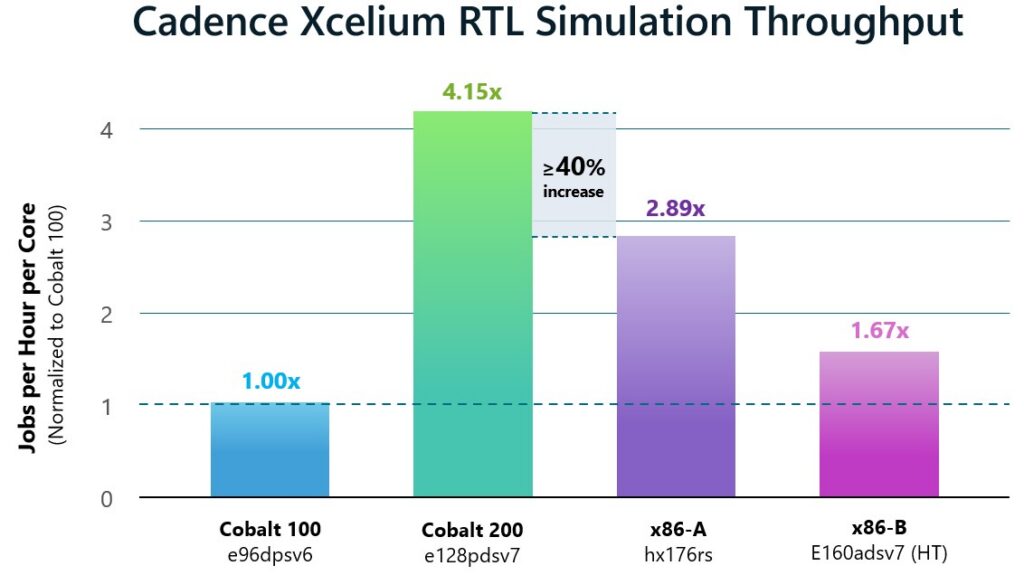
| Digital simulation | Cadence Xcelium1 | Peak throughput per logical core | More than 40% higher than any other tested system |
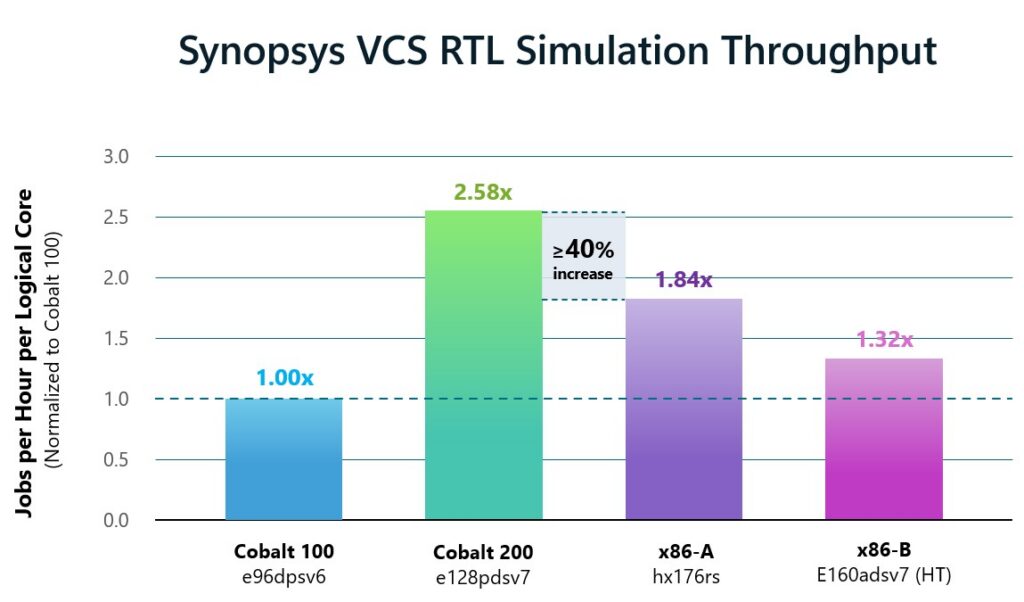
| Digital simulation | Synopsys VCS1 | Peak throughput per logical core | More than 40% higher than any other tested system |
| Analog and mixed-signal simulation | Cadence Spectre2 | Throughput per logical core | 38% higher generation over generation; exceeded tested x86 Azure VMs |
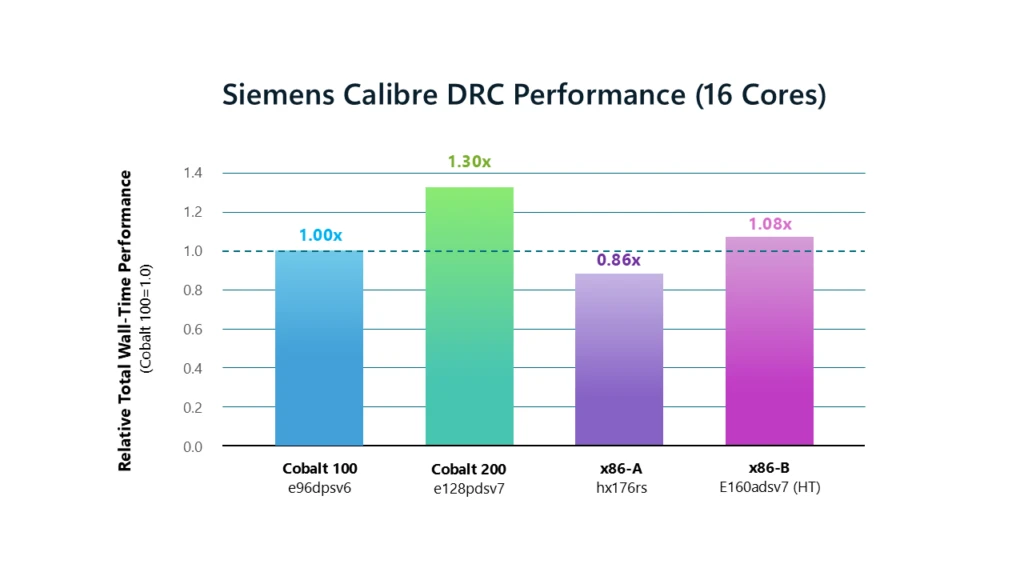
| Physical verification | Siemens Calibre3 DRC | Wall time / relative performance | 23% lower wall time; 1.30× relative performance versus Cobalt 100 |
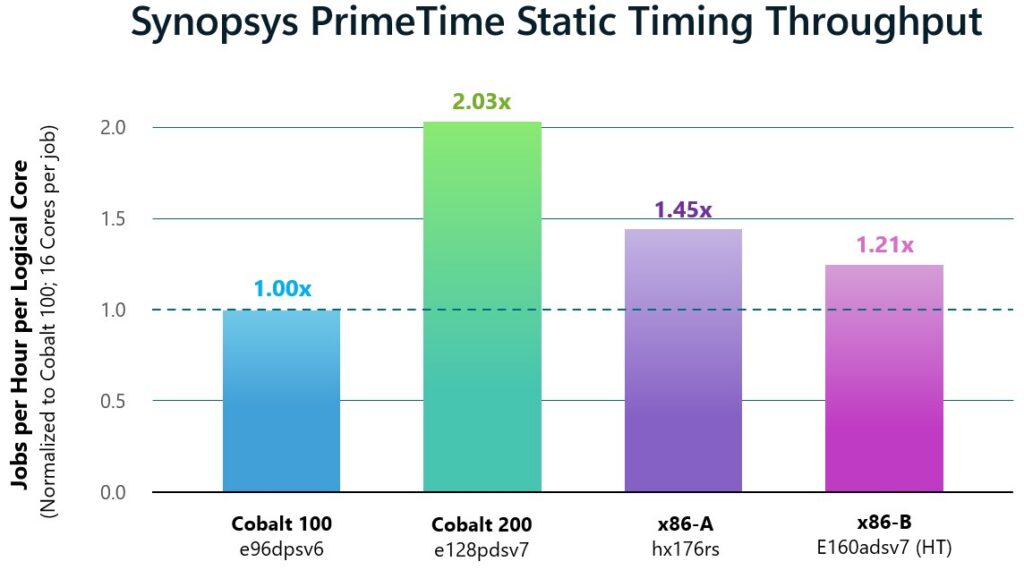
| Static timing analysis | Synopsys PrimeTime4 | Peak throughput per logical core | 2.0× Cobalt 100; exceeded tested x86 Azure VMs |
Digital simulation
Cadence Xcelium and Synopsys VCS are tools used to simulate and verify digital designs. RTL simulation is central to functional verification and can consume significant compute capacity as teams run large regression suites. When testing RTL workloads using both simulators, optimally loaded Cobalt 200 systems delivered significantly greater peak throughput than the previous generation. For the workload tested on Xcelium and VCS, Cobalt 200 delivered more than 40% higher throughput per logical core than any other system we tested.
Throughput is normalized per logical core to account for the VMs’ different core counts.
Cobalt 200 was optimized for EDA workloads through increased cache size and improved memory bandwidth per core. Our results demonstrate that Cobalt 200 design optimizations generate significantly improved performance for logic simulation workloads.
Analog and mixed signal simulation
Cadence Spectre is used for analog and mixed-signal circuit simulation. Analog and mixed-signal circuit simulation workloads differ from RTL simulation and are dominated by multithreaded performance. We tested Cadence Spectre on Cobalt 200 and observed 38% higher throughput per logical core generation over generation, and delivered 11-52% higher throughput per logical core compared with all other platforms tested.
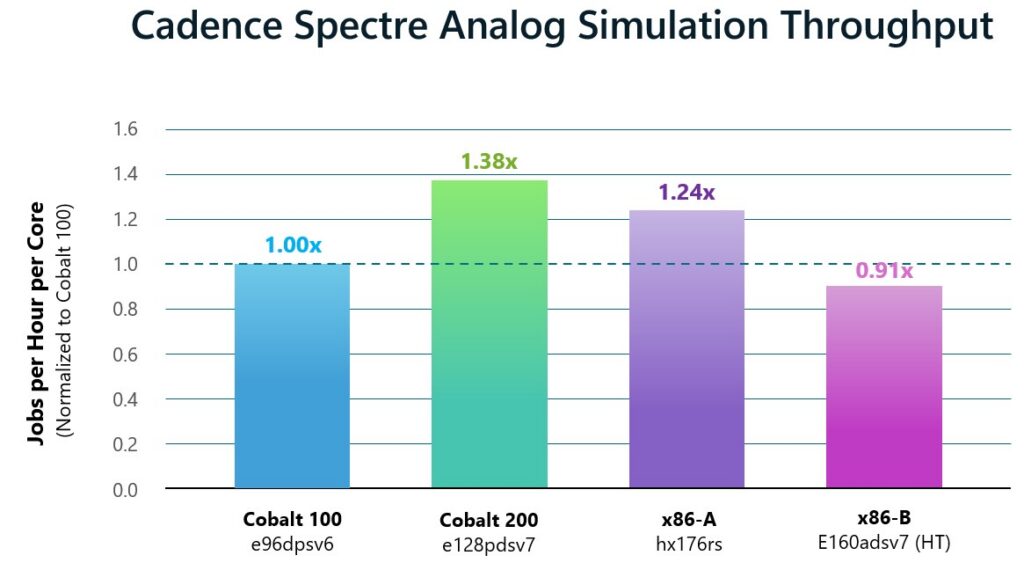
This result shows meaningful progress between Cobalt generations.
Physical verification
Siemens Calibre DRC checks a design’s physical layout against manufacturing design rules before tapeout.
For the Calibre workload we tested DRC against an IP Macro with 16 cores per job, Cobalt 200 completed the run in approximately 23% lower wall time than Cobalt 100, equivalent to 1.30x relative performance. It also outperformed the selected x86 Azure VMs at the same per-job core count.
Static timing analysis on Synopsys PrimeTime
Synopsys PrimeTime is used for static timing analysis to verify that a design meets its timing requirements. For the PrimeTime workload tested with 16 cores per job, Cobalt 200 delivered 2x the peak throughput per logical core of Cobalt 100 and exceeded the selected x86 Azure VMs. Figure 5 compares each VM platform’s highest measured throughput value, normalized to Cobalt 100.
More than just an SoC: Platform-level advantages to Cobalt 200
A higher-performance compute SoC only helps if the rest of the platform scales its performance as well. EDA workloads depend on high-bandwidth and low-latency storage and data movement, and demand varies throughout a silicon program. Verification activity can spike before a milestone, while physical verification and signoff activity increase toward tapeout. Demand can fall sharply once those milestones are completed.
Running on Azure pairs Cobalt 200 compute with:
- Elastic capacity: provisioning compute capacity for a regression campaign or signoff push, then release it as demand falls. Size for the workload, not the annual peak.
- High-performance storage: supporting the data demands of large design databases, waveform dumps, and physical verification runs.
- Global capacity: aligning deployments with engineering locations, data residency requirements, and regional availability.
- Adjacency to Azure AI services: As agentic and AI-assisted design workflows evolve, proximity between AI inference services and Cobalt 200 compute creates opportunities for tighter integration of AI-powered reasoning with EDA execution. This reduces data movement overhead, accelerates iterative design and verification cycles, and enables AI agents to orchestrate complex engineering workflows more efficiently.
Microsoft is a key partner for Cadence, and our collaboration on Cobalt spans multiple generations of Azure silicon. With Cadence EDA workflows now qualified on Cobalt 200, we are extending that collaboration to the latest generation of Azure infrastructure and giving semiconductor teams greater flexibility in how they access and scale compute for demanding design and verification workloads.
—Paul Cunningham, Sr. VP & GM, System Verification Group, Cadence
As semiconductor designs grow increasingly complex, engineering teams face mounting pressure to accelerate silicon development while managing growing compute demands. Executing Siemens EDA solutions on Microsoft Azure Cobalt 200 provides an efficient, scalable platform for demanding verification and signoff workloads. Our collaboration with Microsoft demonstrates the value of matching the right workloads to the right compute architecture to advance silicon innovation.
—Craig Johnson, VP of Cloud Solutions, Siemens EDA
Our longstanding partnership with Microsoft is grounded in a shared commitment to help engineering teams tackle increasingly complex design challenges. We congratulate Microsoft on the impressive performance of Cobalt 200, developed using Synopsys’ comprehensive EDA flow spanning verification, implementation and signoff, together with HAPS hardware prototyping and Synopsys IP. We’re excited to see Cobalt 200 delivering meaningful performance gains generation-on-generation, including more than 40% faster runtimes with Synopsys VCS and 2x per-core throughput with Synopsys PrimeTime. We look forward to continuing our collaboration to help engineering teams advance the next generation of AI silicon.
—Sanjay Bali, Senior Vice President of EDA Product Management and Strategy at Synopsys
Designing Next-Generation Cobalt with Cobalt 200
There’s a virtuous cycle between silicon development and EDA performance: EDA tools helped bring Cobalt 200 to life, and now Cobalt 200 is accelerating those same design and verification workloads for our next-generation Cobalt products. By observing how EDA workloads perform at scale, we gain insights that help shape future generations of Cobalt and Azure compute infrastructure, with each generation helping design and improve the next.
What comes next
Our early tests show significant progress for EDA on Cobalt 200. Existing Arm-enabled tools ran without workflow changes, and the tested workloads performed competitively against the selected x86 Azure VMs. Xcelium and PrimeTime showed a particularly large improvement over Cobalt 100. Spectre and Calibre which were strong performers on Cobalt 100 also improved generation over generation, and we are working with our EDA partners on further tuning of multiple tools.
We are broadening workload coverage, validating results on a greater scale, and continuing to collaborate with our EDA partners as Cobalt 200 enters general availability.
If you’re evaluating cloud infrastructure for semiconductor design, we invite you to test your EDA workflows on Azure Cobalt 200 VMs.
- Learn more about Cobalt at Microsoft Ignite: Cobalt 200: Delivering Azure’s Best Performance And Efficiency
- Check out Microsoft’s silicon to system approach to infrastructure.
Run next-generation AI workloads with Azure Cobalt 200

1. Cadence Xcelium and Synopsys VCS results use an internal RTL simulation test case, concurrently run. Throughput is calculated from mean full-job wall time at the tested concurrency. Each platform’s highest measured throughput is normalized to Cobalt 100. Throughput is normalized as jobs per hour per logical core to account for different VM core counts.
2. Cadence Spectre results use an internal analog simulation test case, concurrently run with mt=16 per job. Peak throughput is normalized as jobs per hour per logical core to account for different VM core counts. The 38% figure is the measured generation-over-generation throughput improvement from Cobalt 100 to Cobalt 200 for the evaluated workload.
3. Siemens Calibre DRC results use an internal IP Macro test case, run with mt=16 on a quiet VM. Relative performance is calculated as Cobalt 100 mean total wall time divided by each platform’s mean total wall time.
4. Synopsys PrimeTime results use an internal static-timing test case, concurrently run with 16 cores per job. Throughput is calculated from mean full-job wall time at the tested concurrency. Each platform’s highest measured throughput per logical core is normalized to Cobalt 100. Throughput is normalized as jobs per hour per logical core to account for different VM core counts.
5. Results are from internal Microsoft test cases and apply only to the evaluated workloads, software versions, VM configurations, concurrency levels, and test conditions. Tested VMs included Cobalt 100 (96 cores), Cobalt 200 (128 cores), hx176rs (176 cores), and e160adsv7 (160 logical cores, hyperthreading enabled).