
We are excited to announce the general availability (GA) of smart tier for Azure Blob and Data Lake Storage. Smart tier is a fully managed, automated tiering capability for Azure Blob Storage and Data Lake Storage that helps optimize storage costs without ongoing operational effort. By continuously optimizing data placement, smart tier ensures your storage costs are aligned with actual usage.
As data estates expand and access patterns evolve, managing lifecycle rules at scale becomes complex. Customers need automated, continuous tiering to keep costs aligned with usage.
Smart tier continuously evaluates your data access patterns and automatically moves objects across the hot, cool, and cold tiers to keep your costs aligned with usage without manual configuration.
Since launching the public preview of smart tier at Ignite in November 2025, customers and partners have adopted it across a range of data estates and over 50% of smart-tier–managed capacity has automatically shifted to cooler tiers based on actual access patterns:
We see a significant and measurable benefit from adopting smart tier in Azure Storage for our Azure Data Explorer (ADX) clusters. By intelligently placing data in the most cost‑effective tier based on actual usage patterns, smart tier allows us to optimize storage spend without sacrificing performance. Hot data remains instantly accessible for query workloads, while cooler, less frequently accessed data is automatically shifted to lower‑cost tiers. Smart tier effectively removed the guesswork from storage optimization, enabling us to focus on delivering insights rather than managing data placement.
Brad Watts, Principal PM for Azure Data Explorer
The Azure Blob and Data Lake Storage partner ecosystem is also integrating smart tier into their solutions:
Smart Tier represents a major step forward in simplifying how enterprises optimize storage in the cloud. The ability to automate tiering while maintaining resilience and predictable economics is highly complementary to Qumulo’s data services on Azure. Together with Microsoft, we’re enabling customers to modernize file workloads on Azure while reducing operational complexity and improving long‑term cost efficiency.
Brandon Whitelaw, SVP and Head of Product at Qumulo
Smart tier is generally available today in nearly all zonal public cloud regions, supporting both Azure Blob and Data Lake Storage.
How smart tier makes tiering decisions
Smart tier continuously evaluates the last access time of each individual object on the storage account where smart tier is enabled.
Frequently accessed data stays in the hot tier to support performance and transaction efficiency; inactive data transitions to the cool tier after 30 days and to the cold tier after an additional 60 days. When data is accessed again, it is immediately promoted back to hot and the tiering cycle restarts. This means your datasets remain in the most cost-effective tier automatically, removing the need to predict access patterns.
Read and write operations against an object, i.e. Get Blob or Put Blob operations are restarting the tiering cycle. Metadata operations, i.e. Get Blob Properties, are not impacting transitions. These static tiering rules are part of the underlying service and ensure automatic optimizations without the need for manual maintenance.
Setting up smart tier
Enabling smart tier is straightforward and designed to minimize change management while delivering immediate cost-optimization benefits:
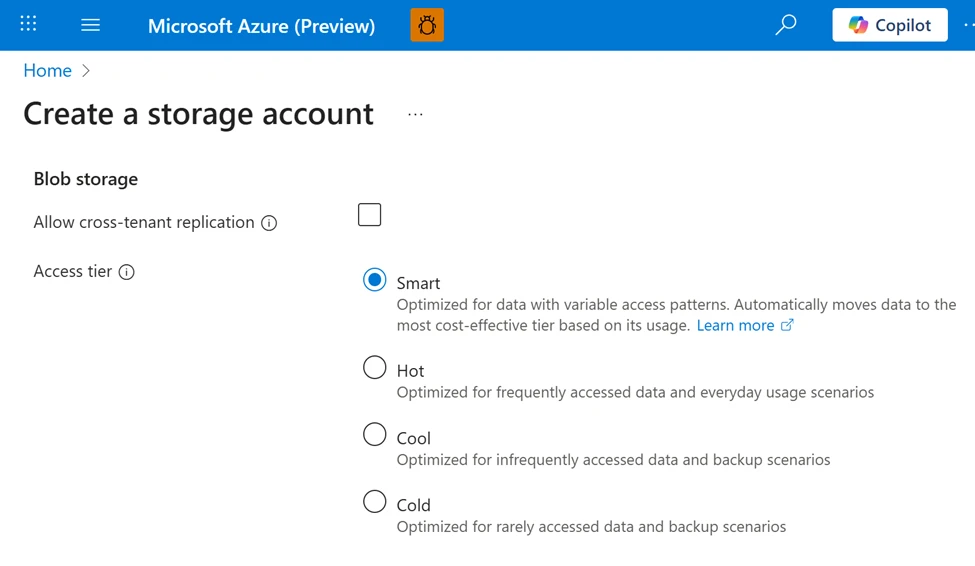
- During storage account creation, just select smart tier as the default access tier through the storage account configuration for any storage account with zonal redundancy. This is supported both via API and the Azure portal.
- Enable existing accounts with zonal redundancies by switching the blob access tier from default to smart through the same tooling.
- Let Azure optimize automatically: Objects inheriting the default tier are continuously managed without manual interventions needed.
Please note: Smart tier doesn’t support legacy account types such as Standard general-purpose v1 (GPv1) and is not applicable on page or append blobs.
For objects managed by smart tier, you pay standard hot, cool, and cold capacity rates, without additional charges for tier transitions, early deletion, or data retrieval. Moving existing objects into smart tier does not incur tier-change fees; a monitoring fee covers the orchestration.
Over time, automated down-tiering of inactive data combined with smart tier’s simplified billing can translate into meaningful savings at scale.
Best practices for maximizing smart tier value
- After enabling smart tier on the account level, you can explicitly pin objects that you don’t want to be managed by smart tier to other tiers. No monitoring fee will apply to those objects.
- Don’t exclude small objects. Objects less than 128 KiB stay in hot, don’t tier down, and don’t incur the monitoring fee. If an object later grows to equal to or greater than 128 KiB, smart tier policies apply automatically.
- Common pitfall: Avoid trying to influence tiering behavior using lifecycle rules or other tier optimization mechanisms for smart tier–managed objects.
Based on patterns observed across multiple large smart tier preview deployments, customers commonly see the following outcomes after enabling smart tier:
Smart tier adoption for a large analytics workload
During public preview, a large data analytics customer enabled smart tier across hundreds of tebibytes of telemetry and log data with mixed and evolving access patterns.
Before enabling smart tier, the team relied on custom lifecycle rules that required frequent retuning as access patterns evolved and often led to unexpected cost spikes after re-access.
After enabling smart tier:
- More than half of this customer’s managed data footprint automatically transitioned to cooler tiers based on actual usage patterns.
- The team eliminated lifecycle policy management entirely, freeing engineering time.
- Storage costs became more predictable and resilient to re-access spikes, since rehydration occurred automatically without retrieval or early deletion charges.
While savings vary by workload, this pattern reflects how smart tier helps align object storage costs with real usage.
Who should use smart tier?
Smart tier is well suited for organizations that:
- Manage large or fast-growing object data estates.
- Have mixed, evolving, or unpredictable access patterns.
- Want to optimize costs without maintaining lifecycle rules.
- Need data to remain online and immediately accessible, even when infrequently used.
- Want safeguards against billing spikes caused by unplanned rehydration of cooler-tier datasets.
This includes analytics pipelines, data lakes, logs, telemetry, and application data where usage naturally changes over time.
Why enable smart tier now?
- Reduce operational overhead: No lifecycle rules to design, test, or maintain.
- Align costs with real usage: Data continuously moves to the most appropriate tier based on access patterns.
- Preserve performance: Frequently accessed data remains hot; re‑access is automatic.
- Simplify billing: No tier transition, early deletion, or retrieval charges within smart tier; a monthly monitoring fee occurs for each object in scope.
- Scale with confidence: Built for large, evolving data estates.
What’s next for smart tier?
Smart tier is designed as a foundational capability that will continue to evolve. Upcoming improvements focus on:
- Broader regional availability, including additional public cloud regions as GA rollout progresses.
- Client tooling support: Watch out for upcoming releases of our Storage SDKs and tooling supporting this new capability.
Get started with smart tier
Enable smart tier during storage account creation or update an existing zonal storage account by setting smart tier as the default access tier. Once enabled, Azure continuously optimizes data placement—no ongoing configuration required.