Running mission-critical workloads require both performance and reliability. To improve your Azure VPN experience, we are introducing a new generation of VPN gateways with better performance, a better SLA, and at the same price as our older gateways.
Many customers with network intensive workloads in Azure Virtual Networks (VNets) are driving the need for increased cross-premises and cross-region VPN performance. To accommodate even more demanding workloads we re-engineered our VPN Gateway service to provide 6X more performance coupled with better reliability and backed by an even stricter SLA.
In addition to performance, many customers with mission-critical workloads need control over the VPN policies to meet compliance regulations. We now provide custom IPsec/IKE policy selection giving you more flexibility to choose your encryption policy. We are also enhancing the new gateways to accommodate both route-based and policy-based VPNs. Although a route-based VPN using BGP to automatically learn routing is easier to manage, many customers have already deployed policy-based VPNs at their branch offices. The new VPN gateways allow multiple sites using policy-based VPNs to connect to the same VPN gateway.
New guidance
As we introduce the new VPN gateways, called VpnGw1, VpnGw2, and VpnGw3, we are also updating our deployment guidance. The existing Basic VPN gateway is unchanged with the same 80-100 Mbps performance and a 99.9% SLA. The Basic VPN gateway is appropriate for non-production dev/test scenarios. The Basic VPN gateway should not be used for any production scenarios.
For your production services, we strongly recommend that you select or migrate to the new VPN Gateways that have a 99.95% SLA. The new VPN gateways have a higher SLA and better performance at the same price as the old gateways. We will continue to support the old VPN gateways so you can manage existing deployments, but starting in September you will not be able to create the older Standard or High Performance VPN gateways.
Better performance
The new generation of Azure VPN Gateways provide single tunnel performance of up to 1 Gbps and aggregate up to 1.25 Gbps with multiple tunnels improving your access to VNets either from your premises or for cross-region VNet-to-VNet connectivity. Enabling the active-active VPN gateway option provides even higher throughput with multiple flows to your Azure VPN gateways.
Here are the details:
| VPN Gateway | Recommended Workload Type | Price ($ per hour) | Throughput Benchmark* | SLA | S2S & V2V tunnels ($ per tunnel-hour) | PS2 Tunnels (Max) |
| Basic | Dev/Test | $0.04 | 100 Mbps | 99.9% | Max 10 1- 10: included | 128 |
| VpnGw1 | Production | $0.19 | 650 Mbps | 99.95% | Max 30 1- 10: included 11-30: $0.015 | 128 |
| VpnGw2 | Production | $0.49 | 1 Gbps | 99.95% | Max 30 1-10: included 11-30: $0.015 | 128 |
| VpnGw3 | Production | $1.25 | 1.25 Gbps | 99.95% | Max 30 1-10: included 11-30: $0.015 | 128 |
* Benchmark data obtained by running iperf3 between VNets in the same region, with minimum duration of 120 seconds and up to 32 flows. Refer to this page for more details on how to measure throughput across your Azure VPN gateways.
VpnGw1 at 650 Mbps provides a 6.5x and VpnGw2 at 1Gbps provides a 5x performance improvement at the same price as the old Standard and High Performance gateways, respectively. We also increased the Site to Site (S2S) tunnel count from 10 to 30 tunnels so you can connect more of your sites to the VPN Gateway. There is a per S2S tunnel charge for the 11th through 30th tunnels. We also are introducing a new, even higher performance VPN gateway called VpnGw3. With multiple tunnels VpnGw3 has shown 1.25 Gbps throughput in our tests. Please note that the actual performance in production is highly dependent on the application behavior, the quality of your ISP, and the actual distance (network path) from your physical VPN device to the Azure region with your Azure VNet.
Customers often deploy a S2S VPN to connect branch offices to the same Azure VNet while the main corporate WAN is accessed via ExpressRoute. The corporate WAN may also use S2S VPN as a backup path in case of a connectivity issue with ExpressRoute.
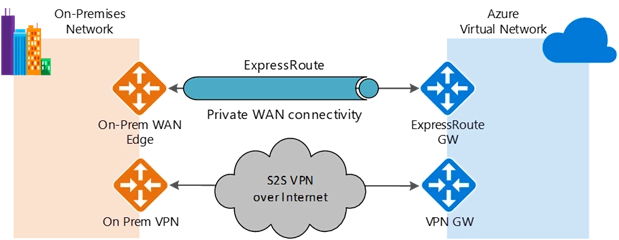
If you have a 1 Gbps ExpressRoute circuit you can now also have a 1 Gbps S2S tunnel on the backup path so if a failover event occurs you still have a performant network connection to your VNets, although via the Internet. Note the performance caveats mentioned previously regarding the quality of your ISP.
New VPN capabilities – Custom IPsec/IKE policy & multi-site policy-based VPN
We are also releasing two new features to improve VPN manageability and give customers more choices. These include the support for custom IPsec/IKE connection policies to satisfy your compliance and security requirements, and the ability to connect multiple on-premises networks using policy-based firewall devices to your Azure VPN gateway.
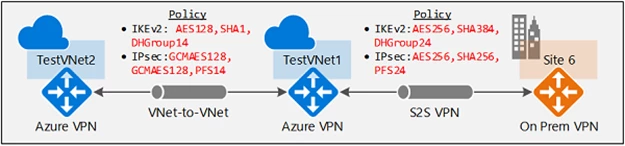
With custom IPsec/IKE policy, you can now set the exact cryptographic algorithms and key strengths on each S2S or VNet-to-VNet connection to satisfy your enterprise compliance and security requirements. Azure VPN gateways utilize a default set of IPsec/IKE cryptographic algorithms that maximize interoperability with a wide range of 3rd party VPN devices. The default list may not meet all your compliance requirements. For example, you may need higher Diffie-Hellman Group or PFS Group (Perfect Forward Security) than the default, or there are certain cryptographic algorithms that you want to exclude (e.g., SHA1, 3DES, etc.) You can now specify the exact combinations of cryptographic algorithms and key strengths, as shown in the example below:
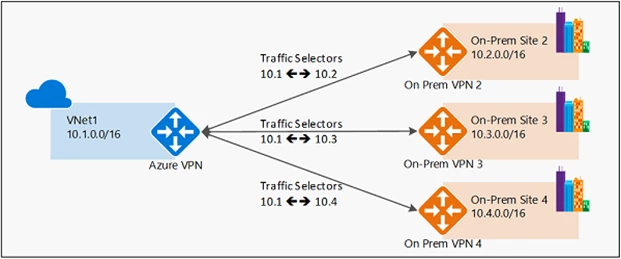
Additionally, you can now connect multiple on-premises policy-based VPN devices to your Azure VPN gateway, by utilizing the custom policy:
We do understand that configuring and maintaining VPNs for mission-critical workloads are complex tasks. These new VPN capabilities were developed based on customer feedback. We have re-written much of our documentation and will be providing more deployment blueprints, guidance, and best practices.
Please let us know how we can further enhance the Azure VPN service. Here are some links to get started with the new VPN gateways: