

Across industries, organizations are increasingly standardizing on open models to gain greater control over performance, cost, customization, and the security and compliance required for enterprise deployment. Open models give teams the flexibility to choose the right architecture for each workload and avoid lock‑in to a single model provider as their needs evolve.
As adoption grows, however, performance alone is no longer enough. Teams need a consistent way to evaluate models quickly, operate them safely in production, and improve them over time without rebuilding infrastructure or fragmenting their tooling. Too often, organizations are forced to assemble bespoke serving stacks, slowing innovation and making it harder to scale and compound progress.
Microsoft Foundry is designed to address this challenge. It serves as a unified system of record and enterprise control plane for AI, bringing together models, agents, evaluation, deployment, and governance into a single experience. With Microsoft Foundry, teams can move from experimentation to production with confidence, using the models and frameworks that best fit their requirements, while relying on a consistent operational foundation.
Today, we’re announcing the public preview of Fireworks AI on Microsoft Foundry, bringing high‑performance open model inference into Azure. This integration reflects Microsoft Foundry’s broader direction: providing a single place where developers can not only run open models efficiently but also customize and operationalize them as part of a complete enterprise‑ready AI lifecycle.
Fireworks AI models on Microsoft Foundry: A single place for open models
Fireworks AI delivers industry-leading inference for open models, and Microsoft Foundry is what makes that performance usable at enterprise scale. Accessing Fireworks AI through Microsoft Foundry gives teams a single, trusted control plane to evaluate, deploy, customize, and operate open models alongside the rest of their AI stack.
As open models mature, customization increasingly extends beyond training. Teams need consistent ways to configure, deploy, optimize, govern, and iterate on models in production without fragmenting tools or infrastructure. Microsoft Foundry provides the environment where these customization and operational workflows are standardized, while Fireworks AI supplies the performance and efficiency needed to run open models at scale. This means teams can move from experimentation to production using open models without stitching together separate tools, contracts, and deployment paths.
Together, Fireworks AI and Microsoft Foundry enable a more complete and sustainable approach to working with open models combining fast, efficient inference with a platform designed to support enterprise open model operations over time.
With Fireworks AI on Foundry, developers can get access to best-in-class inferencing for open models, including optimized deployments for custom weight models. Fireworks AI is a market leader for high performance inference for open models. Its engine already runs at internet scale processing over 13T tokens daily, sustaining about 180 thousand requests per second, and generating over 1,000 tokens per second on large models, substantiated by leading benchmark performance on Artificial Analysis. This performance is now available on Foundry.
Developers can log into Foundry and access these open models with Fireworks AI today:
- DeepSeek V3.2
- OpenAI gpt-oss-120b
- Kimi K2.5
- MiniMax M2.5 (new)
This brings a new open model (MiniMax M2.5) to Foundry with serverless support and offers optimized inference for already popular open models.

With Fireworks AI in Microsoft Foundry, developers can:
- Evaluate models faster with day‑zero access and support: Start building immediately with access to state-of-the-art open models from Fireworks AI through a single Azure endpoint via Foundry.
- Optimize inference: Requests to open models are served by Fireworks’ high‑throughput inference stack for fast performance with Azure‑grade governance.
- Run the models you already trust: With bring-your-own-weights (BYOW), you can upload and register quantized or fine‑tuned weights trained elsewhere without changing the serving stack.
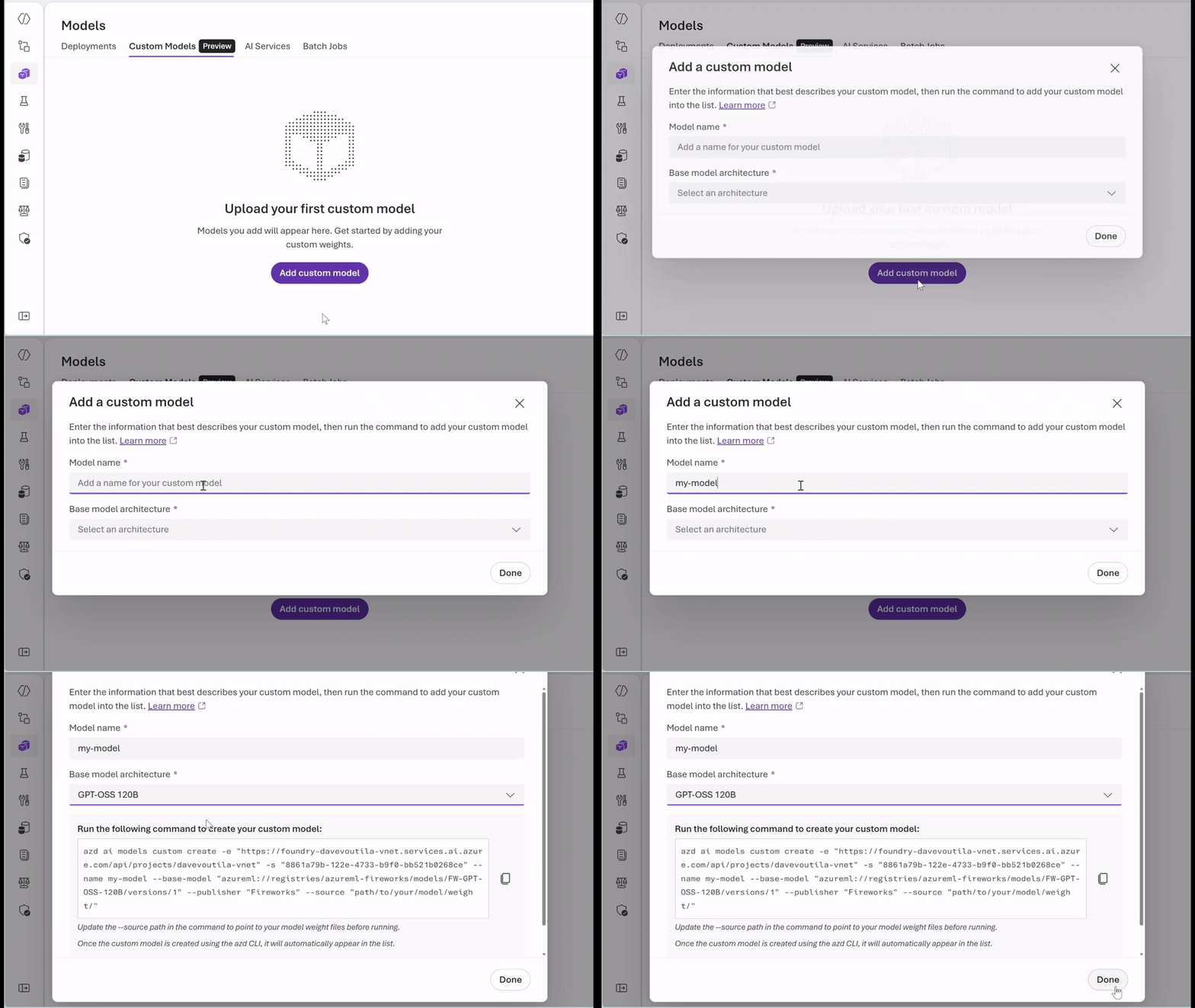
- Choose the right pricing model for your workload: Use serverless, pay-per‑token inference to experiment securely and quickly with Data Zone Standard or choose provisioned throughput units (PTUs) for predictable, steady-state performance with base or custom models. Whether you’re optimizing for agility or efficiency, you get flexibility without managing infrastructure.
- Operate with enterprise trust and scale: We are committed to enabling customers to build production-ready AI applications quickly, while maintaining the highest levels of safety and security. Foundry provides an end-to-end workspace for agent development, evaluation, and deployment, including unified governance, observability, and agent-ready tooling.
The future of Fireworks and AI use cases
Microsoft Foundry is evolving to support the full lifecycle of open models—from early evaluation through production operation and ongoing optimization. As teams scale their use of open models, having a consistent, enterprise‑ready foundation becomes increasingly important.
By integrating Fireworks AI into Microsoft Foundry, developers gain access to high‑performance inference today while building on a platform designed to support deeper customization and enterprise operations over time. This approach gives teams the confidence to adopt open models not just for what they can do now, but for how they can grow, adapt, and operate reliably as their AI ambitions expand. We’re looking forward to seeing how developers and enterprises use Fireworks AI on Microsoft Foundry to power the next generation of intelligent applications.
To get started:
- Go to Microsoft Foundry models and select Fireworks AI open models in the model catalog collection.
- Select the open model hosted by Fireworks.
- View the model card.
- Select your deployment option—serverless or PTU—and deploy.
Learn more about Fireworks on Microsoft Foundry
- Learn more about Fireworks on Microsoft Foundry.
- Learn how to upload custom weight models for inferencing with Fireworks on Foundry.
- Join Fireworks on Model Mondays on March 23 live on YouTube or on demand.
- Explore The Fast Track to AI Apps and Agents for a roadmap to build, deploy, and scale AI-native solutions with Azure.