Azure storage offers several options to encrypt data at rest. With client-side encryption you can encrypt data prior to uploading it to Azure Storage. You can also choose to have Azure storage manage encryption operations with storage service encryption using Microsoft managed keys or using customer managed keys in Azure Key Vault. Today, we present enhancement to storage service encryption to support granular encryption settings on storage account with keys hosted in any key store. Customer provided keys (CPK) enables you to store and manage keys in on-premises or key stores other than Azure Key Vault to meet corporate, contractual, and regulatory compliance requirements for data security.
Customer provided keys allows you to pass an encryption key as part of read or write operation to storage service using blob APIs. Since the encryption key is defined at the object level, you can have multiple encryption keys within a storage account. When you create a blob with customer provided key, storage service persists the SHA-256 hash of the encryption key with the blob to validate future requests. When you retrieve an object, you must provide the same encryption key as part of the request. For example, if a blob is created with Put Blob using CPK, all subsequent write operations must provide the same encryption key. If a different key is provided, or if no key is provided in the request, the operation will fail with 400 Bad Request. As the encryption key itself is provided in the request, a secure connection must be established to transfer the key. Here’s the process:
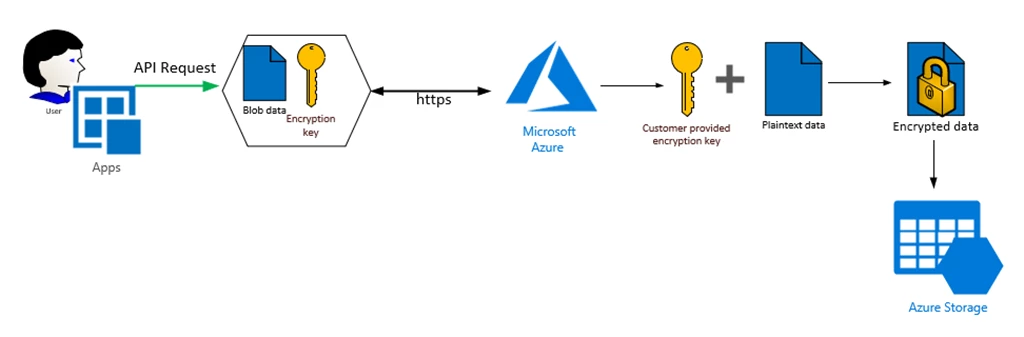
Figure 1 Customer Provided Keys
Getting started
Customer Provided Keys may be used with supported blob operations by adding the x-ms-encryption-* headers to the request.
| Request Header | Description |
| x-ms-encryption-key | Required. A Base64-encoded AES-256 encryption key value. |
| x-ms-encryption-key-sha256 | Required. The Base64-encoded SHA256 of the encryption key. |
| x-ms-encryption-algorithm | Required. Specifies the algorithm to use when encrypting data using the given key. Must be AES256. |
Request
PUT mycontainer/myblob.txt
x-ms-version: 2019-02-02
x-ms-encryption-key: MDEyMzQ1NjcwMTIzNDU2NzAxMjM0NTY3MDEyMzQ1Njc=
x-ms-encryption-key-sha256: 3QFFFpRA5+XANHqwwbT4yXDmrT/2JaLt/FKHjzhOdoE=
x-ms-encryption-algorithm: AES256
Content-Length:
...
Key management
Azure Storage does not store or manage customer provided encryption keys. Keys are securely discarded as soon as possible after they’ve been used to encrypt or decrypt the blob data. If customer provided keys are used on blobs with snapshots enabled, each snapshot can be provisioned with different encryption key. You must keep track of snapshot and associated encryption key to pass the correct key with blob operations. If you need to rotate the key associated with an object, you can download the object and upload with new encryption key.
Next steps
This feature is available now on your storage account with recent release of Storage services REST API (version 2019-02-02). You may also use .NET Client library and Java Client library. There are no additional charges for customer provided keys.
For more information on customer provided keys please visit our documentation page. For any further questions, or to discuss your specific scenario, send us an email at azurestoragefeedback@microsoft.com or post your ideas and suggestions about Azure Storage on our feedback forum.