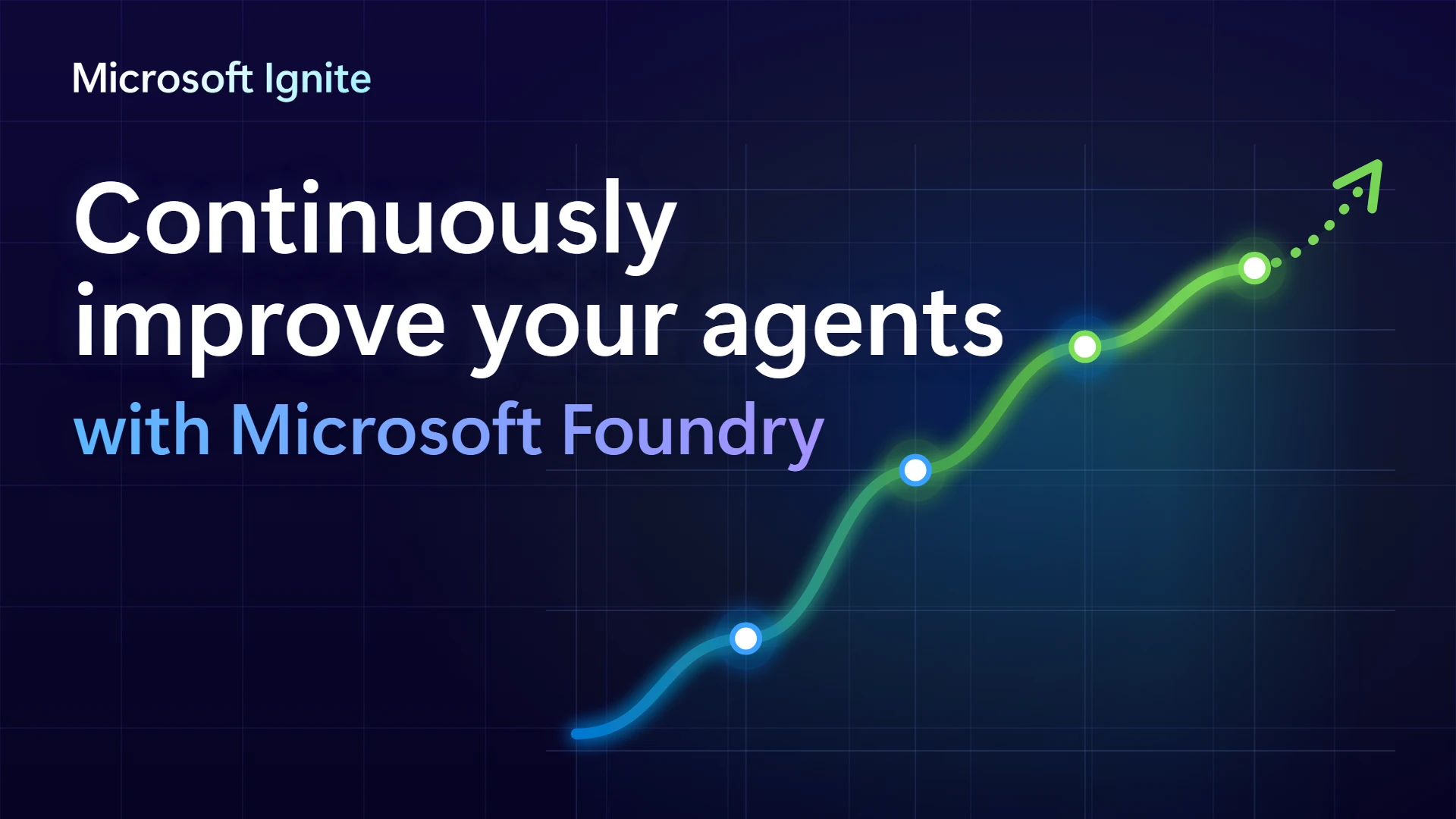
New models ship every few weeks, and your customers ask questions no one planned for. The agents that learn from all of it pull ahead. That’s continuous improvement, and today at Microsoft Ignite we’re bringing it to Microsoft Foundry. To unlock it, you need an end-to-end system where you build agents, give them context, run them, govern them, and improve them over time.
And as part of the new Microsoft IQ, Foundry accomplishes two things that only Microsoft can deliver: your unique intelligence stays your advantage, and your agents keep getting better the longer they run.
Out of the box, an AI model is exactly the same for you as it is for anyone else. Three things help you improve your agents as your teams accomplish real work.
- Agents on Foundry get better the more you use them. Foundry lets you feed agent traces and user input back into the system, creating a continuous learning loop that improves the performance of the system over time.
- Foundry looks across every run for ways to make your agents better. The system finds and tests improvements; shows you how each one trades off across quality, speed, and cost; and then you decide what ships.
- Foundry provides a range of other capabilities that allow you to improve progressively, from lightweight skill improvements to agent configuration, all the way to training model weights using your data.
Underneath it all, you have GitHub, where you build your agents, and Foundry, where you run and supervise them as they continuously improve. And they both run on Azure as one system that operates on a global scale.
GitHub: Building intelligent agents
Before you improve an agent, you need to build it. Say you want an agent to automate your supply chain processes, and you want that agent to be available in Teams—where your team already works. Just explain what you’re trying to do in clear, everyday language, and GitHub Copilot writes most, if not all, of the code. And with GitHub Copilot Fusion under the hood, it routes and orchestrates models while you’re building, so you don’t have to. That means you get the right model for the job, while balancing performance, latency, and cost.
Foundry: Running and continuously improving agents at scale
Once you’ve built your agent, you need a place to run it, govern it, and improve it for all your teams, in every region, alongside hundreds or thousands of other agents.
With more than 11,000 models, from OpenAI and Anthropic to Meta, Mistral, open source, our own Microsoft AI (MAI) models, and more, Foundry lets you do just that. And you don’t have to choose just one or be locked into a single model provider. Foundry’s model router sends simple requests to small, fast models and more complicated asks to larger, state-of-the-art models, so you spend less on tokens, time, and compute. Our testing shows that using Foundry’s model router can save you up to 65% compared with sending everything to the frontier.
When your agent runs in Foundry, it has an identity. Entra Agent ID and Foundry guardrails give the agent only the access it needs, and sensitive actions keep a human in the loop as required by your business. And your organization stays in control at every step. You set the standard, every change is tested against evidence, and your team decides what reaches production. Agent controls in Foundry Safety extend that oversight to the runtime. For agents built in Foundry and, in the future, outside it, this means checking an agent’s behavior against the guardrail policies you set as it runs.
ignite session: The trust foundation…
Run agents with the orchestration layer of your choice. Foundry Agent Service runs agents built with your preferred framework and harness through hosted agents, which now handle more concurrent sessions at once (in general availability [GA]) and start faster (in preview). And for teams that would rather have the harness managed for them, the Microsoft Copilot harness (now in preview) has built-in capabilities like reusable skills and sub-agents. Fashable, an AI-native fashion company, is using voice agents (now in GA) and the Microsoft Copilot harness to make design and sourcing more conversational and agent powered.
Foundry learns from how your teams use your agents, evaluates every change against your own standard of what “good” looks like, and helps you make each agent better. Agents learn from their own past work and your experts’ feedback, and those lessons become new skills, evaluations, and more. That’s how your agents, and the system around them, keep getting better.
How continuous improvement works
Continuous improvement in Foundry follows four steps, repeated, so each pass builds on the last: Establish, Identify, Optimize, then Validate and repeat.
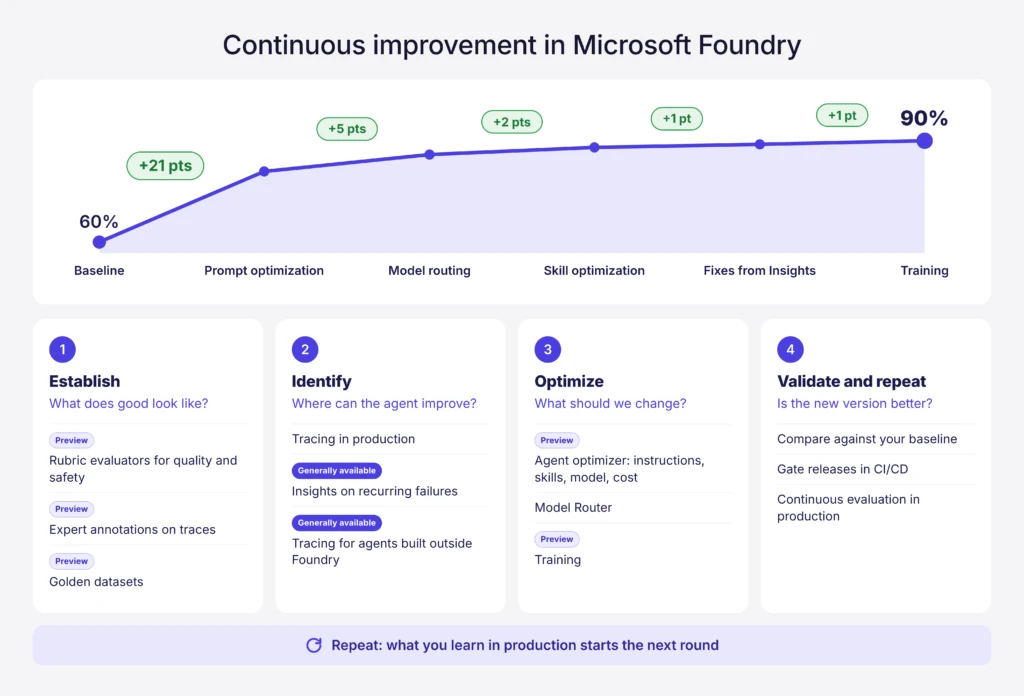
Establish: You decide what good looks like
Improvement starts with a clear standard. In Foundry, that standard lives in evaluations, which are automated tests that score an agent’s responses against criteria you choose. Rubric evaluators let you write those criteria for your own business, like a checklist your best expert would use, and they now cover safety as well as quality (in preview).
Your people know quality better than any metric, and their feedback turns a capable agent into an expert on your business. Every time an agent runs, Foundry logs a trace: a step-by-step record of what the agent was asked, what it did, and how it answered. With annotations on traces (now in preview), experts review real conversations and mark what worked, what didn’t, and what the agent should have done instead. Those annotated traces become evaluation datasets (in preview), built from real usage rather than hypothetical test cases. From those datasets, Foundry can generate a rubric for each test case, so your experts’ judgment becomes part of how every future version of the agent is scored.
You can then lock in your best set of test cases as a golden dataset (in preview). Think of it as the answer key: the benchmark each new version has to beat.
Identify: Find areas where your agent can improve
Your customers shouldn’t be the first to tell you something broke. Traces show how an agent really behaves, including where things go wrong, but there are far too many to read on your own. Insights (now in GA) groups the problems that keep recurring, shows the evidence, and points to a likely cause, so teams fix what affects the most people first. And your teams can bring the same visibility to agents built outside Foundry with LangGraph, LangChain, and CrewAI (now in GA).
Optimize: Make a good agent better
Agent optimizer turns what you’ve learned into a better agent, whether you’re fixing a repeated mistake or raising the bar on an agent that already performs well. It improves an agent’s instructions, skills, and model choice and tests every candidate change against your evaluations before anything ships. And while it recommends the strongest candidate, your team decides which change to ship—and nothing changes in production until you apply it. Agent optimizer builds on prompt optimization and Foundry’s model router (both already available), with new ways to improve an agent:
- Sending insights to agent optimizer (now in preview) turns a problem found in production into a fix in one step. Pick a recurring issue in insights, send it to agent optimizer, and get candidate fixes tested against your evaluations.
- Skill optimization (now in preview) helps agents learn from experience. Agent optimizer reviews an agent’s past work and the feedback your experts left, finds the mistakes it keeps repeating and the approaches that worked, and turns those lessons into new or improved skills for similar situations. Skills are versioned, so you can roll back or reuse a proven skill in other agents, and you choose when to adopt it.
- Cost optimization (now in preview) finds cost-efficient ways to run your agent, like using a smaller model, without compromising on quality.
- Managed Training (previously called managed fine-tuning) lets you train models on your own data. Docusign, which already cut AI processing costs by 90% with fine-tuned models in Foundry, is now fine-tuning MAI models with Managed Training to read agreements.
- Programmed Training (now in preview) lets your engineers write their own training recipes in Python while Foundry runs them on serverless GPUs. Heidi, an AI care partner for clinicians, used Programmed Training to post-train an open-weight model for clinical notes that matches a widely used frontier model on its clinical quality metrics, at an estimated 87% lower cost per note.
Alaska Airlines put continuous improvement in Foundry to work. They explored how fine-tuning MAI-Code-2-Flash could assist trained personnel in classifying aircraft maintenance reports by ATA code, with qualified employees retaining responsibility for review and final decisions. In Alaska’s classification evaluation, the model scored 81.2% out of the box and 91.1% after tuning, outperforming GPT-6 Astra and GPT-6.1 Sol at a fraction of the cost.
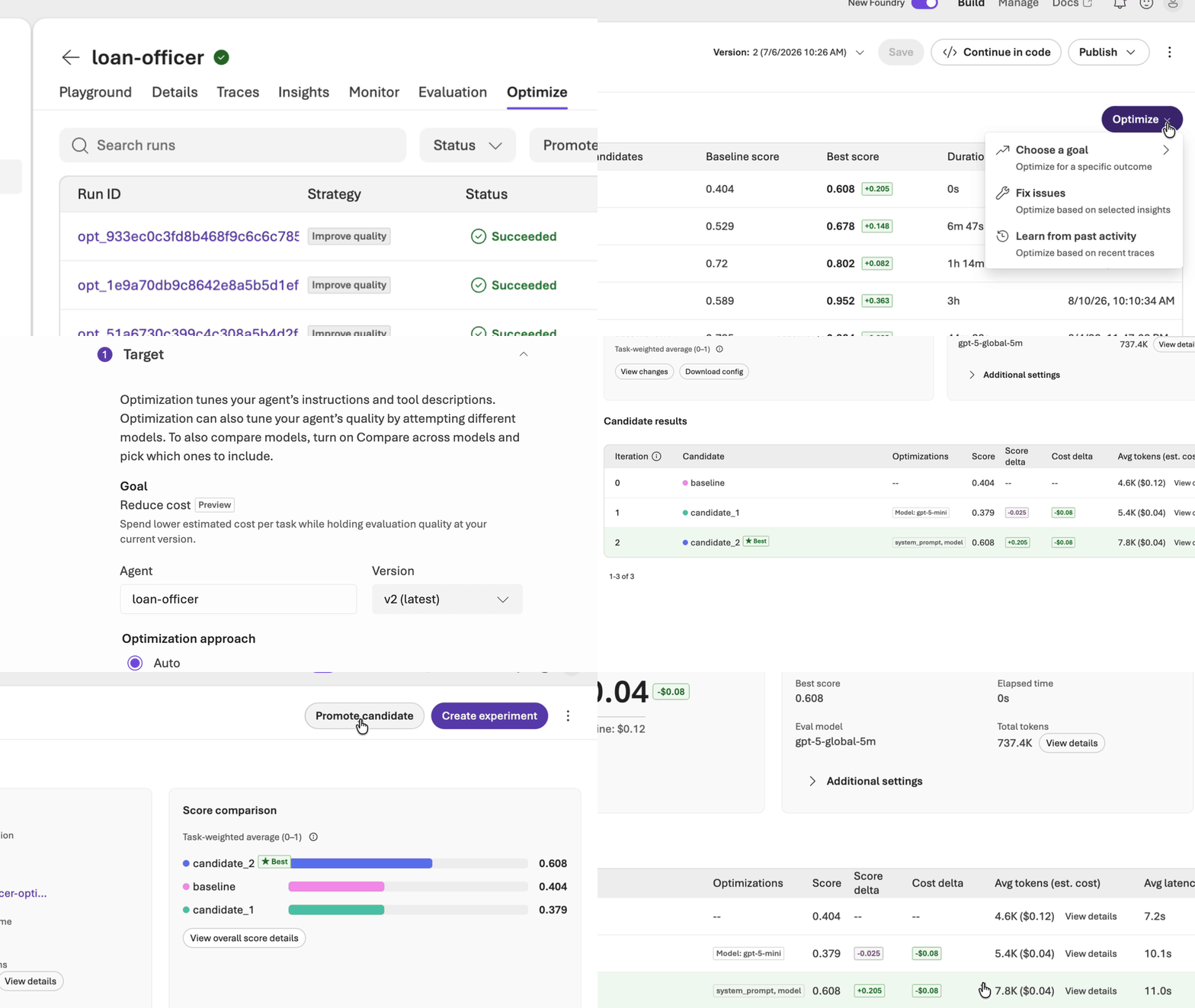
Validate and repeat: Prove the improvement
Every improvement should be something you can prove. When you compare a new version of an agent with your current one, Foundry runs statistical tests on the results, so you can see whether a difference is real or just noise. Teams can build the same check into the release pipeline their developers already use, in GitHub Actions or Azure DevOps, so nothing ships until it clears your quality bar.
Continuous evaluation (already available in Foundry) samples live traffic and scores it with the same evaluators you set at the start, to check that an improvement holds up with real users in production. Scheduled evaluations rerun your golden dataset, and scheduled red-team scans keep testing for new risks. Each agent’s monitoring dashboard shows quality, safety, latency, and token usage in one view, and alerts flag when scores slip.
When something does slip, whether from a model update, a change in your business, or a new type of request, that signal becomes the next insight, and the loop starts again. The version you just shipped becomes the new baseline, so every round starts from your best agent to date.
ignite session: The Foundry improvement loop
Customers are already putting this loop to work, including NTT DATA, which is sharing its story at Ignite (BRK249). NTT DATA is applying a continuous improvement loop to its program-management agent, using observability, evaluations, and optimization to identify issues and systematically improve quality. The team is validating the approach as it prepares to scale the agent across more than 1,000 internal projects, showing how continuous improvement can help maintain agent quality at enterprise scale.
Agents that increase your advantage
An agent becomes an expert when it understands your business: how your people work, your organization’s institutional knowledge, and what “good” looks like—in your specific business context. Microsoft IQ grounds agents in your company’s data, know-how, and tools through a context layer you own, built from the IT investments you’ve already made. Your agents start with years of experience, and everything they learn in Foundry adds to it. That value accrues to you and stays in your business.
We believe AI should increase your advantage. And with continuous improvement in Foundry, those gains compound over time.
Also announced at Microsoft Ignite
- Voice agents (now in GA) let people talk to an agent the way they would talk to a colleague, by phone or in an app.
- Microsoft 365 accounts for agents (in preview) let agents work inside the same tools your people use.
- Deploying hosted agents to Azure Kubernetes Service is coming soon (in preview).
- Updates to Toolboxes and browser automation connect agents to more tools and workflows.
- Cost in Microsoft Foundry (now in preview) gives you one view of spend across agents, models, and tools, with a forecast and month-end report on the assets driving the most cost.
- New Microsoft AI models for coding, security, and creative work are available, plus partner models through fal and Baseten on Foundry.
- Microsoft-Decision-1.1 is now generally available in Foundry and also available to be used as a judge in Foundry Evaluations to measure performance, quality, and safety.
If you’re attending Microsoft Ignite 2026, or watching on demand later, check out these sessions:
- BRK240 – Build and scale the next generation of AI agents in Microsoft Foundry
- BRK249 – From traces to better agents: The Foundry improvement loop
- BRK251 – Agents in production: From issue detection to continuous improvement
- BRK242 – Build your self-improving AI Platform with Microsoft Foundry
- BRK244 – Voice agents in Microsoft Foundry: Prototype to production in 45 mins
- BRK247 – Token economics: Get more from your production AI budget
- BRK252 – Turn your data into AI advantage with Training in Microsoft Foundry
- BRK312 – The trust foundation for the next era of intelligence
Learn. Adapt. Improve.
Use Microsoft Foundry to learn from agent feedback, evaluate changes, and continuously improve performance.