We’re excited to announce the availability of a new planned maintenance experience in Azure, providing you more control, better communication, and better visibility. While most planned maintenance is performed without any impact to your virtual machines using memory preserving maintenance, some do require a reboot to improve reliability, performance, and security.
What’s new?
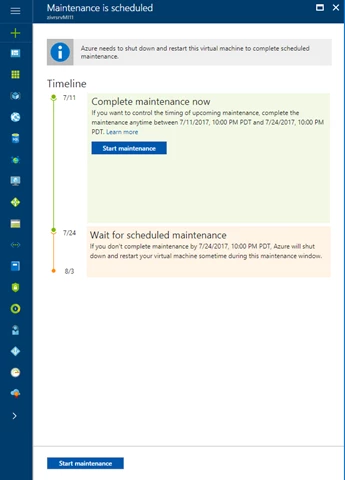
- More control: You now have the option to proactively initiate a redeploy of your VMs on your schedule within a pre-communicated window, ensuring that planned maintenance will be performed when it is most convenient for you.
- Better communication: We added planned maintenance to the Azure Monitor experience where you can create log-based alerts. With Azure Monitor notifications, you can add multiple email recipients to maintenance alerts, receive SMS messages, and configure webhooks, which integrate with your third-party software, to alert you of upcoming maintenance.
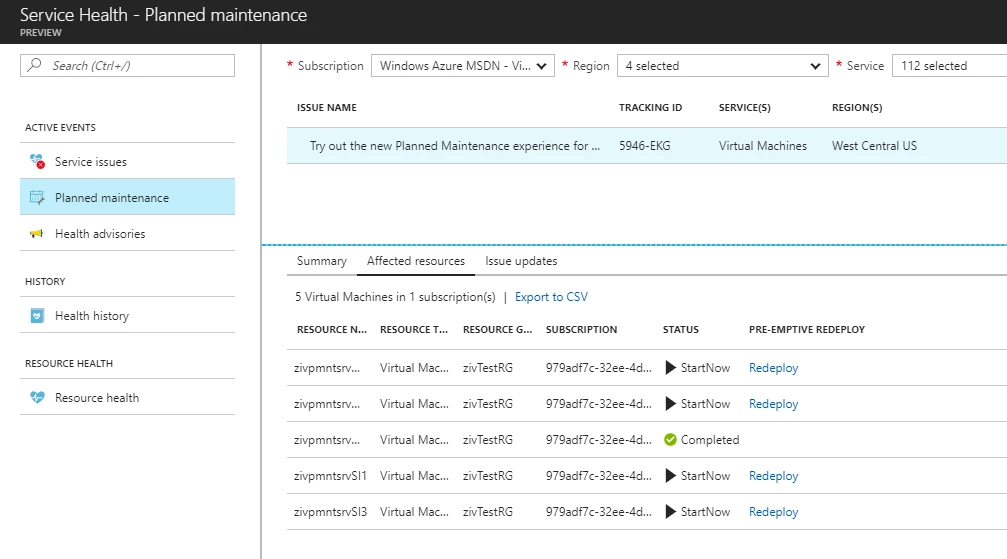
- Better visibility: We recently introduced Azure Service Health in the Azure Portal, which provides you planned maintenance information at the VM level. Additionally, we introduced Scheduled Events, which surfaces information, including upcoming planned maintenance, via REST API in the VM. You can use this capability as part of maintenance preparation. Lastly you can view upcoming maintenance information via PowerShell and CLI.
Why should I consider proactive-redeploy?
During a communicated window, customers can choose to start maintenance on their virtual machines. If you do not utilize the window, the virtual machines will be rebooted automatically during a scheduled maintenance window (which is visible to you). Starting the maintenance will result in the VM being redeployed to an already-updated host. While doing so, the content of the local (temporary) drive will be lost.
Native cloud applications running in a cloud service, availability set, or virtual machines scale set, are resilient to planned maintenance since only a single update domain is impacted at any given time.
You may want to use proactive-redeploy in the following cases:
- Your application runs on a single virtual machine and you need to apply maintenance during off-hours.
- You need to coordinate the time of the maintenance as part of your SLA.
- You need more than 30 minutes between each VM restart even within an availability set.
- You wish to take down the entire application (multiple tiers, multiple update domains) in order to complete the maintenance faster.
What should I do next?
Prior to the next planned maintenance in Azure:
- Become familiar with how to proactively redeploy your VMs on Windows and Linux.
- Create alerts and notifications in Azure Monitor.
- Set up Scheduled Events for your Windows and Linux VMs.
For more information: - Watch Azure Friday on Planned Maintenance.
- Watch Tuesdays with Corey on Planned Maintenance.