Skip to main content Explore View all products (200+) Microsoft Foundry Azure Copilot GitHub Copilot Azure Kubernetes Service (AKS) Azure Cosmos DB Azure Database for PostgreSQL Azure Arc Microsoft Fabric Linux virtual machines in Azure Foundry Models Foundry Agent Service Foundry IQ Foundry Tools Foundry Control Plane Observability in Foundry Control Plane Azure OpenAI in Foundry Models Azure Speech in Foundry Tools Azure Machine Learning View all databases Azure Cosmos DB Azure DocumentDB Azure SQL Azure Database for PostgreSQL Azure Managed Redis Microsoft Fabric Azure Databricks Linux virtual machines in Azure Windows Server on Azure Azure Functions Azure Virtual Machine Scale Sets Azure API Management Azure Container Apps Azure Kubernetes Service (AKS) Azure Kubernetes Fleet Manager Azure Container Registry Azure Red Hat OpenShift Azure Container Instances Azure Container Storage Azure Arc Azure Local Microsoft Defender for Cloud Azure Monitor Microsoft Sentinel Azure Migrate View all solutions (40+) Cloud solutions for small and medium businesses Cloud migration and modernization center Data analytics for AI Azure Databases AI apps and agents Microsoft Marketplace Microsoft Sovereign Cloud AI apps and agents Responsible AI with Azure AI Infrastructure Data analytics for AI Machine learning operations (MLOps) Low-code application development on Azure Integration Services Serverless computing DevOps Migration and modernization center .NET apps migration Databases on Azure Linux on Azure Oracle on Azure SAP on the Microsoft Cloud Adaptive cloud High-performance computing (HPC) Infrastructure as a service (IaaS) Resiliency Azure Essentials Frontier Accelerate for Azure FinOps on Azure Microsoft Marketplace Azure pricing overview Create an Azure account Free Azure services Flexible purchase options Pricing calculator FinOps on Azure Maximize ROI from AI Azure savings plans Azure reservations Azure Hybrid Benefit Virtual Machines Azure SQL Microsoft Foundry Microsoft Fabric Azure Kubernetes Service (AKS) Microsoft Defender for Cloud View more Software Development Companies Microsoft Marketplace Find a partner Resources for Azure partners Get started with Azure Customer stories Analyst reports, white papers, and e-books Videos Learn more about cloud computing Documentation Explore Azure portal Developer resources Quickstart templates Resources for startups Developer community Students Azure for partners Blog Events and Webinars Learn Support Contact Sales Get started with Azure Sign in

I’m thrilled to announce the preview release of Enterprise Cost Management within the Azure portal. With today’s release, Azure Enterprise Agreement (EA) users can view and analyze their subscription costs across different pivots, within the Azure portal. This addresses a top ask from our EA customers to empower subscription admins with visibility into their costs. We’ve also heard you on the need for more granular cost reporting by resource group and tag.

This is an initial step in our commitment to providing best-in-class cost management experiences within the Azure portal. Over the next few months, you will continue to see us roll out new capabilities to help you better manage your Azure costs and services.

In the remainder of this post, I walk you through some of the new features we’ve made available.

Try it today

All you have to do is sign in to the Azure portal at https://portal.azure.com. Go to Browse -> Subscriptions and click on your subscription. You’ll see the below charts in the Overview blade.
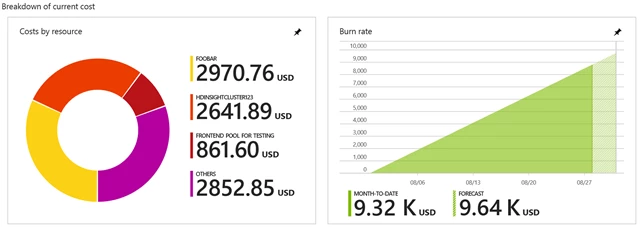
Cost charts for Azure EA Subscription

The pie chart on the left gives you a quick idea of the top resources contributing to your costs. The burn rate chart on the right tells you your month-to-date costs and provides a forecast, enabling you to take corrective action early.

Click into the pie chart or on Cost analysis in the Resource menu. This launches the Costs by resource report that gives you a breakdown of your costs by resource. Here you can filter costs by Resource Group, Tag, or Resource Type. If you spot excessive spend, you can right-click to navigate to a resource and view its activity logs or take corrective action. You can also download the results into a CSV file for offline analysis.
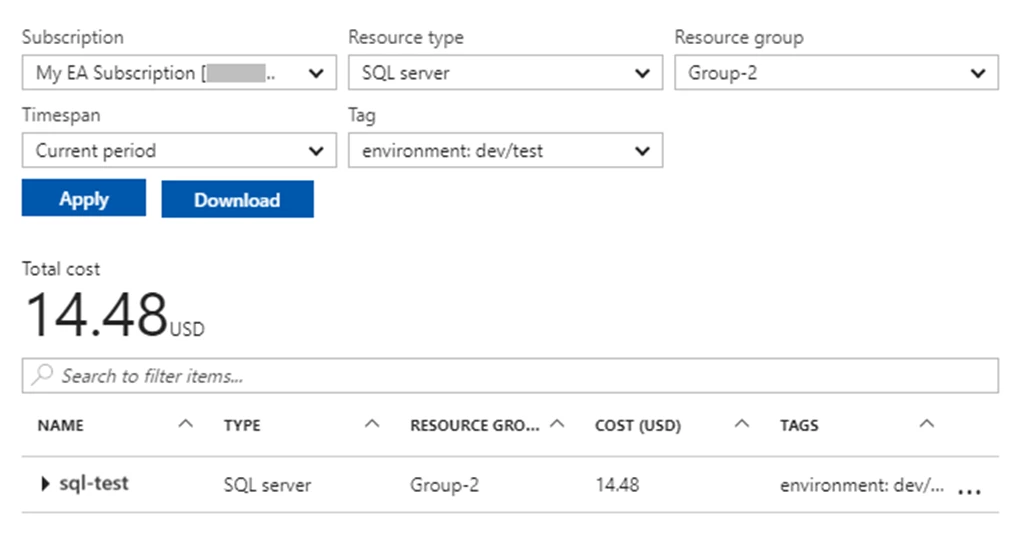
Costs by Resource for Azure Subscription

Further, left-clicking into any resource will launch the Cost history report. This enables you to spot trends and spikes in costs. You can get cost history for a resource group or resource, and group the results so you can easily identify what’s contributing to costs.
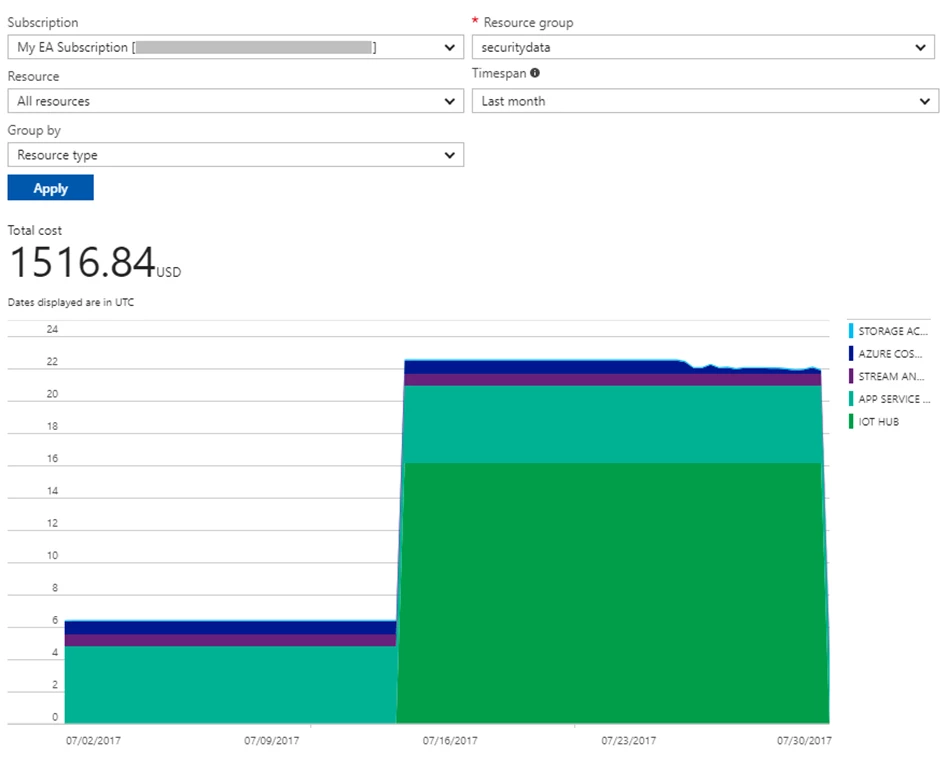
Cost history for Azure subscription

Note: in order to access these subscription-level costs in the Azure portal, the user needs to be a Billing Reader, Reader, Contributor, or Owner at the Subscription level.

To learn more about these capabilities, visit our help documentation here.

As mentioned above, this preview is just an early step in our efforts to build rich cost management experiences in the Azure portal, for Enterprise customers. Over the next few months, you will continue to see us roll out new capabilities to help you better manage your Azure costs and services. As always, we’d love to hear from you. Send us your feedback here.


WE ARE MICROSOFT

Explore Microsoft Foundry

The future of AI starts here. Envision your next great AI app with the latest technologies. Get started with Azure.