One C# statement to authenticate. One statement to create a virtual machine. One statement to modify an existing virtual network, etc. No more guessing about what is required vs. optional vs. non-modifiable.
https://github.com/Azure/azure-sdk-for-net/tree/Fluent
We are announcing the first developer preview release of the new, simplified Azure management libraries for .NET. Our goal is to improve the developer experience by providing a higher-level, object-oriented API, optimized for readability and writability. These libraries are built on the lower-level, request-response style auto generated clients and can run side-by-side with auto generated clients.
Azure Authentication
One statement to authenticate and choose a subscription. The Azure class is the simplest entry point for creating and interacting with Azure resources.
Azure azure = Azure.Authenticate(credFile).WithDefaultSubscription();
Create a Virtual Machine
You can create a virtual machine instance by using a Define() … Create() method chain.
Console.WriteLine("Creating a Windows VM");

var windowsVM = azure.VirtualMachines.Define("myWindowsVM")
    .WithRegion(Region.US_EAST)
    .WithNewResourceGroup(rgName)
    .WithNewPrimaryNetwork("10.0.0.0/28")
    .WithPrimaryPrivateIpAddressDynamic()
    .WithNewPrimaryPublicIpAddress("mywindowsvmdns")
    .WithPopularWindowsImage(KnownWindowsVirtualMachineImage.WINDOWS_SERVER_2012_R2_DATACENTER)
    .WithAdminUserName("tirekicker")
    .WithPassword(password)
    .WithSize(VirtualMachineSizeTypes.StandardD3V2)
    .Create();

Console.WriteLine("Created a Windows VM: " + windowsVM.Id);
Update a Virtual Machine
You can update a virtual machine instance by using an Update() … Apply() method chain.
windowsVM.Update()
     .WithNewDataDisk(10)
     .DefineNewDataDisk(dataDiskName)
          .WithSizeInGB(20)
          .WithCaching(CachingTypes.ReadWrite)
          .Attach()
     .Apply();
Management libraries unleash the power of IntelliSense in Visual Studio
Fluent interface-inspired method chains in combination with IntelliSense deliver a wizard-like developer experience by presenting required and optional methods in the right sequence. For example, once you choose a Windows virtual machine image, IntelliSense will prompt for an admin password and nothing else.
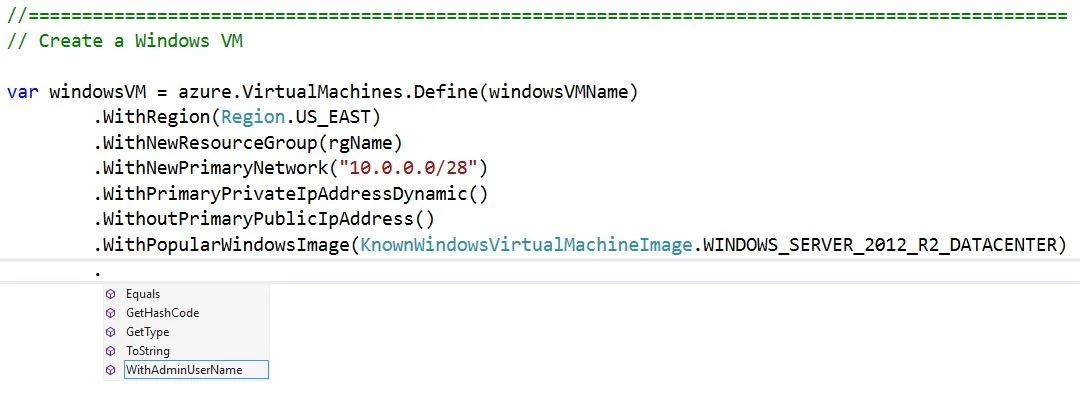
Then, IntelliSense will prompt for a password and nothing else. This will continue until you reach the minimum required to call create().
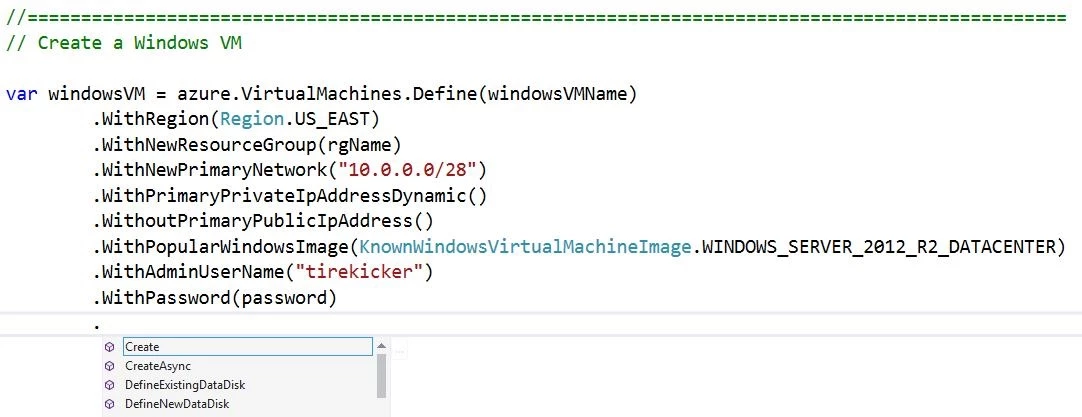
As another example, if you were to choose a Linux virtual machine image, IntelliSense would prompt for a root user name and then SSH key.
Samples
You can find plenty of sample code that illustrates key management scenarios in Azure Virtual Machines, Virtual Machine Scale Sets, Storage, Networking, Resource Manager, Key Vault and Batch …
- Service
- Management Scenario
- Virtual Machines
- Virtual Machines – parallel execution
- Virtual Machine Scale Sets
- Storage
- Network
- Resource Groups
- Key Vault
- Batch
Give it a try
This is a developer preview that supports major parts of Azure Virtual Machines, Virtual Machine Scale Sets, Storage, Networking, Resource Manager, Key Vault and Batch. You can run the samples above or go straight to our GitHub repo.
Give it a try and let us know what do you think (via e-mail or comments below), particularly –
- Usability and effectiveness of the new management libraries for .NET?
- What Azure services you would like to see supported soon?
- What additional scenarios should be illustrated as sample code?
The next preview version of the Azure Management Libraries for .NET is a work in-progress. We will be adding support for more Azure services and tweaking the API over the next few months.