Today’s customers live in a multi-platform, multi-cloud, multi-OS world – that’s just reality. This world brings new challenges and customers need tools to make everything work together. Microsoft is working company-wide to deliver management tools that empower customers to manage any platform, from anywhere, on any device, using Linux or Windows. This shift to a more open, customer-obsessed approach to deliver innovation is one of the things that makes me most excited to come to work every day.
You’ve heard Satya Nadella say “Microsoft loves Linux” and that’s never been more true than now. Nearly one in three VMs on Azure are Linux. Nearly 60 percent of third-party IaaS offers in the Azure Marketplace are open source software (OSS). We have forged strong industry partners to extend choice to our customers. We’ve announced SQL Server on Linux, as well as open sourced .NET. We added Bash to Windows 10 to make it a great platform for developing OSS. And, we’re active contributors and participants to numerous open source projects (e.g. OpenSSH, FreeBSD, Mesos, Docker, Linux and many more) across the industry.
Today, we are taking the next step in our journey. I am extremely excited to share that PowerShell is open sourced and available on Linux. (For those of you who need a refresher, PowerShell is a task-based command-line shell and scripting language built on the .NET Framework to help IT professionals control and automate the administration of the Windows, and now Linux, operating systems and the applications that run on them.) I’m going to share a bit more about our journey getting here, and will tell you how Microsoft Operations Management Suite can enhance the PowerShell experience.
The journey to opening up PowerShell
Let’s start the journey to PowerShell on Linux, and an open sourced version with a story…
My customer was upset.
Early in the days of Monad (before it was PowerShell), I gave a demo to an executive of a large customer. He loved it but now he was angry with me.
He had asked me in what language it was implemented and was unhappy with my answer: C#. Confused, I asked why that was a problem. “Because” he told me, “Monad is exactly the right approach and I want to standardize my entire company on it, but I can’t because .NET is not available on Linux!”
In the past, Microsoft’s business focus meant that .NET, and thus PowerShell, were only available on Windows. But this is a new Microsoft. Satya’s leadership and Azure have shifted us to a more open, customer-centric, mindset captured perfectly in this photo:
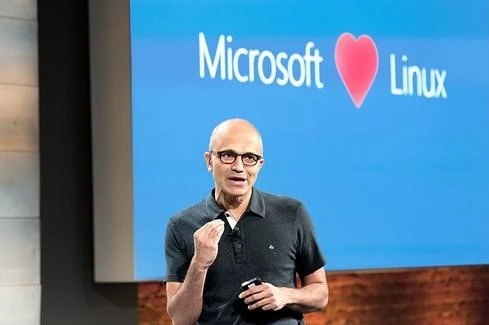
Microsoft wants to earn customers’ preference as the platform for running all their workloads – Linux as well as Windows. This new thinking empowered the .NET team to port .NET Core to Linux and that in turn, enabled PowerShell to port to Linux as well. PowerShell on Linux is now designed to enable customers to use the same tools, and the same people, to manage everything from anywhere. It is initially available on Ubuntu, Centos, as well as Red Hat, and also runs on Mac OS X. More platforms will be added in the future. You can download Alpha builds and check out the source code from GitHub.
Now, users across Windows and Linux, current and new PowerShell users, even application developers can experience a rich interactive scripting language as well as a heterogeneous automation and configuration management that works well with your existing tools. Your PowerShell skills are now even more marketable, and your Windows and Linux teams, who may have had to work separately, can now work together more easily.
So, where are we in this journey? We are in the beginning stages and in learning mode. We started by open sourcing small portions of PowerShell and talking to a number of our partners who were experienced with open source to understand what it took to succeed. What we learned, is that it is critical that individual users can use Git to checkout code, make changes, compile everything on their machines and run all the tests to verify that their change didn’t break anything. This required a large investment in our engineering/build/test systems. We also worked to define a governance model so we had clear roles, responsibilities, and processes so that community contributions could be smoothly incorporated into the product.
The PowerShell team has always prided itself on being a very community focused team but this announcement takes it to the next level by making the source code available and by adopting an open source development model where we can enjoy a deeper connection with the community in RFCs, issues and accept contributions directly. We also needed to extend our community since open source, like so many things, takes a village and that village is key to a great experience! We are partnering with third party companies – Chef, Amazon Web Services, VMware, and Google to name a few – to create a rich, seamless experience across the platforms you know and use.
As we port PowerShell to Linux, we are making sure that we are a first class citizen on that platform. We fit in well with the architecture, idioms and existing tools. This was pretty easy as most of the original PowerShell team had deep Unix backgrounds and that shows in our design. There were a number of little changes that we made and two big things:
- We created a PowerShell Editor Service. This allow users to choose from a range of editors (VS Code and Sublime with others to follow) and get a great PowerShell authoring experience with Intellisense, debugging, etc.
- We will be extending the PowerShell Remoting Protocol (MS-PSRP) to use OpenSSH as a native transport. Users will have the option to use SSH or WINRM as a transport.
The initial release is an “alpha” and is community supported. In the future, we will deliver an official Microsoft released version of PowerShell based on open source to anyone running a supported version of Windows or *nix. The timing of the official Microsoft version will be based upon community input and business needs. We hope all of you will help us get it right!
Extending the PowerShell experience with Microsoft Operations Management Suite
I also want to tell you more about how today’s PowerShell news extends what you can do with our cloud management solution, Operations Management Suite (OMS). OMS gives you visibility and control of your applications and workloads across Azure and other clouds. Integral to this, it enables customers to transform their cloud experience when using PowerShell on both Linux and Windows Server. OMS Automation elevates PowerShell and Desired State Configuration (DSC) with a highly available and scalable management service from Azure. You can graphically author and manage all PowerShell resources including runbooks, DSC configurations and DSC node configurations from one place.
With OMS hybrid runbook worker, you can extend your OMS Automation capability and apply, monitor and update configurations anywhere, including on-premises. Today we also made the OMS monitoring agent for Linux generally available. Together, customers can gain rich insights and real-time visibility into their Linux workloads, and the power to quickly remediate any issues that may arise.
We hope that all of you will take the time to test drive PowerShell on Linux and let us know what you think! You can also learn more about OMS Automation here. And, be sure to check us out at LinuxCon next week. Wim Coekaerts will be giving a keynote address, we’ll have a booth where we’ll be showing PowerShell, and I’ll be doing a session that will be packed with demos.
If you are new to PowerShell, a great way to start learning is with our Learning PowerShell repository on GitHub. We also offer a free Microsoft Virtual Academy online course: Getting Started with PowerShell 3.0 Jump Start. You’ll want to join/participate in the PowerShell Community at powershell.org/ and follow the PowerShell Team blog. We’ll be updating these to meet the needs of the Linux community (e.g. examples) in the near future.
This has been a long time coming and it is going to be a lot of fun so please join us so that together we can produce a tool that knocks our socks off every time we use it.