Azure Migrate now supports assessments for Azure VMware Solution (AVS), providing even more options for you to plan your migration to Azure. AVS enables you to run VMware natively on Azure. AVS provides a dedicated Software Defined Data Center (SDDC) for your VMware environment on Azure, ensuring you can leverage familiar VMware tools and investments, while modernizing applications overtime with integration to Azure native services. Delivered and operated as a service, your private cloud environment provides all compute, networking, storage, and software required to extend and migrate your on-premises VMware environments to Azure.
As organizations now more than ever look for cost efficiencies, business stability, and consistency, choosing the most efficient migration path is imperative. This means considering a number of different workload scenarios and destinations, such as migrating your servers to Azure Virtual Machines or running your existing VMware workloads natively on Azure with AVS.
Previously, Azure Migrate tooling provided support for migrating Windows and Linux servers to Azure Virtual Machines, as well as support for database, web application, and virtual desktop scenarios. Now, you can use the migration hub to assess machines for migrating to AVS as well.
With the Azure Migrate: Server Assessment tool, you can analyze readiness, Azure suitability, cost planning, performance-based rightsizing, and application dependencies for migrating to AVS. The AVS assessment feature is currently available in preview.
This expanded support allows you to get an even more comprehensive assessment of your datacenter. Compare cloud costs between Azure native virtual machines (VMs) and AVS to make the best migration decisions for your business. Azure Migrate acts as an intelligent hub, gathering insights throughout the assessment to make suggestions, including tooling recommendations for migrating VM or VMware workloads.
How to perform an AVS assessment
You can use all the existing assessment features that Azure Migrate offers for Azure Virtual Machines to perform an AVS assessment. Plan your migration to AVS with up to 35,000 VMware servers in one Azure Migrate project.
- Discovery: Use the Azure Migrate: Server Assessment tool to perform a datacenter discovery, either by downloading the Azure Migrate appliance or by importing inventory data through a CSV upload. Read Assess your servers with a CSV import into Azure Migrate to learn more about the import feature.
- Group servers: Create groups of servers from the list of machines discovered. Here, you can select whether you’re creating a group for an Azure Virtual Machine assessment or AVS assessment. Application dependency analysis features allow you to refine groups based on connections between applications.
- Assessment properties: You can customize the AVS assessments by changing the properties and recomputing the assessment. Select a target location, node type, and Redundant Array of Independent Disks (RAID) level—there are currently three locations available—including East US, West Europe, and West US, and more will continue to be added as additional nodes are released.
- Suitability analysis: The assessment gives you a few options for sizing nodes in Azure, between performance-based or as on-premises. It checks AVS support for each of the discovered servers and determines if the server can be migrated “as is” to AVS. If there are any issues found, the assessment automatically provides remediation guidance.
- Assessment and cost planning report: Run the assessment to get a look into how many machines are in use and what estimated monthly and per-machine costs will be in AVS. The assessment also recommends a tool for migrating the machines to AVS. With this, you have all the information you need to plan and execute your AVS migration as efficiently as possible.
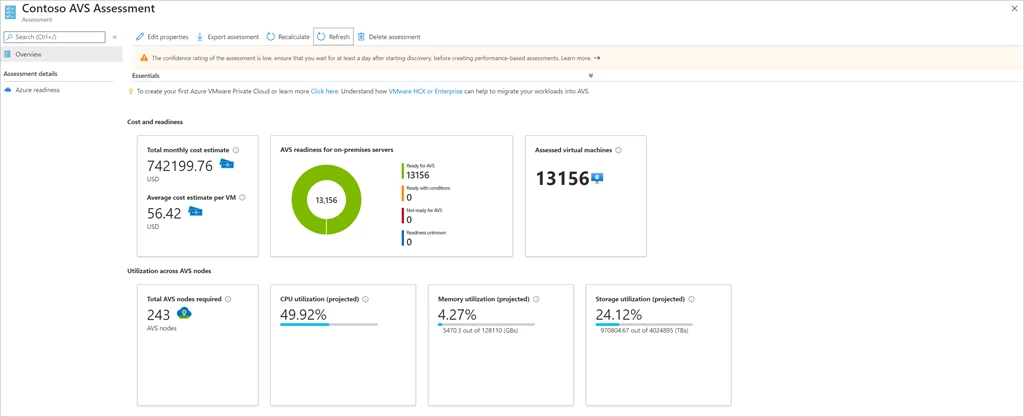
AVS Assessment and cost planning report.
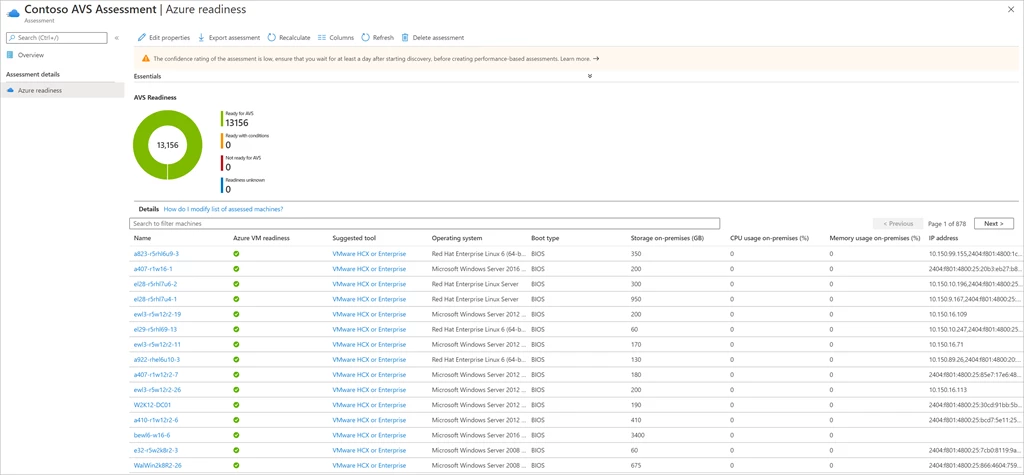
AVS Readiness report with suggested migration tool.
Learn more
- For detailed instructions on how to perform an AVS assessment, go to the documentation page.
- Read more about Azure VMware Solution on the website or documentation page.
- Learn more about Azure Migrate on the Azure Migrate website.
- Watch the latest Azure Migrate video for a demo of performing a server migration.
- Check out the new Azure Migrate e-book.