At Microsoft Ignite, we announced new Microsoft Azure Migrate assessment capabilities that further simplify migration planning. In this post, I will talk about how you can plan migration of physical servers. Using this feature, you can also plan migration of virtual machines of any hypervisor or cloud. You can get started right away with these features by creating an Azure Migrate project or using an existing project.
Previously, Azure Migrate: Server Assessment only supported VMware and Hyper-V virtual machine assessments for migration to Azure. At Ignite 2019, we added physical server support for assessment features like Azure suitability analysis, migration cost planning, performance-based rightsizing, and application dependency analysis. You can now plan at-scale, assessing up to 35K physical servers in one Azure Migrate project. If you use VMware or Hyper-V as well, you can discover and assess both physical and virtual servers in the same project. You can create groups of servers, assess by group and refine the groups further using application dependency information.
While this feature is in preview, the preview is covered by customer support and can be used for production workloads. Let us look at how the assessment helps you plan migration.
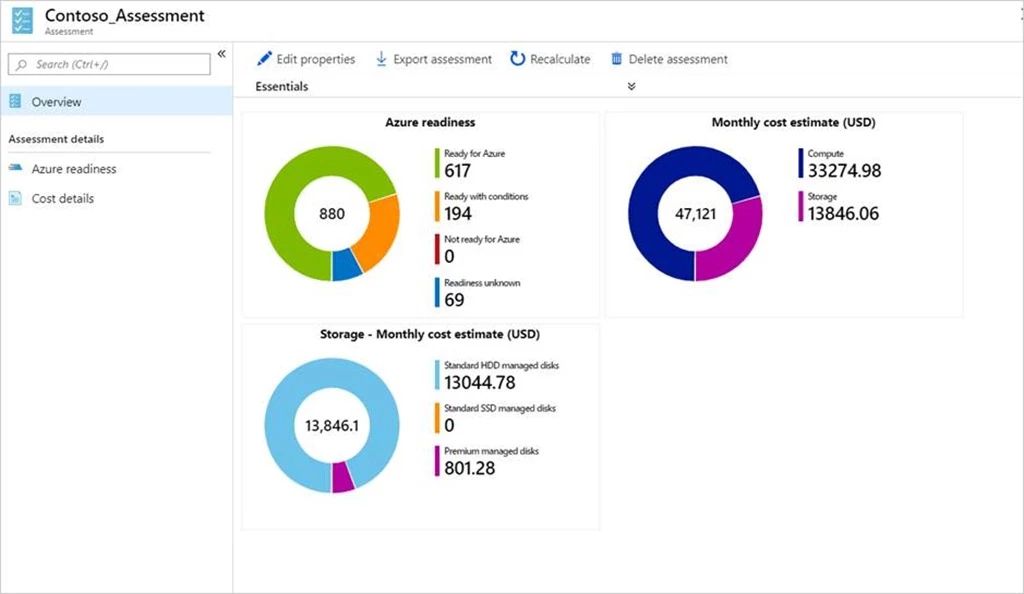
Azure suitability analysis
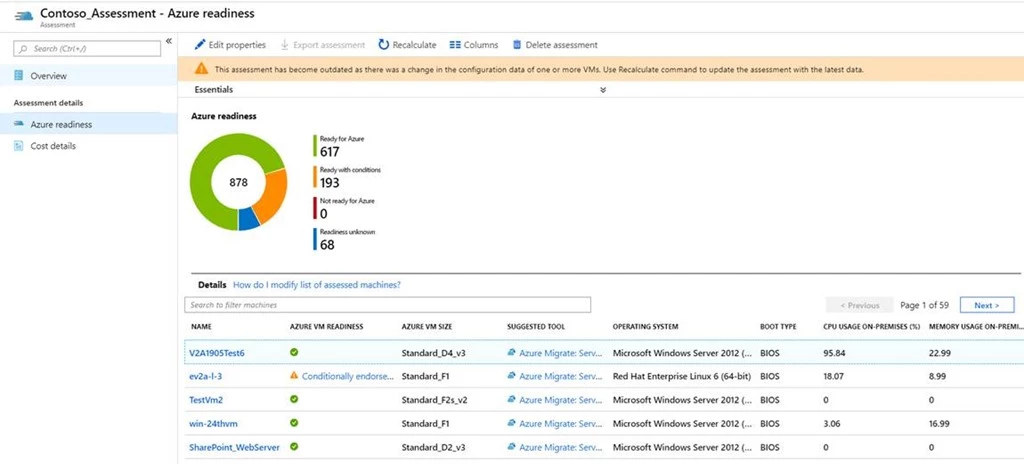
The assessment checks Azure support for each server discovered and determines whether the server can be migrated as-is to Azure. If incompatibilities are found, remediation guidance is automatically provided. You can customize your assessment by changing its properties, and recomputing the assessment. Among other customizations, you can choose a virtual machine series of your choice and specify the uptime of the workloads you will run in Azure.
Cost estimation and sizing
Assessment also provides detailed cost estimates. Performance-based rightsizing assessments can be used to optimize on cost; the performance data of your on-premises server is used to recommend a suitable Azure Virtual Machine and disk SKU. This helps to optimize on cost and right-size as you migrate servers that might be over-provisioned in your on-premises data center. You can apply subscription offers and Reserved Instance pricing on the cost estimates.
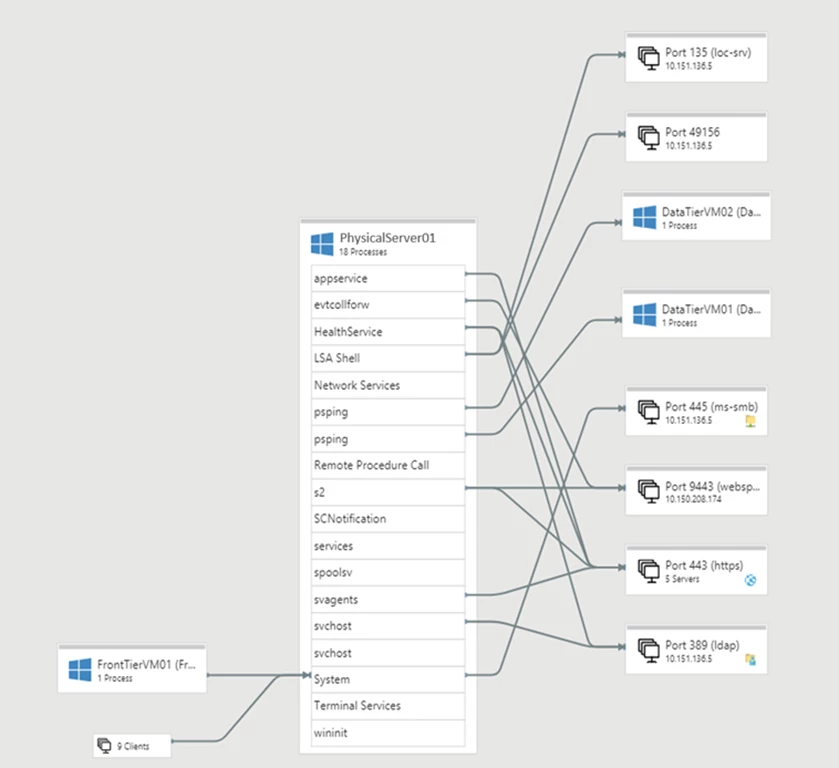
Dependency analysis
Once you have established cost estimates and migration readiness, you can plan your migration phases. Using the dependency analysis feature, you can understand which workloads are interdependent and need to be migrated together. This also helps ensure you do not leave critical elements behind on-premises. You can visualize the dependencies in a map or extract the dependency data in a tabular format. You can divide your servers into groups and refine the groups for migration by reviewing the dependencies.
Assess your physical servers in four simple steps
- Create an Azure Migrate project and add the Server Assessment solution to the project.
- Set up the Azure Migrate appliance and start discovery of your server. To set up discovery, the server names or IP addresses are required. Each appliance supports discovery of 250 servers. You can set up more than one appliance if required.
- Once you have successfully set up discovery, create assessments and review the assessment reports.
- Use the application dependency analysis features to create and refine server groups to phase your migration.
When you are ready to migrate the servers to Azure, you can use Server Migration to carry out the migration. You can read more about migrating physical servers. In the coming months, we will add support for application discovery and agentless dependency analysis on physical servers as well.
Note that the inventory metadata gathered is persisted in the geography you select while creating the project. You can select a geography of your choice. Server Assessment is available today in Asia Pacific, Australia, Brazil, Canada, Europe, France, India, Japan, Korea, United Kingdom, and United States geographies.
Get started right away by creating an Azure Migrate project. In the upcoming blogs, we will talk about import-based assessments, application discovery, and agentless dependency analysis.
Resources to get started
- Tutorial on how to assess physical servers using Azure Migrate: Server Assessment.
- Prerequisites for assessment of physical servers
- Guide on how to plan an assessment for a large-scale environment. Each appliance supports discovery of 250 servers. You can discover more servers by adding
- Tutorial on how to migrate physical servers using Azure Migrate: Server Migration.