Azure Stream Analytics is a fully managed PaaS offering that enables real-time analytics and complex event processing on fast moving data streams. Thanks to zero-code integration with over 15 Azure services, developers and data engineers can easily build complex pipelines for hot-path analytics within a few minutes. Today, at Inspire, we are announcing various new innovations in Stream Analytics that help further reduce time to value for solutions that are powered by real-time insights. These are as follows:
Bringing the power of real-time insights to Azure Event Hubs customers
Today, we are announcing one-click integration with Event Hubs. Available as a public preview feature, this allows an Event Hubs customer to visualize incoming data and start to write a Stream Analytics query with one click from the Event Hub portal. Once the query is ready, they will be able to operationalize it in few clicks and start deriving real time insights. This will significantly reduce the time and cost to develop real-time analytics solutions.
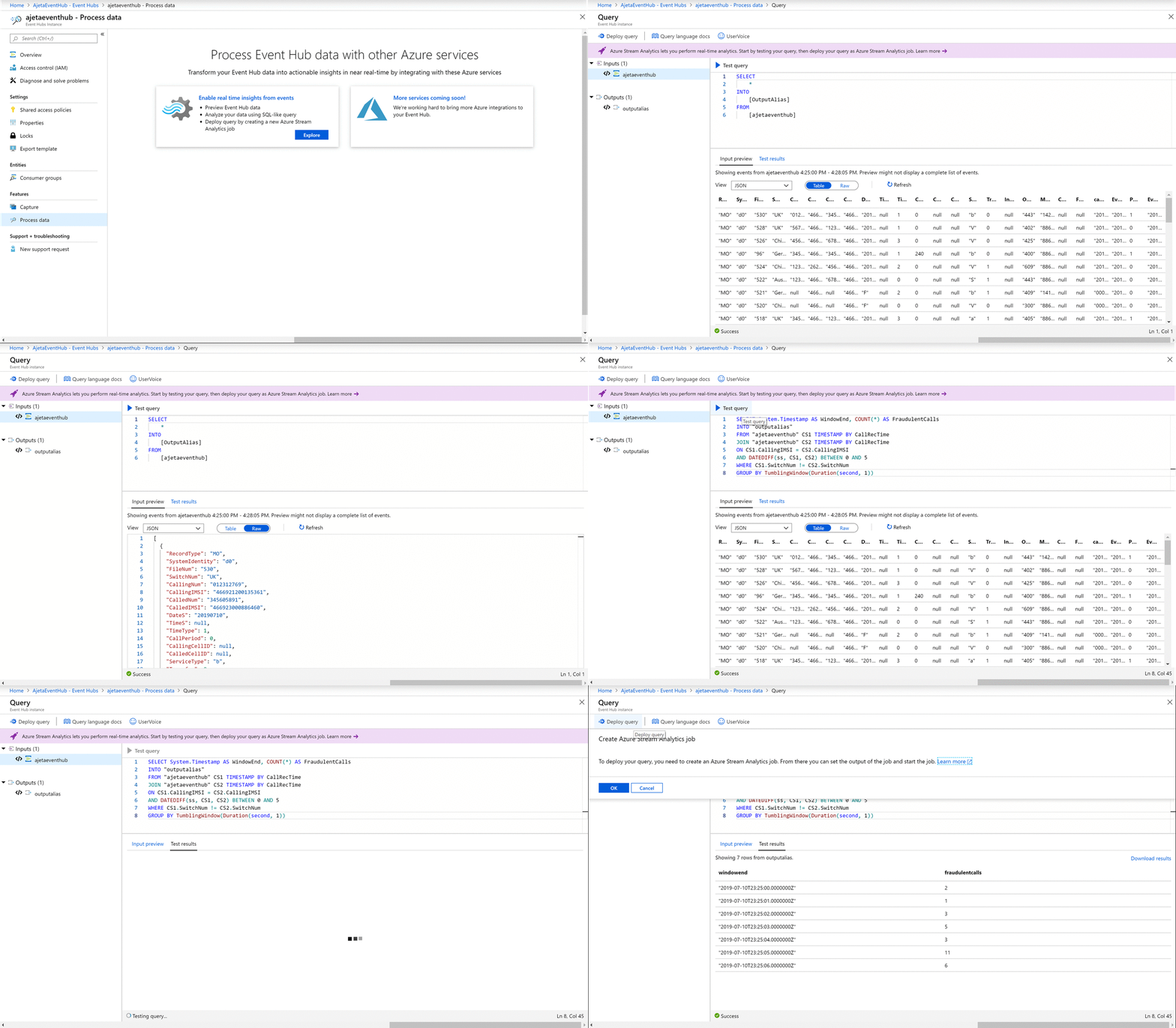
One-click integration between Event Hubs and Azure Stream Analytics
Augmenting streaming data with SQL reference data support
Reference data is a static or slow changing dataset used to augment real-time data streams to deliver more contextual insights. An example scenario would be currency exchange rates regularly updated to reflect market trends, and then converting a stream of billing events in different currencies to a common currency of choice.
Now generally available (GA), this feature provides out-of-the-box support for Azure SQL Database as reference data input. This includes the ability to automatically refresh your reference dataset periodically. Also, to preserve the performance of your Stream Analytics job, we provide the option to fetch incremental changes from your Azure SQL Database by writing a delta query. Finally, Stream Analytics leverages versioning of reference data to augment streaming data with the reference data that was valid at the time the event was generated. This ensures repeatability of results.
New analytics functions for stream processing
- Pattern matching:
With the new MATCH_RECOGNIZE function, you can easily define event patterns using regular expressions and aggregate methods to verify and extract values from the match. This enables you to easily express and run complex event processing (CEP) on your streams of data. For example, this function will enable users to easily author a query to detect “head and shoulder” patterns on the on a stock market feed.
- Use of analytics function as aggregate:
You can now use aggregates such as SUM, COUNT, AVG, MIN, and MAX directly with the OVER clause, without having to define a window. Analytics functions as Aggregates enables users to easily express queries such as “Is the latest temperature greater than the maximum temperature reported in the last 24 hours?”
Egress to Azure Data Lake Storage Gen2
Azure Stream Analytics is a central component within the Big Data analytics pipelines of Azure customers. While Stream Analytics focuses on the real-time or hot-path analytics, services like Azure Data Lake help enable batch processing and advanced machine learning. Azure Data Lake Storage Gen2 takes core capabilities from Azure Data Lake Storage Gen1 such as a Hadoop compatible file system, Azure Active Directory, and POSIX based ACLs and integrates them into Azure Blob Storage. This combination enables best in class analytics performance along with storage tiering and data lifecycle management capabilities and the fundamental availability, security, and durability capabilities of Azure Storage.
Azure Stream Analytics now offers native zero-code integration with Azure Data Lake Storage Gen2 output (preview.) This feature is currently available in limited regions worldwide. You may request access to the preview by providing additional details in our request form.
Enhancements to blob output
- Native support for Apache parquet format:
Native support for egress in Apache parquet format into Azure Blob Storage is now generally available. Parquet is a columnar format enabling efficient big data processing. By outputting data in parquet format into a blob store or a data lake, you can take advantage of Azure Stream Analytics to power large scale streaming extract, transfer, and load (ETL), to run batch processing, to train machine learning algorithms, or to run interactive queries on your historical data. We are now announcing general availability of this feature for egress to Azure Blob Storage.
- Managed identities (formerly MSI) authentication:
Azure Stream Analytics now offers full support for Managed Identity based authentication with Azure Blob Storage on the output side. Customers can continue to use the connection string based authentication model. This feature is available as a public preview.
Many of these features just started rolling out worldwide and will be available in all regions within several weeks.
Feedback
The Azure Stream Analytics team is highly committed to listening to your feedback and letting the user voice influence our future investments. We welcome you to join the conversation and make your voice heard via our UserVoice page.