This month’s updates include an improved “All services” view, Virtual Network Gateway overview updates, an improved DNS Zone and Load Balancer creation experience, Management Group integration into Activity Log, redesigned overview screens for certain services within Azure DB, an improved creation experience for Azure SQL Database, multiple changes to the Security Center, and more updates to Intune.
Sign in to the Azure portal now and see for yourself everything that’s new. Download the Azure mobile app to stay connected to your Azure resources anytime, anywhere.
Here’s the list of March updates to the Azure portal:
Shell
IaaS
Management experiences
SQL
- Redesigned overview blade for Azure Database for MySQL, PostgreSQL, and MariaDB services
- Improved creation experience for Azure SQL Database
Azure Security Center
- Secure score added as a dashboard KPI
- New regulatory compliance dashboard
- Updated security policies
- Updated security recommendations
Other
Shell
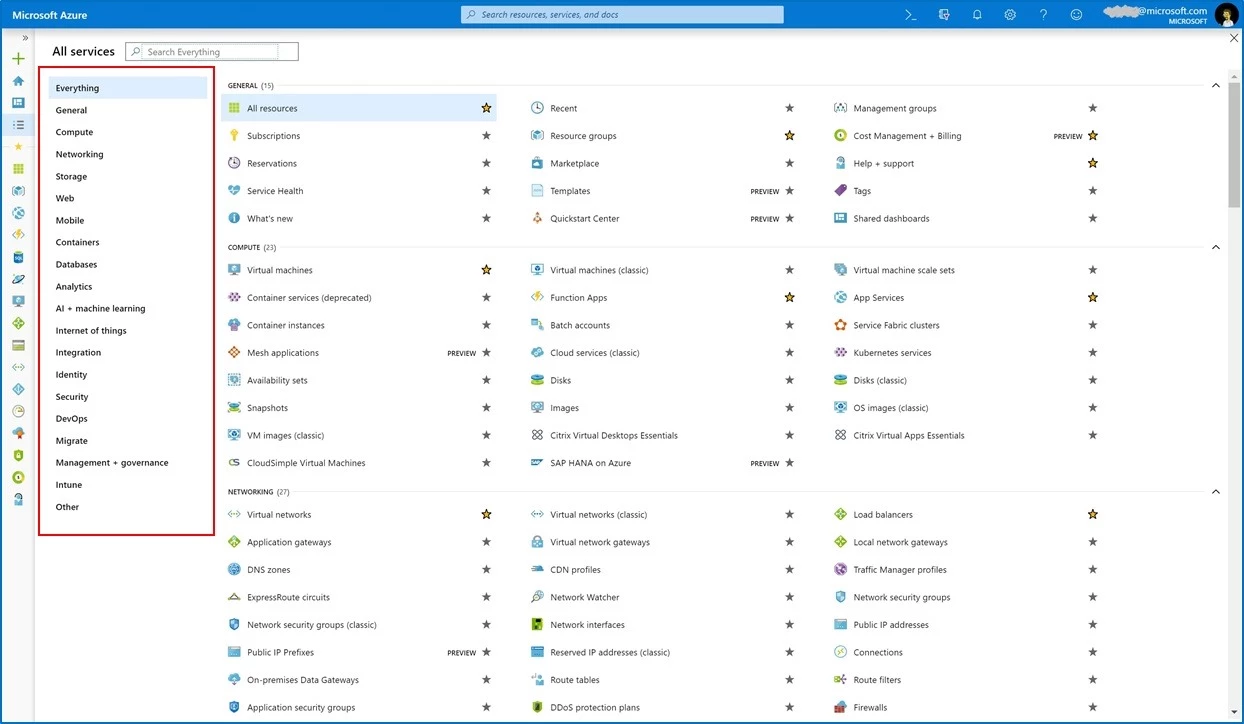
We have improved the “All services” view, the view that shows all available services and resources in Azure:
- The entire screen’s real estate is now utilized to show more services.
- A category index has been added at the left to help navigate the Azure offering.
IaaS
Virtual network gateway overview updates
We’ve made significant updates to the overview page for virtual network gateways. We’ve added shortcut tiles in the center of the page to make it easier to find troubleshooting tools, and we’ve added a tile that brings up documentation so you can quickly learn more about your resource. We’ve also added metric charts so you can see at a glance what the tunnel ingress and egress are for your gateway.
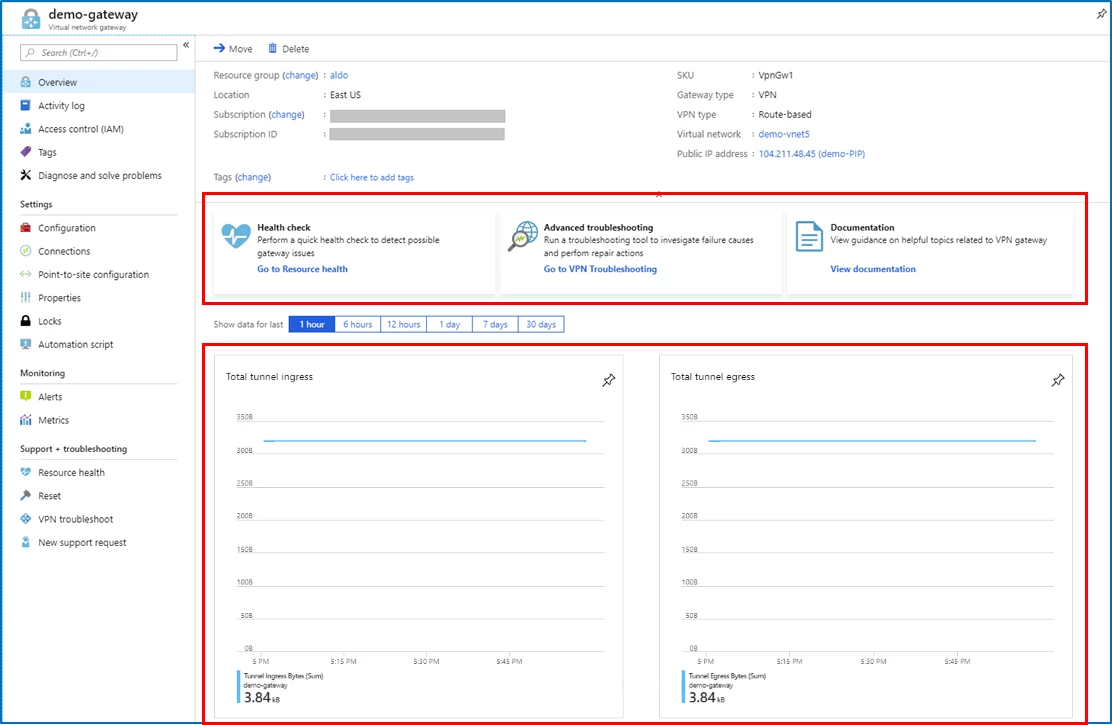
Go to any virtual network gateway resource to try out the changes.
Improved creation experience for DNS Zones and Load Balancer
We are continuing our efforts to bring improved and consistent instance creation experiences for our top-level resources. As part of that effort, we’ve just updated DNS Zones and Load Balancer. This updated flow eliminates horizontal scrolling during the creation workflow and follows the same UI patterns that we use in other popular services like Virtual Machine, Storage, Cosmos DB, and Azure Kubernetes Service, resulting in easier to learn and better customer experiences.
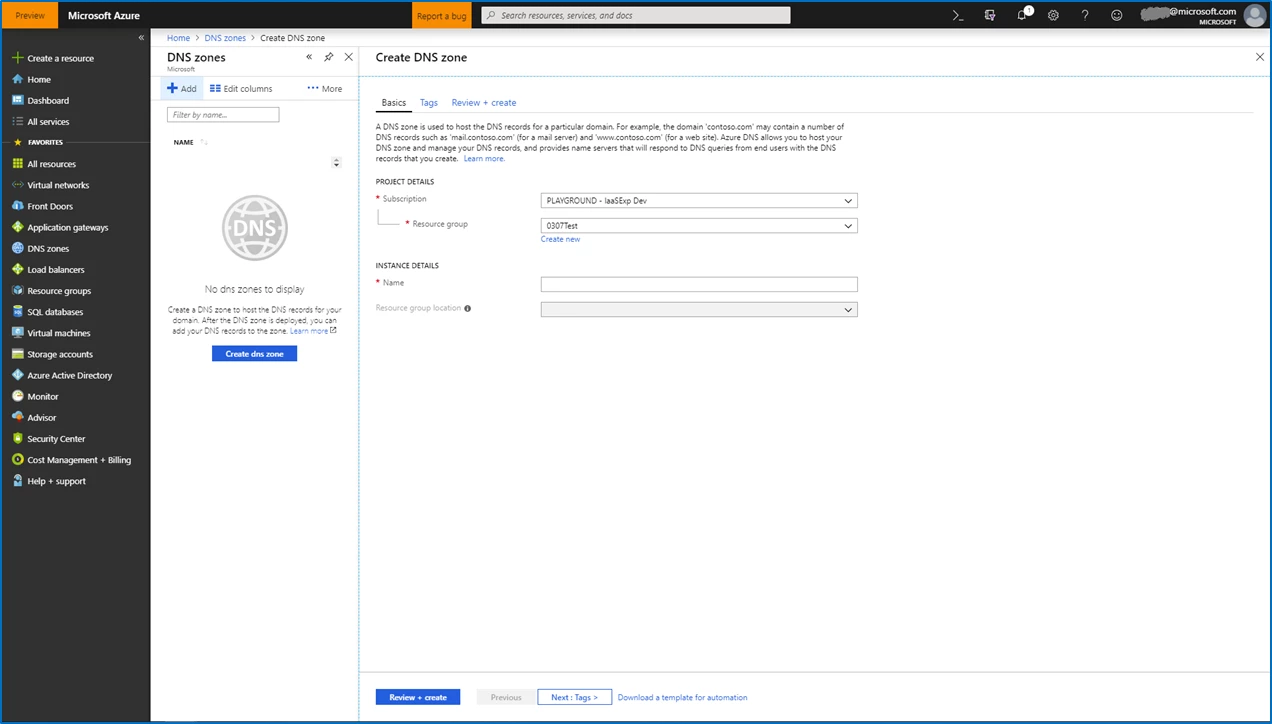
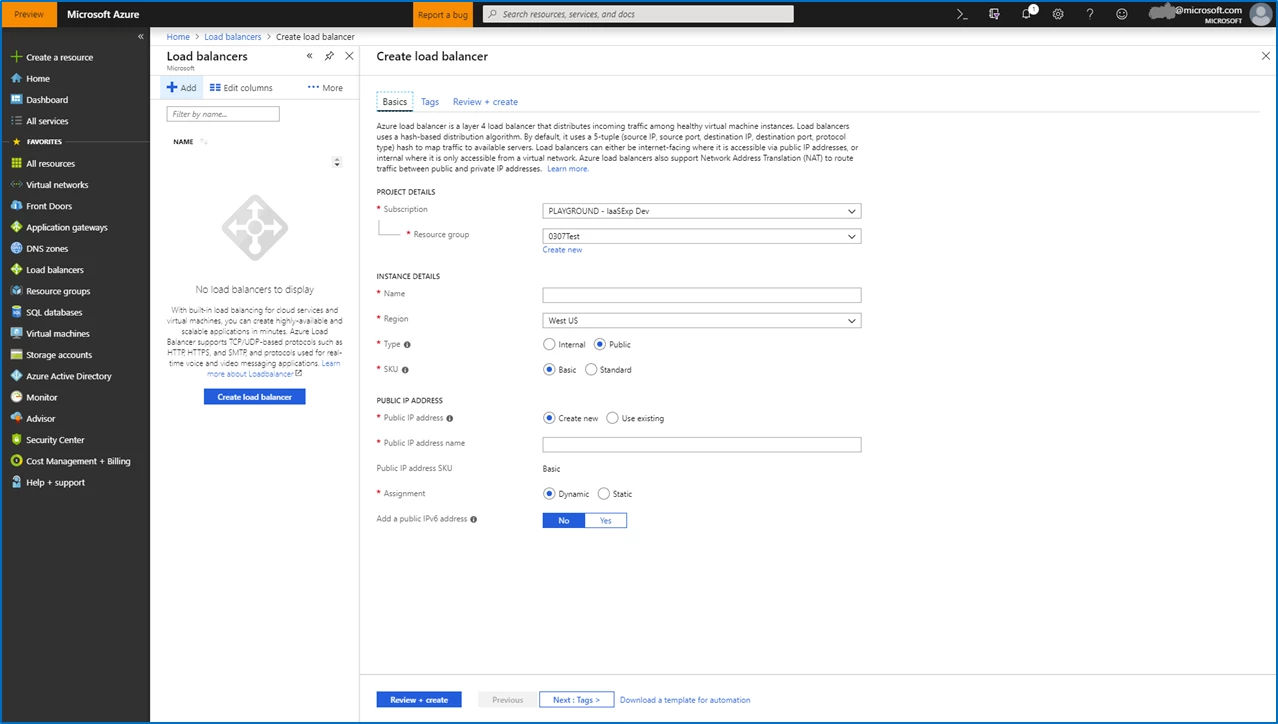
- Bring up either the DNS zone or Load Balancer resource in the Azure portal
- Select Add to launch the new create experience
Management experiences
Management Group integration into Activity Log
Azure Management Groups provide a level of scope above subscriptions and is being adopted across the Azure Portal. Users had been asking to view Management Groups events in the Activity Log, and now, integration of Management Group events and filtering into the Activity Logs allows users to audit their Management Groups. An authorized user of a Management Group can go to the Activity Log and see all actions that have happened on a Management Group such as create, edit, delete, and parent change. In addition, you can now audit Policy Assignments on Management Groups.
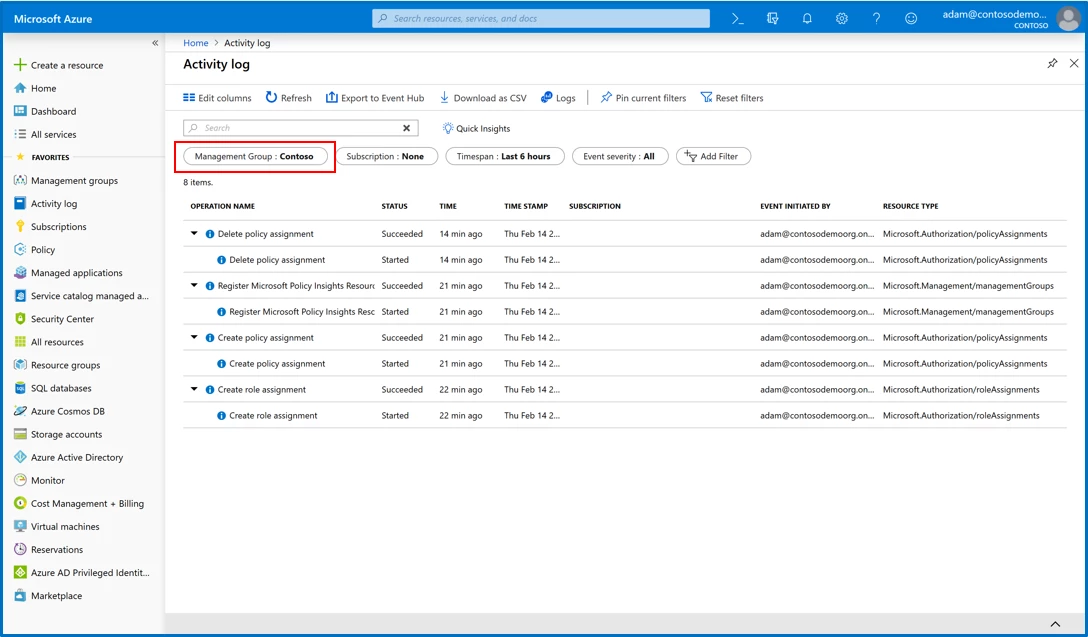
- If you have access to Management Groups in your current tenant, simply navigate to the Activity Log.
- Select what Management Group you want to filter by using the first pill on the left.
SQL
Redesigned overview blades for Azure Database for MySQL, PostgreSQL, and MariaDB services
We have redesigned the overview blade for MySQL, PostgreSQL, and MariaDB, which provides an at-a-glance understanding of the status of your server. It is also aligned with the overview design of Azure SQL Database, Elastic Pools, Managed Instance, and Data Warehouse. In the overview, you can now see the resource usage over the last hour, common tasks, features available, and whether the features have been configured. Clicking on any of these tiles in the overview takes you to the full details and settings.
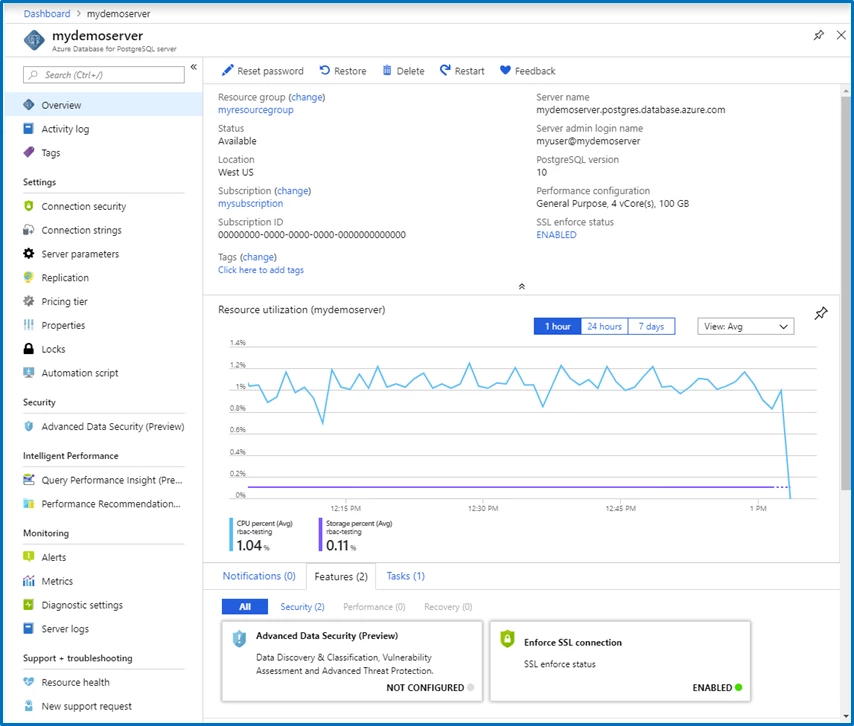
- Select All Services
- Search and select either Azure Database for MySQL, Azure Database for PostgreSQL, or Azure Database for MariaDB
- Select any server from the list
- Observe the overview blade
Improved creation experience for Azure SQL Database
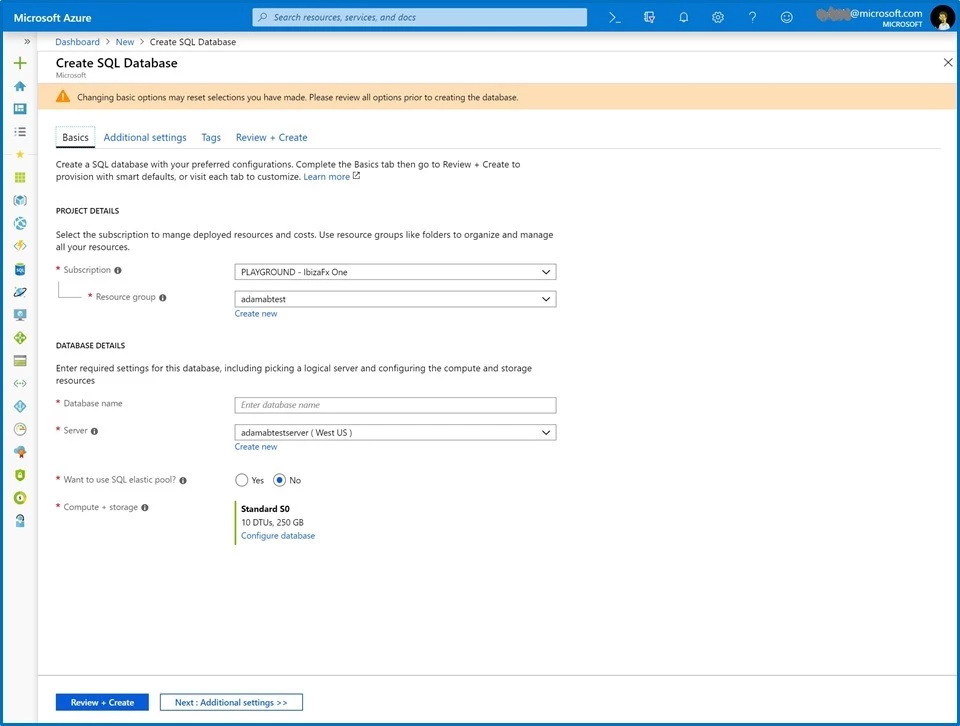
We are continuing our efforts to bring improved and consistent creation experiences for our top-level resources. As part of that effort, we’ve just updated the SQL database create workflow. This updated flow eliminates horizontal scrolling during the creation workflow and follows the same UI patterns that we use in other popular services like VM, Storage, Cosmos DB and AKS, resulting in easier to learn and better customer experiences.
Azure Security Center
Secure score as a dashboard KPI
Secure score is now the main compliance KPI in the Azure Security Center dashboard, replacing the previous percentage-based compliance metric.
New regulatory compliance dashboard
The new Azure Security Center regulatory compliance dashboard helps streamline the process for meeting regulatory compliance requirements by providing insights into your compliance posture. The information provided is based on continuous assessments of your Azure environment.
Updated security policies
We are updating Azure Security Center policies to use Azure Policy. You will be migrated automatically, no action is required by you. For more information see our documentation, “Working with security policies.”
Updated security recommendations
Azure App Service security recommendations have been improved to provide greater accuracy and environment compatibility. For more information see out documentation, “Protecting your machines and applications in Azure Security Center.”
Other
Updates to Microsoft Intune
The Microsoft Intune team has made updates to Microsoft Intune. You can find them on the What’s new in Microsoft Intune page.
Did you know?
We now have several new videos in the recently launched Azure portal “how to” video series! This weekly series highlights specific aspects of the portal so you can be more efficient and productive while deploying your cloud workloads from the portal. Recent videos include a demonstration of how to create, share, and use dashboards, how to manage virtual machines while on the go using the Azure mobile app, and how to configure a virtual machine with the Azure portal. Keep checking in to our playlist on YouTube for a new video each week.
Next steps
The Azure portal’s large team of engineers always wants to hear from you, so please keep providing us with your feedback in the comments section below or on Twitter @AzurePortal.
Don’t forget to sign in the Azure portal and download the Azure mobile app today to see everything that’s new. See you next month!