TypeScript is becoming increasingly popular in the JavaScript community. Since Azure Functions runs Node.js, and TypeScript compiles to JavaScript, motivated users already could get TypeScript code up and running in Azure Functions. However, the experience wasn’t seamless, and things like our default folder structure made getting started a bit tricky. Today we’re pleased to announce a set of tooling improvements that improve this situation. Azure Functions users can now easily develop with TypeScript when building their event-driven applications!
For those unfamiliar, TypeScript is a superset of JavaScript which provides optional static typing, classes, and interfaces. These features allow you to catch bugs earlier in the development process, leading to more robust software engineering. TypeScript also indirectly enables you to leverage modern JavaScript syntax, since TypeScript is compatible with ECMAScript 2015.
With this set of changes to the Azure Functions Core Tools and the Azure Functions Extension for Visual Studio Code, Azure Functions now supports TypeScript out of the box! Included with these changes are a set of templates for TypeScript, type definitions, and npm scripts. Read on to learn more details about the new experience.
Templates for TypeScript
In the latest version of the Azure Functions Core Tools and the Azure Functions Extension for VS Code, you’re given the option to use TypeScript when creating functions. To be more precise, on creation of a new function app, you will now see the option to specify TypeScript on language stack selection. This action will opt you into default package.json and .tsconfig files, setting up their app to be TypeScript compatible. After this, when creating a function, you will be able to select from a number of TypeScript specific function templates. Each template represents one possible trigger, and there is an equivalent present in TypeScript for each template supported in JavaScript.
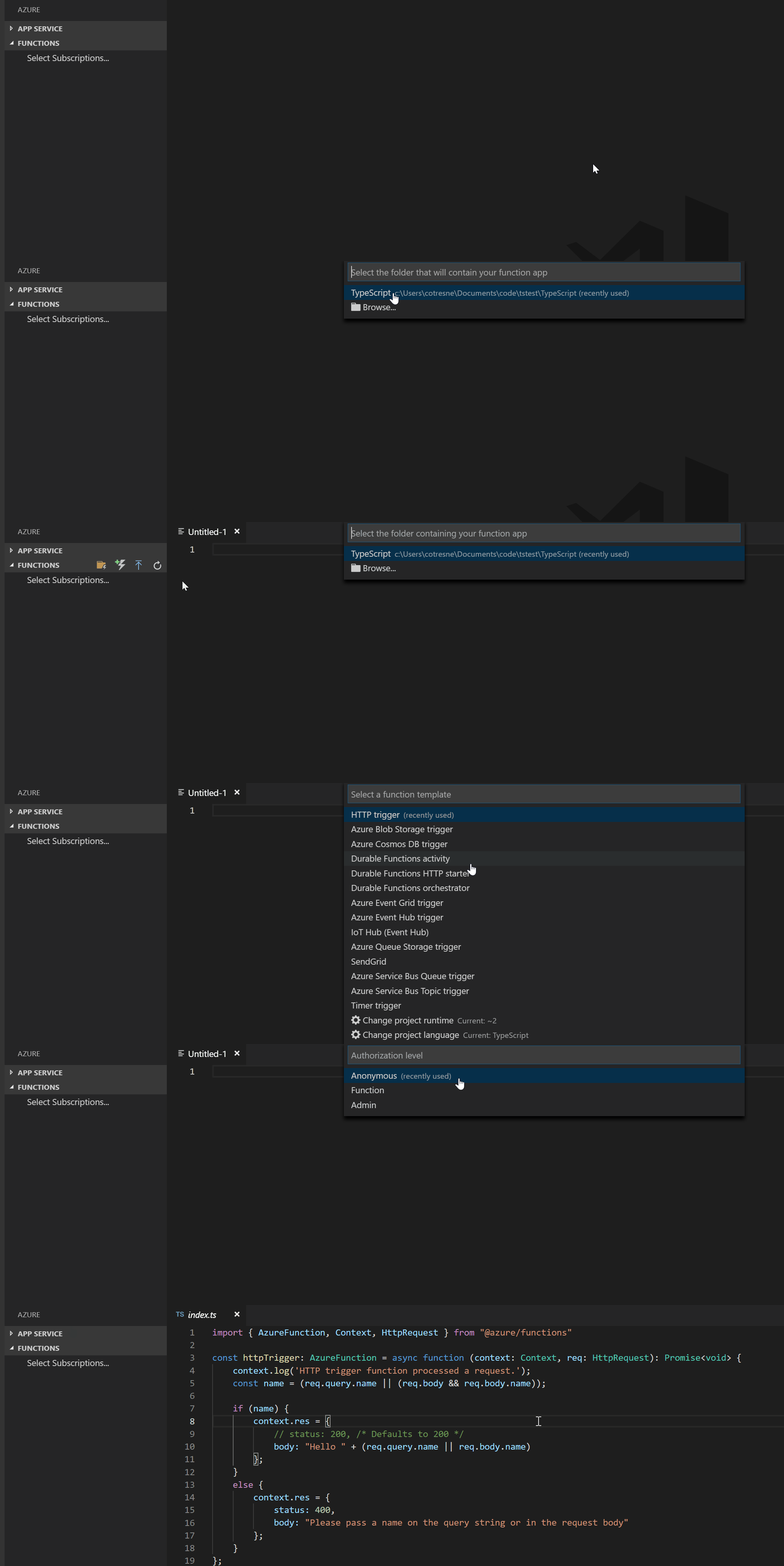
The best part of this new flow is that to transpile and run TypeScript functions, you don’t have to take any actions at all that are unique to Functions. For example, what this means is that when a user hits F5 to start debugging Visual Studio Code, Code will automatically run the required installation tasks, transpile the TypeScript code, and start the Azure Functions host. This local development experience is best in class, and is exactly how a user would start debugging any other app in VS Code.
Learn more about how to get your TypeScript functions up and running in our documentation.
Type definitions for Azure Functions
The @azure/functions package on npm contains type definitions for Azure Functions. Have you ever wondered what’s an Azure Function object is shaped like? Or maybe, the context object that is passed into every JavaScript function? This package helps! To get the most of TypeScript, this should to be imported in every .ts function. JavaScript purists can benefit too – including this package in your code gives you a richer Intellisense experience. Check out the @azure/functions package on npm to learn more!
Npm scripts
Included by default in the TypeScript function apps is a package.json file including a few simple npm scripts. These scripts allow Azure Functions to fit directly into your typical development flow by calling specific Azure Functions Core Tools commands. For instance, ‘npm start’ will automatically run ‘func start’, meaning that after creating a function app you don’t have to treat it differently than any other Node.js project.
To see these in action, check out our example repo!
Try it yourself!
With either the Azure Functions Core Tools or the Azure Functions Extension for VS Code, you can try out the improved experience for TypeScript in Azure Functions on your local machine, even if you don’t have an Azure account.
Next steps
- Get started with Azure Functions in VS Code.
- Get started with Azure Functions in your CLI with the Azure Functions Core Tools.
- Check out a sample TypeScript Function App.
- Take a look at the Azure Functions JavaScript Developer Guide for additional details.
- Sign up for an Azure free account if you don’t have one, and deploy your serverless apps to the cloud.
As always, feel free to reach out to the team with any feedback on our GitHub or Twitter. Happy coding!