Microsoft customers rely on Azure to host mission-critical workloads and services. A substantial percentage use the traditional infrastructure-as-a-service (IaaS) approach to deploying virtual machines, often orchestrated with Azure Virtual Machine Scale Sets or third-party tools.
Customers rely on Azure to provide compute capacity on demand. However, in some situations, customers need more specific assurances:
- Business-critical applications—certain business processes can be disrupted even by a temporary interruption.
- Disaster recovery (DR)—in the event of a natural disaster, businesses require capacity guarantees to recover and resume operations in a different location.
- Special events—sometimes a substantial surge in capacity is expected, obtaining capacity assurance can ensure that business performance remains at the highest levels.
Until now, the only way to obtain a service level agreement (SLA) for Azure Virtual Machines capacity has been to deploy actual virtual machines (VM), whether running or stopped. This can lead to management overhead to keep all VMs up to date and impedes the use of compute capacity for other business purposes, for example when the VMs are not needed for a primary workload.
Introducing on-demand capacity reservations
Today we are announcing the preview of on-demand capacity reservations for Azure Virtual Machines. This new feature allows you to deploy and manage the compute capacity required to run Azure VMs separately from the VMs themselves. On-demand capacity reservations will come with a defined SLA (forthcoming at general availability).
This creates new options for you to better manage your capacity needs. More specifically, as outlined above:
- Business-critical applications—use on-demand capacity reservations to protect your capacity, for example when taking these VMs offline to perform updates.
- Disaster recovery—you now have the option to set aside compute capacity to ensure a seamless recovery in the event of a natural disaster. The compute capacity can be repurposed to run other workloads whenever DR is not in effect. The VM maintenance can be handled by keeping core images up to date without the need to deploy or maintain VMs outside of DR testing.
- Special events—claiming capacity ahead of time provides assurance that your business can handle the extra demand.
An on-demand capacity reservation will operate as a deployable object: specify a VM size, location, and quantity using the Compute Resource Provider. Upon successful completion of a reservation, customers can then assign VMs to the reserved capacity. The reservation is on-demand because there is no term commitment required. You can delete on-demand capacity reservations whenever they are no longer needed.
The lack of a term commitment means that reservations can be made using pay-as-you-go terms based on the underlying price of the VM size (without the cost of the operating system you may want to deploy later on), location, and quantity of the reservation. Within the Azure billing system, any available term discounts from purchased Reserved VM Instances (RIs) will be automatically applied. The rules for applying RIs to VM usage will be the same that we have in place today for reservations and virtual machines. See also the on-demand capacity reservations documentation for more details on pricing.
Here is a comparison between on-demand capacity reservations and RIs:
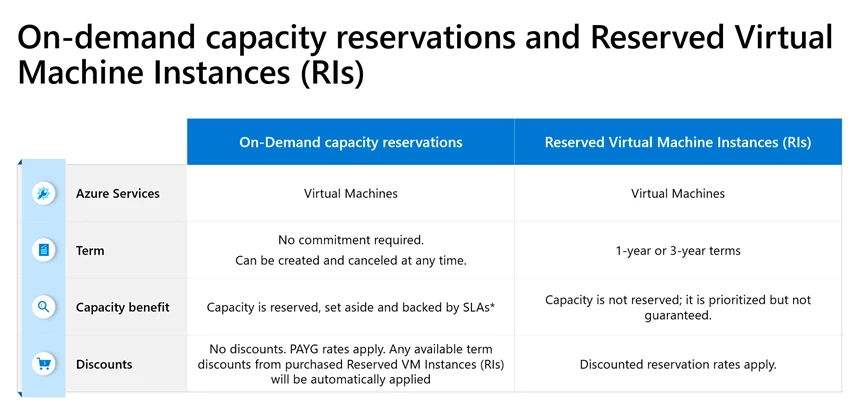
*SLA guarantees will apply only after general availability
Once the feature becomes generally available, if you successfully create an on-demand capacity reservation, the SLA will supersede the capacity priority option on any applicable RIs. You can configure your RIs for size flexibility to maximize your discounted usage.
Existing and future capabilities
During the preview, register each subscription to access the API and Azure portal interfaces.
The preview supports general-purpose Azure VM families:
- Burstable (B)
- General-purpose (Av2, Dv2, and later generations including Dav4)
- General purpose, memory-optimized (Ev3 and later generations including Eav4)
- Compute-optimized (Fv1 and newer)
We are planning to support additional VM series. Expect additional announcements later this year. Region support is inclusive of Azure Public Cloud locations that are generally available. Microsoft plans to extend support to Azure for US Government and Azure China in the near future.
The ability to use reserved capacity will be extended to more scenarios in the coming months. For example, stay tuned for the direct integration with Azure Site Recovery (coming soon in preview).
Resources to get started
If you would like to learn more about on-demand capacity reservations, you can watch this introductory video and see how they work.
You can also read the on-demand capacity reservations documentation, which includes sample code.