Skip to main content Explore View all products (200+) Microsoft Foundry Azure Copilot GitHub Copilot Azure Kubernetes Service (AKS) Azure Cosmos DB Azure Database for PostgreSQL Azure Arc Microsoft Fabric Linux virtual machines in Azure Foundry Models Foundry Agent Service Foundry IQ Foundry Tools Foundry Control Plane Observability in Foundry Control Plane Azure OpenAI in Foundry Models Azure Speech in Foundry Tools Azure Machine Learning View all databases Azure Cosmos DB Azure DocumentDB Azure SQL Azure Database for PostgreSQL Azure Managed Redis Microsoft Fabric Azure Databricks Linux virtual machines in Azure Windows Server on Azure Azure Functions Azure Virtual Machine Scale Sets Azure API Management Azure Container Apps Azure Kubernetes Service (AKS) Azure Kubernetes Fleet Manager Azure Container Registry Azure Red Hat OpenShift Azure Container Instances Azure Container Storage Azure Arc Azure Local Microsoft Defender for Cloud Azure Monitor Microsoft Sentinel Azure Migrate View all solutions (40+) Cloud solutions for small and medium businesses Cloud migration and modernization center Data analytics for AI Azure Databases AI apps and agents Microsoft Marketplace Microsoft Sovereign Cloud AI apps and agents Responsible AI with Azure AI Infrastructure Data analytics for AI Machine learning operations (MLOps) Low-code application development on Azure Integration Services Serverless computing DevOps Migration and modernization center .NET apps migration Databases on Azure Linux on Azure Oracle on Azure SAP on the Microsoft Cloud Adaptive cloud High-performance computing (HPC) Infrastructure as a service (IaaS) Resiliency Azure Essentials Frontier Accelerate for Azure FinOps on Azure Microsoft Marketplace Azure pricing overview Create an Azure account Free Azure services Flexible purchase options Pricing calculator FinOps on Azure Maximize ROI from AI Azure savings plans Azure reservations Azure Hybrid Benefit Virtual Machines Azure SQL Microsoft Foundry Microsoft Fabric Azure Kubernetes Service (AKS) Microsoft Defender for Cloud View more Software Development Companies Microsoft Marketplace Find a partner Resources for Azure partners Get started with Azure Customer stories Analyst reports, white papers, and e-books Videos Learn more about cloud computing Documentation Explore Azure portal Developer resources Quickstart templates Resources for startups Developer community Students Azure for partners Blog Events and Webinars Learn Support Contact Sales Get started with Azure Sign in

Azure Service Health is extending its ability to help you stay informed about the availability of your Azure resources. Starting today, you can configure resource health alerts to notify you immediately when your resources become unavailable due to Azure platform issues, even before outages are declared.

Resource health alerts take advantage of the Azure Activity Log and resource health data to provide you with prompt notifications as these events take place. Check out this video to get an overview and see a quick demo of these new resource health alerts.

Stay informed about resource availability with resource health alerts

It’s easier than ever to stay informed about your resources’ availability, minute by minute, and to determine whether any issues you’re experiencing are due to a problem with you or with Azure.

You can now configure resources health alerts to monitor your resources and notify you when they become unavailable, recover, or go through any health transitions. Additionally, you can choose to focus on platform-level issues by ignoring events which result from user-initiated actions like an Azure Virtual Machine (VM) restart. This way, you can find out about platform events even before outages are officially declared.
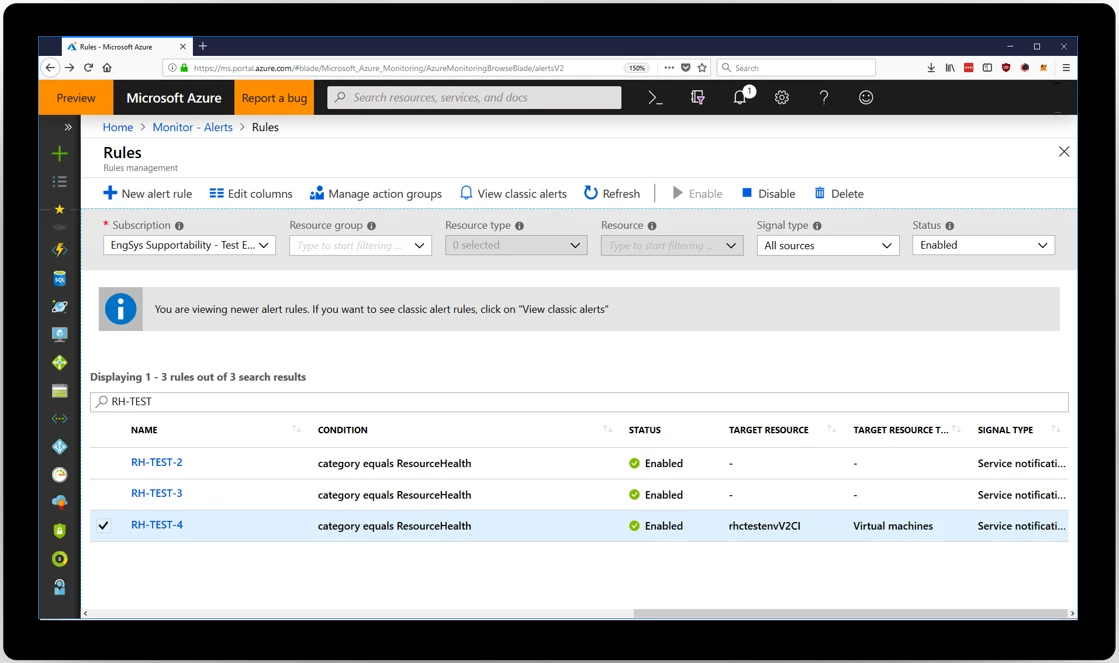
Resource health alerts

You can manage how these alerts notify you by configuring them to send you an SMS, email, or push notification. You can even set up webhooks with downstream services like Service Now, PagerDuty, OpsGenie, and more. We provide detailed guidance on how you can programmatically create these alerts and configure them to fit your needs in our Azure Service Health documentation.

Access resource health events in the Azure Activity Log

Resource health events are now stored and accessible through the Azure Activity Log. This means that you can automatically start ingesting this data into your downstream services like Log Analytics, Splunk, and more. Like other Activity Log events, you can now access resource health programmatically using our ARM Insights APIs. Resource health currently supports over 30 different resource types, and more will be added over time. Learn more about the resource health activity log schema.
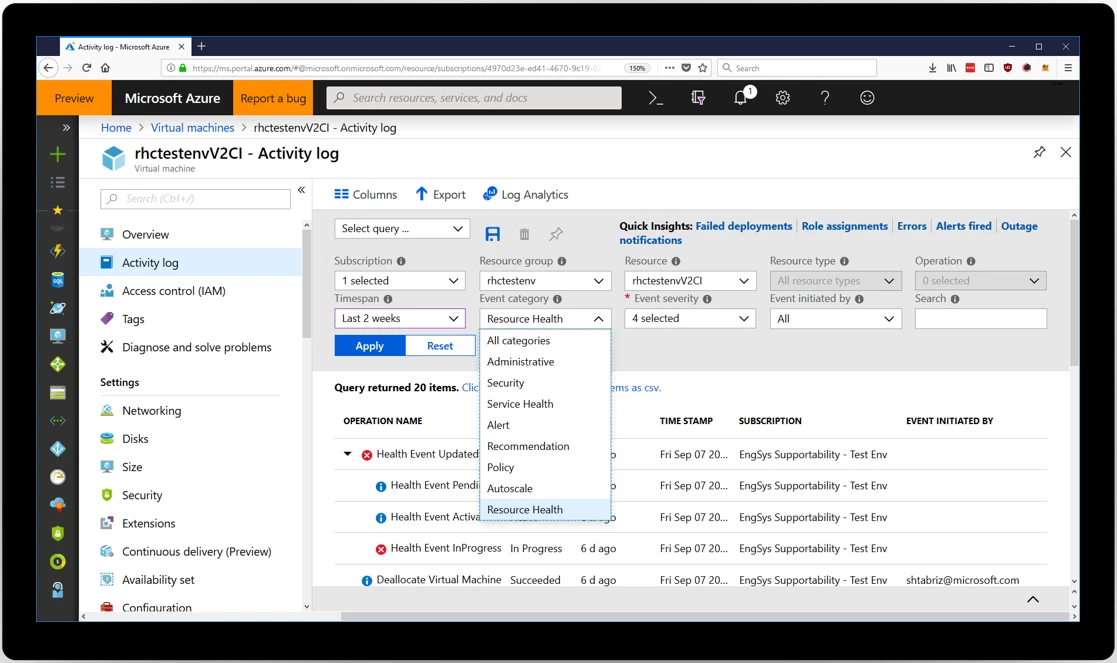
Accessing resource health events in Azure Activity Log

Prepare for the unexpected with resource health alerts today

We know how important it is that you stay informed about the availability of your resources, and we hope these new features will help you stay aware and in control of the status of your Azure environment. To get started, visit the Azure Service Health webpage and review the Azure Service Health documentation today.

As you dive in, we would love your feedback about your experiences. Reach out to us at servicehealth@microsoft.com.


WE ARE MICROSOFT

Explore Microsoft Foundry

The future of AI starts here. Envision your next great AI app with the latest technologies. Get started with Azure.