Azure Databricks has clear advantages over other cloud service providers
This blog is a supplement to the Azure Databricks: Differentiated Synergy blog post and continues to define the differentiation for Azure Databricks in the cloud data analytics and AI landscape.
Azure Databricks: Powering analytics for the data-driven enterprise
In today’s data-driven world, organizations are seeking analytics platforms that simplify management, offer seamless scalability, and deliver consistent performance. While Databricks is available across major cloud service providers (CSPs), not all implementations are equal. Azure Databricks is a first party Microsoft offering co-engineered by Microsoft and Databricks, which stands out for its superior integration, performance, and governance capabilities. It not only delivers strong performance for workloads like decision support systems (DSSs), but it also seamlessly integrates with the Microsoft ecosystem, including solutions such as Azure AI Foundry, Microsoft Power BI, Microsoft Purview, Microsoft Power Platform, Microsoft Copilot Studio, Microsoft Entra ID, Microsoft Fabric, and much more. Choosing Azure Databricks can streamline your entire data lifecycle—from data engineering and Extract Transform Load (ETL) workloads to machine learning (ML), AI, and business intelligence (BI)—within a single, scalable environment.
Performance that matters
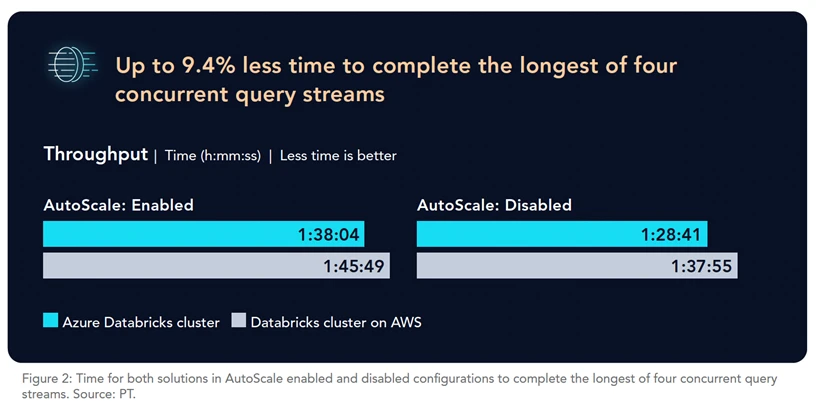
Principled Technologies (PT), a third-party technology assessment firm, recently analyzed the performance of Azure Databricks and Databricks on Amazon Web Services (AWS). PT stated that Azure Databricks, the Microsoft first-party Databricks service, outperformed Databricks on AWS—it was up to 21.1% faster for single query streams and saved over 9 minutes on four concurrent query streams.
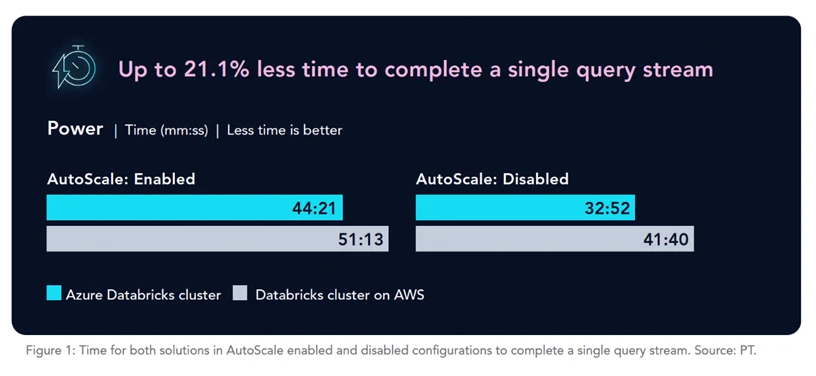
Faster execution for a single query stream demonstrates the better experience a lone user would have. For example, data engineers, scientists, and analysts, and other key users could save time when running multiple detailed reports, tasking the system to handle heavy analytical queries without resource competition.
Faster concurrent query performance demonstrates the better experience multiple users would have while running analyses at the same time. For example, your analysts from different departments can save time when running reports or dashboards simultaneously, sharing cluster resources.
With or without autoscale?1, 2
If cost is a top priority, we recommend autoscaling your Azure Databricks cluster. When certain parts of your data pipeline are more computationally intensive, autoscale enables Azure Databricks to add compute resources and then remove them when the intensity cools down. This can help reduce your costs compared to static compute sizing. Considering the total cost of ownership (TCO) for data and AI platforms is essential, in addition to their integration and optimization capabilities combined with data gravity. An autoscaling cluster is often the most cost-effective option, though it may not be the fastest. If consistent performance is a top priority, consider disabling autoScale.
Key differences: Azure Databricks versus Databricks on other clouds deployed as third party
While all three CSPs offer Databricks, several factors distinguish Azure Databricks:
- Underlying infrastructure: Azure Databricks is deeply optimized for Azure Data Lake Storage (ADLS), while AWS uses S3 and Google Cloud uses its own storage solution.
- Control plane: Management layers differ, affecting billing, access control, and resource management.
- Ecosystem integrations: Azure Databricks natively integrates with Microsoft services like Power BI, Microsoft Fabric, Microsoft Purview, Azure AI Foundry, Power Platform, Copilot Studio, Entra ID, and more.
- Pricing: Each CSP has different pricing models, so it’s important to calculate projected costs based on your needs.
Azure-Native features: Anchoring data and AI
Azure Databricks delivers a range of Azure-native features that streamline analytics, governance, and security:
- Centralized billing and support: Manage everything through the Azure portal, with unified support from Microsoft and Databricks.
- Identity and access management: Use Microsoft Entra ID for seamless authentication and Azure role-based access control (RBAC) for fine-grained access control.
- Azure DevOps integration: Native support for Git (Azure Repos) and continuous integration and continuous delivery/deployment (CI/CD) (Azure Pipelines) simplifies deployment and collaboration.
- Power BI: Automate and orchestrate the publishing of Power BI semantic models directly from Azure Databricks jobs or through the Azure Databricks UI, leveraging Unity Catalog for secure and governed data access.
- Azure Key Vault: Securely manage secrets directly within Databricks notebooks.
- ML integration: Deep integration with Azure Machine Learning for experiment tracking, model registry, and one-click deployment from Databricks to Azure ML endpoints.
- Azure confidential computing: Protect data in use with hardware-based Trusted Execution Environments, preventing unauthorized access—even by cloud operators.
- Azure Monitor: After signing on with Microsoft Entra ID, users can access Azure Databricks, Azure Data Lake Storage, and Azure Monitor from a single pane of glass for an efficient, cohesive, and secure analytics ecosystem in Azure.
Cross-cloud governance: One platform, multiple clouds
Azure Databricks now supports cross-cloud data governance, allowing direct access and management of AWS S3 data via Unity Catalog—without the need for data migration or duplication. This unified approach means you can standardize policies, access controls, and auditing across both Azure and AWS, simplifying operations and enhancing security in hybrid and multicloud environments.
Seamless integration with the Microsoft ecosystem
Azure Databricks is the only Databricks offering that is deeply integrated with the Microsoft ecosystem and some latest integrations are as follows:
- Mirrored Azure Databricks Catalog in Microsoft Fabric: This feature enables access to Databricks Unity Catalog metadata and tables directly from Microsoft Fabric, enabling unified governed analytics and eliminating the need for data movement or duplication, especially for serving to Power BI via Direct Lake mode.
- Power Platform Connector: Instantly connect Power Apps, Power Automate, and Copilot Studio to Azure Databricks, enabling real-time, governed access to enterprise data and empowering users to build intelligent, data-driven applications without custom configuration or data duplication.
- Azure AI Foundry data connection: Native connector that allow organizations to leverage real-time Azure Databricks data for building responsible, governed AI solutions.
What it means to you
Azure Databricks offers exceptional performance, cost efficiency, and deep integration with Microsoft’s trusted cloud ecosystem and solutions. With features like centralized management, advanced security, cross-cloud governance, and performance advantages, organizations can scale their analytics and AI workloads, unlock faster insights, and drive operational efficiency with Azure Databricks.
Get started with Azure Databricks today and experience why it’s the best home for your data and AI workloads.
Check out the full Principled Technologies report for more information on Azure Databricks performance.
Explore how Azure Databricks functions and find additional information about the service via Databricks.com.
Learn more about why Databricks runs best on Azure:
- Azure Databricks: Differentiated synergy.
- 5 Reasons Why Azure Databricks is the Best Data + AI Platform on Azure.
- Explore and get started with the Azure Databricks Skilling Plan.
- Azure Databricks Essentials—Virtual Workshop.
- E-Book: Experimentation and AI with Azure Databricks.
- E-Book: Modernize Your Data Estate by Migrating to Azure Databricks.
- What’s New with Azure Databricks: Unified Governance, Open Formats, and AI-Native Workloads | Databricks Blog.
Azure Databricks
Enable data, analytics, and AI use cases on an open data lake

1Azure, “Best practices for cost optimization,” June 6, 2025, https://learn.microsoft.com/en-us/azure/databricks/lakehouse-architecture/cost-optimization/best-practices.
2Azure, “Best practices for performance efficiency,” June 6, 2025, https://learn.microsoft.com/en-us/azure/databricks/lakehouse-architecture/performance-efficiency/best-practices.