
During this period of the pandemic-disrupted workplace, we have seen unprecedented growth in cloud adoption and dependence on the cloud for data protection to address business continuity and ensure resilience. We understand that protecting your data from increased ransomware attacks, adapting to increased scale with demand surges, managing costs more efficiently, and driving optimizations in overall management are top of mind for you. Azure Backup helps you achieve this by providing built-in capabilities to safeguard your data so that you can recover in the event of accidental deletion, corruption, or ransomware. In our conversations with customers, we realized that it is important for you to be able to manage data protection for an increasing cloud estate in a scalable manner.
Traditionally, at-scale data protection activities like governance, monitoring, operating, and optimizing backup while possible, required leveraging various individual solutions like Azure Policies or Azure Backup’s vault management, monitoring, and reports. This past week at Microsoft Ignite, we announced the general availability of Backup center, a centralized backup management interface built into Azure for all your backup management needs. Backup center simplifies data protection management at-scale by enabling you to discover, govern, monitor, operate, and optimize backup management, all from one unified console, enabling you to drive operational efficiency with Azure.
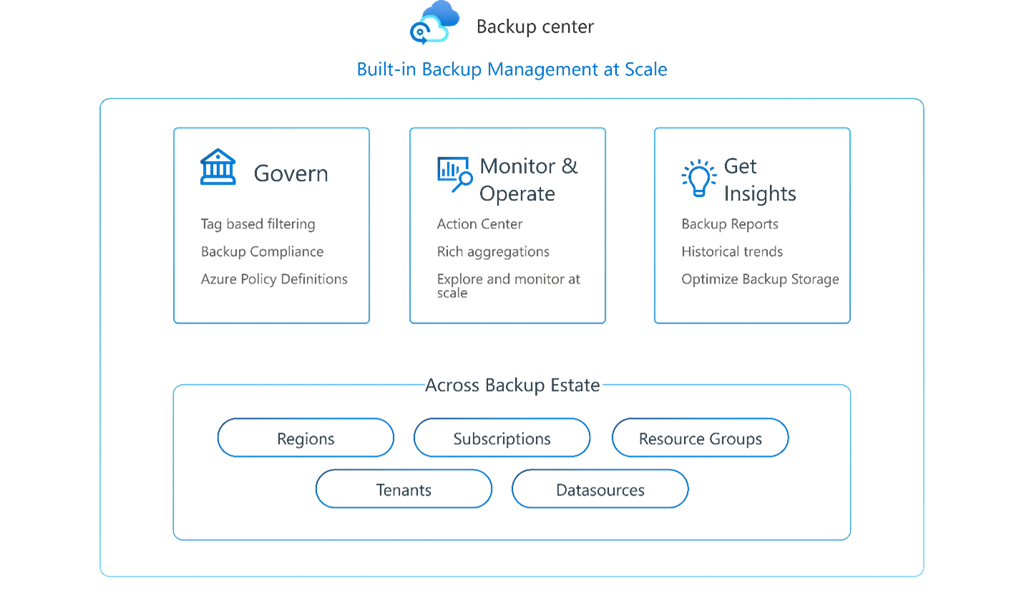
Imagine being able to go to one single console for your daily actions of monitoring, backing up, and restoring data sources in any subscription, resource group, location, or tenant. Imagine being able to define and track compliance with Azure policies to ensure your organization’s desired backup goals are being met. Imagine being able to generate reports on backup activities and derive insights from them to drive optimizations. Now imagine being able to do all of that from one single place. It’s now possible with Backup center.
Discover backup capabilities, samples, and guidance
Jump-start your data protection experience by selecting your workload of choice and following guided experiences to get started with Azure Backup. Access community resources to find sample templates, scripts, and policies to enhance your automation. In addition, get answers to your questions and raise feature requests. Stay updated by finding what’s new with Azure Backup right within Backup center.
Govern your backup estate in a unified manner
Bring your organization to a desired backup goal state through seamless integration with Azure Policy. Track compliance against Azure policies and create remediations. Configure specific backup policies to virtual machines (VMs) based on tag information using our new tag-based Azure policies.
Monitor and operate
With inventory views built on top of Azure Resource Graph, you can now get an overview of your entire Azure Backup estate across subscriptions, resource groups, locations, and even tenants (when using Azure Lighthouse) in a scalable and performant manner. Create custom views by querying Azure Resource Graph directly. Detect potential threats by finding insightful information like soft-deleted or stopped backup instances at a quick glance. Track jobs across job states and operations from a single view. Trigger any daily operation (one-time backups, restores, and even cross-region restores) from a single action center.
Optimize
Generate backup reports for a chosen duration with Backup reports, now generally available and seamlessly integrated within Backup center. You can also configure these reports to be sent to your email inbox periodically. Create custom reports by editing the reporting workbook and choosing data of your choice. Optimize costs with insights on policy optimizations and inactive resources. View trends of usage information and policy adherence.
Backup center enables centralized backup management for Azure Virtual Machines, SQL databases in Azure VMs, HANA databases in Azure VMs, and Azure Files. Additional Backup support is in preview for Azure Blobs (preview), Azure Disks, and Azure Database for PostgreSQL servers (preview). We will continue to add support for more workloads going forward.
With one single place that you can come to for all backup needs, Backup center enhances the simplicity of backup management, enabling you to get faster summaries, make rapid decisions, and drive efficiencies in backup management with Azure. Backup center is part of our ongoing investments to empower you with solutions that help you grow efficiently as your customer base reaches new peaks.
Next steps
- Learn more and get started with Backup center.
- Tell us how we can improve Azure Backup by contributing new ideas and voting up existing ones.
- Write to AskAzureBackupTeam@microsoft.com for preview sign ups.






