As data scientists, we are used to developing and training machine learning models in our favorite Python notebook or an integrated development environment (IDE), like Visual Studio Code (VSCode). Then, we hand off the resultant model to an app developer who integrates it into the larger application and deploys it. Often times, any bugs or performance issues go undiscovered until the application has already been deployed. The resulting friction between app developers and data scientists to identify and fix the root cause can be a slow, frustrating, and expensive process.
As AI is infused into more business-critical applications, it is increasingly clear that we need to collaborate closely with our app developer colleagues to build and deploy AI-powered applications more efficiently. As data scientists, we are focused on the data science lifecycle, namely data ingestion and preparation, model development, and deployment. We are also interested in periodically retraining and redeploying the model to adjust for freshly labeled data, data drift, user feedback, or changes in model inputs.
The app developer is focused on the application lifecycle – building, maintaining, and continuously updating the larger business application that the model is part of. Both parties are motivated to make the business application and model work well together to meet end-to-end performance, quality, and reliability goals.
What is needed is a way to bridge the data science and application lifecycles more effectively. This is where Azure Machine Learning and Azure DevOps come in. Together, these platform features enable data scientists and app developers to collaborate more efficiently while continuing to use the tools and languages we are already familiar and comfortable with.
The data science lifecycle or “inner loop” for (re)training your model, including data ingestion, preparation, and machine learning experimentation, can be automated with the Azure Machine Learning pipeline. Likewise, the application lifecycle or “outer loop”, including unit and integration testing of the model and the larger business application, can also be automated with the Azure DevOps pipeline. In short, the data science process is now part of the enterprise application’s Continuous Integration (CI) and Continuous Delivery (CD) pipeline. No more finger pointing when there are unexpected delays in deploying apps, or when bugs are discovered after the app has been deployed in production.
Azure DevOps: Integrating the data science and app development cycles
Let’s walk through the diagram below to understand how this integration between the data science cycle and the app development cycle is achieved.
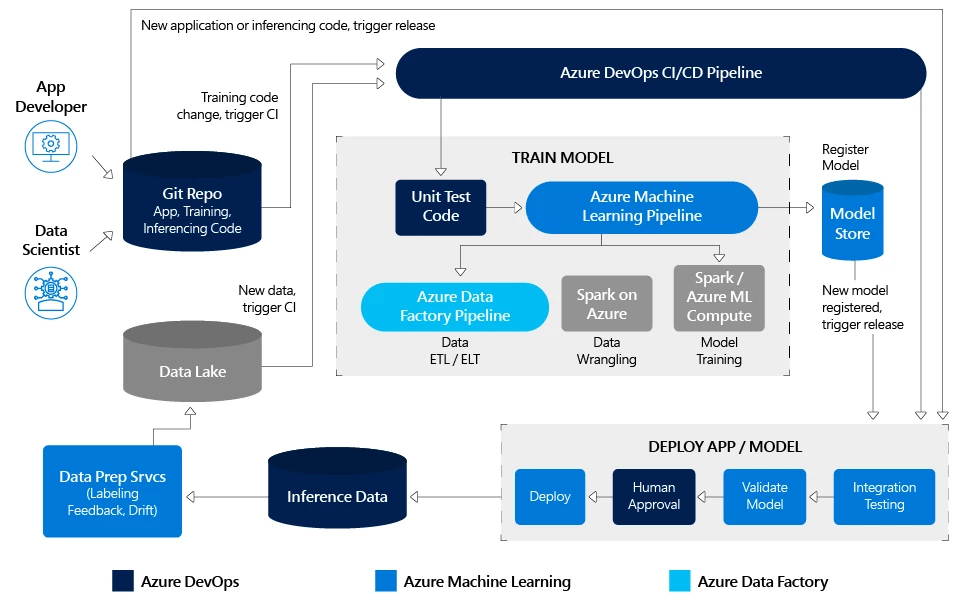
A starting assumption is that both the data scientists and app developers in your enterprise use Git as your code repository. As a data scientist, any changes you make to training code will trigger the Azure DevOps CI/CD pipeline to orchestrate and execute multiple steps including unit tests, training, integration tests, and a code deployment push. Likewise, any changes the app developer or you make to application or inferencing code will trigger integration tests followed by a code deployment push. You can also set specific triggers on your data lake to execute both model retraining and code deployment steps. Your model is also registered in the model store, which lets you look up the exact experiment run that generated the deployed model.
With this approach, you as the data scientist retain full control over model training. You can continue to write and train models in your favorite Python environment. You get to decide when to execute a new ETL / ELT run to refresh the data to retrain your model. Likewise, you continue to own the Azure Machine Learning pipeline definition including the specifics for each of its data wrangling, feature extraction, and experimentation steps, such as compute target, framework, and algorithm. At the same time, your app developer counterpart can sleep comfortably knowing that any changes you commit will pass through the required unit, integration testing, and human approval steps for the overall application.
With the soon to be released Data Prep Services (box in bottom left of above diagram), you will also be able to set thresholds for data drift and automate the retraining of your models!
In subsequent blog posts, we will cover in detail more topics related to CI/CD, including the following:
- Best practices to manage compute costs with Azure DevOps for Machine Learning
- Managing model drift with Azure Machine Learning Data Prep Services
- Best practices for controlled rollout and A/B testing of deployed models
Learn more
- Azure CI/CD Pipeline documentation
- Azure Machine Learning Pipeline documentation
- Learn more about the Azure Machine Learning service.
- Get started with a trial of Azure Machine Learning service.