
Large enterprise customers running business-critical workloads on Azure manage thousands of subscriptions and use automation for deployment and management of their Azure resources. Expert support for these customers is critical in achieving success and operational health of their business. Today, customers can keep running their Azure solutions smoothly with self-help resources, such as diagnosing and solving problems in the Azure portal, and by creating support tickets to work directly with technical support engineers.
We have heard feedback from our customers and partners that automating support procedures is key to help them move faster in the cloud and focus on their core business. Integrating internal monitoring applications and websites with Azure support tickets has been one of their top asks. Customers expect to create, view, and manage support tickets without having to sign-in to the Azure portal. This gives them the flexibility to associate the issues they are tracking with the support tickets they raise with Microsoft. The ability to programmatically raise and manage support tickets when an issue occurs is a critical step for them in Azure usability.
We’re happy to share that the Azure Support API is now generally available. With this API, customers can integrate the creation and management of support tickets directly into their IT service management (ITSM) system, and automate common procedures.
Using the Azure Support API, you can:
- Create a support ticket for technical, billing, subscription management, and subscription and service limits (quota) issues.
- Get a list of support tickets with detailed information, and filter by status or created date.
- Update severity, status, and contact information.
- Manage all communications for a support ticket.
Benefits of Azure Support API
Reduce the time between finding an issue and getting support from Microsoft
A typical troubleshooting process when the customer encounters an Azure issue looks something like this:
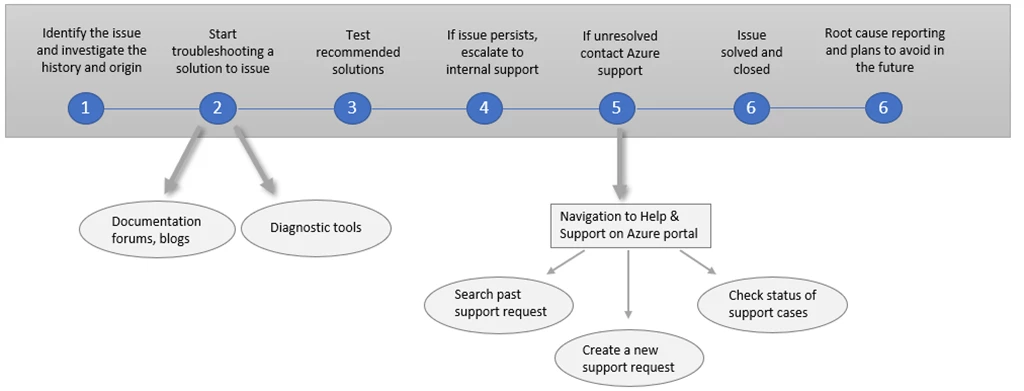
On step five, if the issue is unresolved and identified to be on the Azure side, customers navigate to the Azure portal, to contact support. With programmatic case management access, customers can automate their support process with their internal tooling to create and manage their support tickets, thus reducing the time between finding an issue and contacting support.
Customers now have one end-end process that goes smoothly from internal to external without the person filing the issue having to deal with the complexity and challenges between separate case management systems.
Create support tickets via ARM templates
Deploying an ARM template that creates resources can sometimes result in a ResourceQuotaExceeded deployment error, indicating that you have exceeded your Azure subscription and service limits (quotas). This happens because quotas are applied in the resource group, subscription, account, and other scopes. For example, your subscription may be configured to limit the number of cores for a region. If you attempt to deploy a virtual machine with more cores than the permitted amount, you receive an error stating the quota has been exceeded. The way to resolve it is to request a quota increase by filing a support ticket. With Support APIs in place, you can avoid signing in to the Azure portal to create a ticket, instead request quota increases directly via ARM templates.
Getting started
The Azure Support API is available with a Professional Direct, Premier, or Unified technical support plan.
For detailed examples using .NET and C#, refer to our code samples.
View the list of all languages and interfaces we support for ticket creation and management. As always, you can also directly use the Support REST API.
Use the API and tell us about it
We are looking forward to hearing your feedback about the Azure Support API. In the Azure support feedback forum, you can post ideas and suggestions for the API and other aspects of the support experience.
To report an API issue, go to the issues section of the GitHub repository for the language or interface you’re using. For example, go to the repository for issues with the PowerShell cmdlets. Select New issue and tag it with the labels Support and Service Attention.






