
We are excited to announce you can set any ARM-based Virtual Machines to auto-shutdown with a few simple clicks!
This was a feature originally available only to VMs in Azure DevTest Labs: your self-service sandbox environment in Azure to quickly create Dev/Test environments while minimizing waste and controlling costs. In case you haven’t heard it before, the goal for this service is to solve the problems that IT and development teams have been facing: delays in getting a working environment, time-consuming environment configuration, production fidelity issues, and high maintenance cost. It has been helping our customers to quickly get “ready to test” with a worry-free self-service environment.
The reusable templates in the DevTest Labs can be used everywhere once created. The public APIs, PowerShell cmdlets and VSTS extensions make it super easy to integrate you Dev/Test environments from labs to your release pipeline. In addition to the Dev/Test scenario, Azure DevTest Labs can also be used in other scenarios like training and hackathon. For more information about its value propositions, please check out our GA announcement blog post. If you are interested in how DevTest Labs can help for training, check out this article to use Azure DevTest Labs for training.
In the past months, we’ve been very happy to see that auto-shutdown is the #1 policy used by DevTest Labs customers. On the other hand, we also learned from quite a few customers that they have their centrally managed Dev/Test workloads already running in Azure and simply want to set auto-shutdown for those VMs. Since those workloads have already been provisioned and managed centrally, self-service is not really needed. It’s a little bit overkill for them to create a DevTest lab in this case just for the auto-shutdown settings. That’s why we make this popular feature, VM auto-shutdown, available to all the ARM-based Azure VMs.
With this feature, setting auto-shutdown can’t be easier:
- Go to your VM blade in Azure portal.
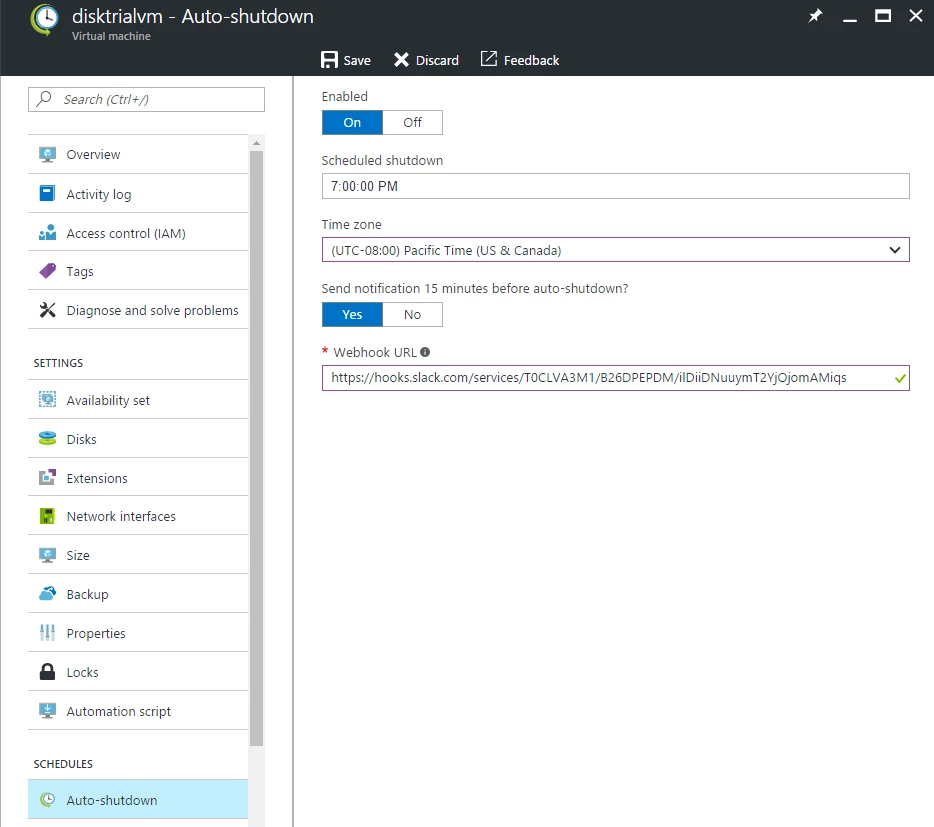
- Click Auto-shutdown in the resource menu on the left-side.
- You will see an auto-shutdown settings page expanded, where you can specify the auto-shutdown time and time zone. You can also configure to send notification to your webhook URL 15 minutes before auto-shutdown. This post illustrates how you can set up an Azure logic app to send auto-shutdown notification.
To learn more about this feature or see what’s more Azure DevTest Labs can do for you, please check out our announcement on the Azure DevTest Labs team blog.
To get latest information on the service releases or our thoughts on the DevTest Labs, please subscribe to the team blog’s RSS feed and our Service Updates.
There are still a lot of things in our roadmap that we can’t wait to build and ship to our customers. Your opinions are valuable for us to deliver the right solutions for your problems. We welcome ideas and suggestions on what DevTest Labs should support, so please do not hesitate to create an idea at the DevTest Labs feedback forum, or vote on others’ ideas.
If you run into any problems when using the DevTest Labs or have any questions, we are ready at the MSDN forum to help you.






