Azure Import/Export Service enables transfer of data in and out of Azure Blob Storage by shipping data on harddrives. You can use this service when you have large amount of data which takes long to upload/download over network. We are happy to share some improvements we have made to this service with you today.
Azure Import/Export in Azure portal
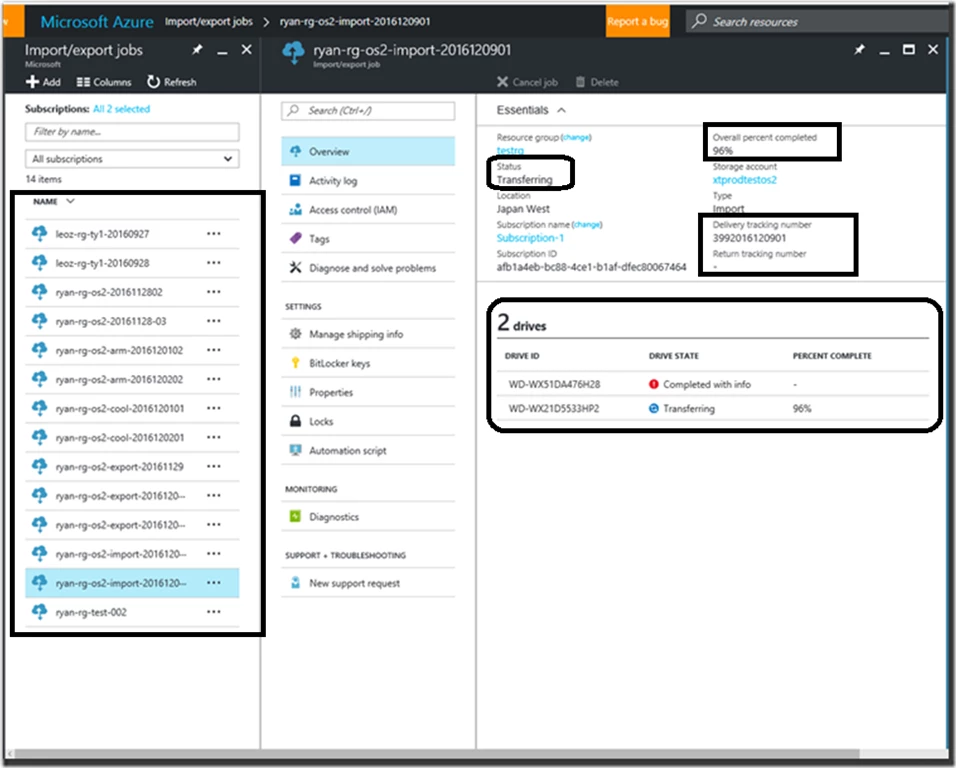
Today we are excited to announce the general availability of Azure Import/Export Service in the new Azure portal.
With Azure portal support, you will have added ability to:
- Manage import and export jobs across all storage accounts from the same pane.
- View status of overall job and of each drives individually with percentage complete during data transfer.
- Obtain a link to error log in case of a warnings/failure encountered during import or export job.
- See reminder warning signs if you happen to miss updating tracking information to avoid delays in the job-processing.
Storage Accounts – Classic, Azure Resource Manager (cool and hot access tier)
In addition to the Classic Storage accounts, you can now create Import and Export jobs targeting Azure Resource Manager account with Hot and Cool access tiers. Any new jobs for both Classic and Resource Manager storage accounts can be created from Azure portal. For any job already created in classic portal, you can continue to manage your jobs via the classic Azure portal.
Import/Export tool – multi-drive and multi-source support
We are also happy to announce WAImportExport client tool improvements. Download latest version of WAImportExport client tool from Download Center. Learn how to use WAImportExport client tool. You can use this tool to copy data to the hard drives you are going to ship to an Azure data center.
Enhancements to this tool are made in order to significantly reduce the preparation work needed before sending the disk to Azure datacenter for processing your large amount of data. You will no longer need to shard the data and figure out optimal placement of data across multiple disk. You can now copy data from multiple source directories in a single command line.
This version of the tool provides the following enhancements while preparing disks for an import job:
- Ability to copy data from multiple source directories in a single command.
- Ability to restructure the destination data from various source directories to different destination virtual directories.
- Ability to prepare multiple disks using a single command line.
- Automatic spreading of data across multiple disks.
- Central control of how each disk and data are handled using comma-separated (CSV) file.
Import/Export tool v1 – platform agnostic copy
We are pleased to introduce a new flag /skipwrite in WAImportExport V1 release of the tool.
With this new flag, the disk preparation can be split into two stages: data-copy using any OS/tool and post-processing using the Import/Export tool v1. Post-processing includes generating journal file, drive manifest and optionally encrypt the disk when data is already pre-written to the disk.
That said, copying of data can happen on any OS that support NTFS file system e.g Linux. Only post-processing needs to happen on windows machine.
Also, you can reuse your backup hard-disk directly and eliminate the need to procure additional hardware for Azure Import/Export job.
You can download WAImportExport V1 version of the tool and refer to WAImportExport V1 usage guide for further information.
Regional availability expansion
We expanded Azure Import/Export service to Canada, US Gov and China now. With these additions, you will have ability to choose from one of the 20 different regions close to you for shipping your drives. For more information on all the regions, please see Import/Export under Storage on Azure Products available by region page.
Hard drives types
In addition to 3.5” internal SATA II/III disks, Azure Import/Export can now process your import or export jobs using 2.5” Internal SATA drives and internal SSD drives.
Questions?
For more information, go to Azure Import/Export Overview. Your feedback is important to us, so send all your feedback or any feature requests using the Import/Export User Voice. And don’t worry – if you need any assistance, Microsoft Support is there to help you along the way!