This post was co-authored by Pavithra Thiruvengadam, Program Manager, Windows Virtual Desktop
Work from home policies require many IT organizations to address fundamental changes in capacity, network, security, and governance. Many employees aren’t protected by the layered security policies associated with on-premises services while working from home. Virtual desktop infrastructure (VDI) deployments on Azure can help organizations rapidly respond to this changing environment. However, you need a way to protect inbound or outbound internet access to and from these VDI deployments.
Windows Virtual Desktop is a comprehensive desktop and application virtualization service running in Azure. It’s the only VDI that delivers simplified management, multi-session Windows 10, and optimizations for Office 365. You can deploy and scale your Windows desktops and apps on Azure in minutes and get built-in security and compliance features. In this post, we explore how to use Azure Firewall for secure and cost-effective Windows Virtual Desktop protection.
Windows Virtual Desktop components
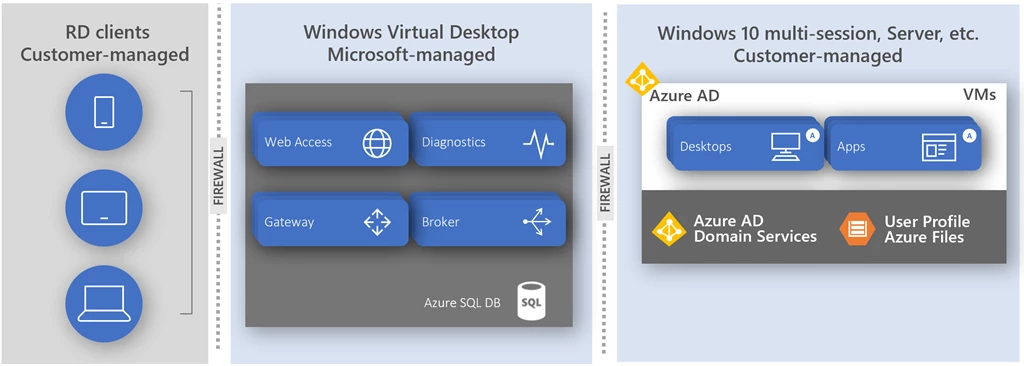
The Windows Virtual Desktop service is delivered in a shared responsibility model:
- Customer-managed RD clients connect to Windows desktops and applications from their favorite client device from anywhere on the internet.
- Microsoft-managed Azure service handles connections between RD clients and Windows Virtual Machines in Azure (including Windows 10 multi-session).
- Customer-managed virtual network in Azure hosts Windows 10 multi-session virtual machines in host pools.
Windows Virtual Desktop doesn’t require you to open any inbound access to your virtual network. However, to ensure platform connectivity between customer-managed virtual machines and the service, a set of outbound network connections must be enabled for the host pool virtual network. While these dependencies can be configured using Network Security Groups, this configuration is limited to network-level traffic filtering only. For application-level protection, you can use Azure Firewall or a third party network virtual appliance (NVA). For best practices to consider before deploying an NVA, see Best practices to consider before deploying a network virtual appliance.
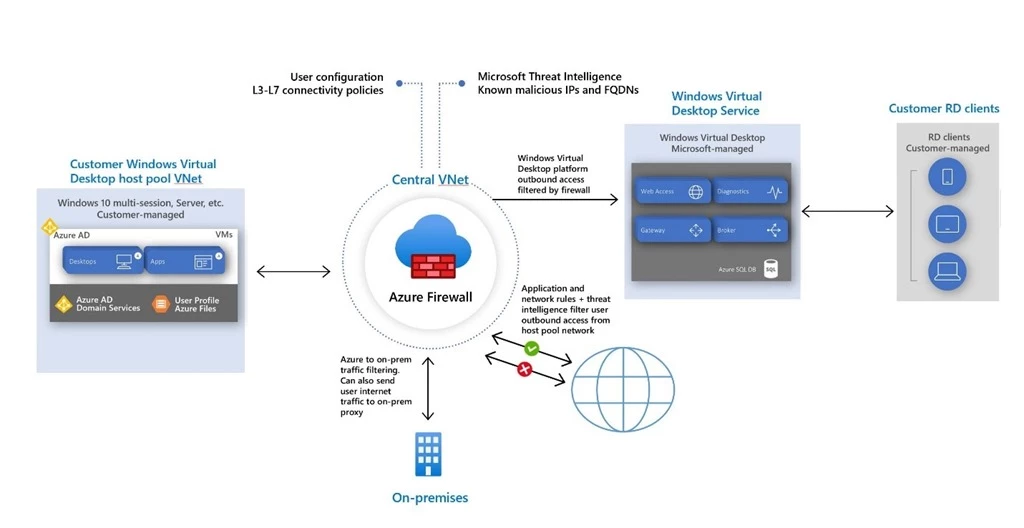
Host pool outbound access to Windows Virtual Desktop
Azure Firewall is a cloud-native firewall as a service (FWaaS) offering that allows you to centrally govern and log all your traffic flows using a DevOps approach. The service supports both application and network-level filtering rules and is integrated with the Microsoft Threat Intelligence feed for filtering known malicious IP addresses and domains. Azure Firewall is highly available with built-in auto scaling.
Azure Firewall provides a Windows Virtual Desktop FQDN Tag to simplify host pool outbound access to Windows Virtual Desktop. Use the following steps to allow outbound platform traffic:
- Deploy Azure Firewall and configure your Windows Virtual Desktop host pool subnet User Defined Route (UDR) to route all traffic via the Azure Firewall.
- Create an application rule collection and add a rule to enable the WindowsVirtualDesktop FQDN tag. The source IP address range is the host pool virtual network, the protocol is https, and the destination is WindowsVirtualDesktop.
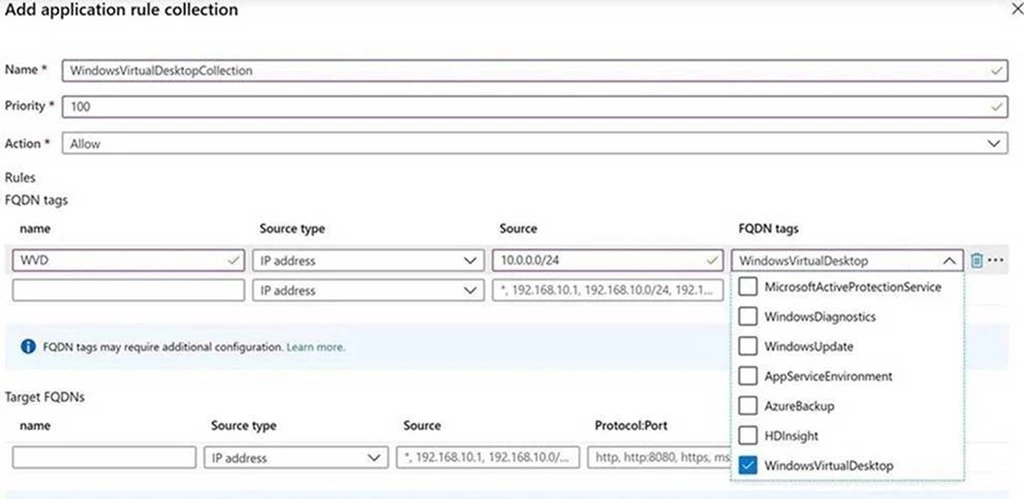
- The set of required storage and service bus accounts for your Windows Virtual Desktop host pool is deployment specific and isn’t yet captured in the WindowsVirtualDesktop FQDN tag. Additionally, a network rule collection is needed to allow DNS access from your Active Directory Domain Services (ADDS) deployment and KMS access from your virtual machines to Windows Activation Service. To configure access for these additional dependencies, see Use Azure Firewall to protect Windows Virtual Desktop deployments.
Host pool outbound access to the internet
Depending on your organization needs, you may want to enable secure outbound internet access for your end users. As Windows Virtual Desktop sessions are running on customer-managed virtual machines, they are also subject to your virtual network security controls. In cases where the list of allowed destinations is well-defined (for example, Office 365 access), you can use Azure Firewall application and network rules to configure the required access. This routes end-user traffic directly to the internet for best performance.
If you want to filter outbound user internet traffic using an existing on-premises secure web gateway, you can configure web browsers or other applications running on the Windows Virtual Desktop host pool with an explicit proxy configuration. For example, see How to use Microsoft Edge command-line options to configure proxy settings. These proxy settings only influence your end-user internet access, allowing outbound traffic directly via Azure Firewall.
Next steps
For more information on everything we covered above please see the following blogs, documentation, and videos.