As the needs of your business grow, and you deploy business-critical applications at cloud scale, the complexity and administrative overhead of managing those applications can increase substantially. To help reduce this management overhead, Azure continues to invest in new capabilities that make it easier to build and distribute application updates across distributed cloud environments.
We recently announced the general availability of automatic image-based upgrades for custom images, providing you the ability to automatically deploy new versions of virtual machine (VM) images to your virtual machine scale sets. Automatic image upgrade natively integrates with Shared Image Gallery, combining the scalable distribution of VM images with the ease and safety of orchestrated infrastructure updates, to offer an end-to-end solution from image publishing to workload deployment.
This blog describes how you can use integrated Azure services to build custom images with your application updates, distribute those images across your organization and automatically deploy the new images to your virtual machine scale sets.
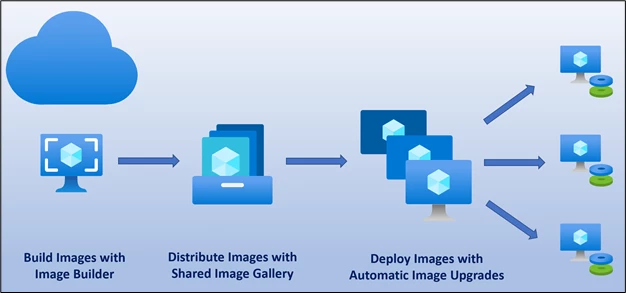
Build images with application updates
Deploying application and security updates across an organization can often be a complex process, involving multiple stages of deployments across disjointed systems. Standardized VM images allow organizations to ensure consistency across deployments, and these images typically include predefined security and configuration settings, and software workloads.
You can build standardized images through your own imaging pipeline or use the Azure VM Image Builder service. Using Azure VM Image Builder (currently in preview), you can quickly start building standardized images without needing to set up your own imaging pipeline. Just provide a simple configuration describing your image, submit it to the Image Builder service, and the image is built and distributed.
The Azure VM Image Builder lets you start with a Windows or Linux-based Azure Marketplace image, as well as existing custom images, and add your own customizations.
Distribute your images
Shared Image Gallery enables image distribution across multiple subscriptions and regions through a centralized image management platform. Shared Image Gallery helps you organize images in logical groups by specifying different image definitions and image versions, allowing you to iterate new image builds for different applications.
As you build new image versions with Image Builder, you can also distribute these images globally by replicating the images across multiple Azure regions based on your organization’s needs. You only need to specify the target regions and Shared Image Gallery will replicate your image versions to the regions you selected.
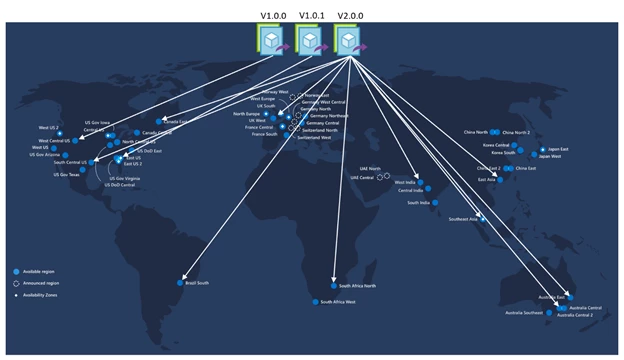
Shared Image Gallery also allows you to share your images across subscriptions and Azure Active Directory (Azure AD) tenants, so you can centralize image management across your entire organization.
Deploy your images
The final step in the process is the deployment of your newly created images to your virtual machine scale sets. With automatic OS image upgrade enabled for your scale sets, you do not need to take any additional action to deploy your images. Automatic OS image upgrade monitors your image gallery and automatically begins scale set upgrades when a new image version is deployed, facilitating faster image deployment without manual overhead.
An upgrade works by replacing the OS disk of a VM with a new disk created using the latest image version. Any configured extensions and custom scripts are run on the OS disk, while data disks are retained. To minimize the application downtime, upgrades take place in batches, with no more than 20 percent of the scale set upgrading at any time. The update orchestrator monitors the health of the VMs being upgraded as well as the health of the scale set during the upgrade process. If more than 20 percent of the scale set virtual machines become unhealthy, then the scale set upgrade stops at the end of the current batch. The upgrade process also supports automatic rollback for upgrade failures. This ensures that rollouts are gradual and orchestrated in a safe manner, preventing any scale set-wide disruption caused by a customization in the image.
An upgrade on a scale set only starts when the new image version is replicated to the region of the scale set. You can stagger global deployments by staging imaging replication to different regions at different times, further increasing global application uptime.
Get started
You can start from your image definition under Shared Image Gallery through the Azure portal and use the + Create VMSS option to create a new scale set from your image.

In the create experience for virtual machine scale set, under the Management tab, simply select the On option for Automatic OS upgrades.
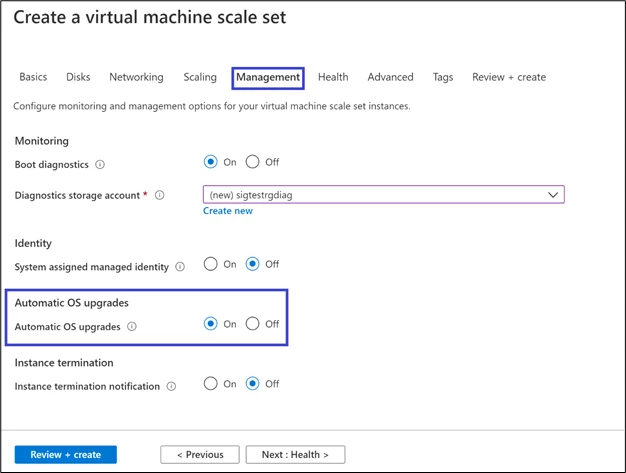
You can also further customize the process and integrate your existing image building pipeline with Shared Image Gallery to benefit from automatic OS image upgrade.
Read the Azure documentation to learn more about the powerful capabilities described above.