We recently announced the general availability of three features for Azure Virtual Machine Scale Sets. Instance protection, custom scale-in policy, and terminate notification provide new capabilities to simplify management of virtual machine instances during scale-in.
Azure Virtual Machine Scale Sets are a way to collectively deploy and easily manage a number of virtual machine (VM) instances in a group. You can also configure autoscaling rules for your scale set that enable you to dynamically increase or decrease the number of instances based on what the workload requires.
With these new features, you now have more control over gracefully handling the removal of instances during scale-in, enabling you to achieve better user experience for your applications and services. These new features are available across all Azure regions for public cloud as well as sovereign clouds. There is no extra charge for using these features with Azure Virtual Machine Scale Sets.
Let’s take a look at how these features provide you better control during scale-in.
Instance protection—protect one or more instances from scale-in
You can apply the policy Protect from scale-in to one or more instances in your scale set if you do not want these instances to be deleted when a scale-in occurs. This is useful when you have a few special instances that you would like to preserve while dynamically scaling in or out other instances in your scale set. These instances might be performing certain specialized tasks different from other instances in the scale set and you may want these special instances to not be removed from the scale set. Instance protection provides you the capability to enable such scenarios for your workload.
Protect one or more instances from scale-set actions
Instance protection also allows you to protect one or more of your instances from getting modified during other scale-set operations like reimage or upgrade. This can be done by applying the policy Protect from scale-set actions to specific instances. Applying this policy to an instance automatically also protects it from a scale-in.
Custom scale-in policy—configure the order of instance removal during scale-in
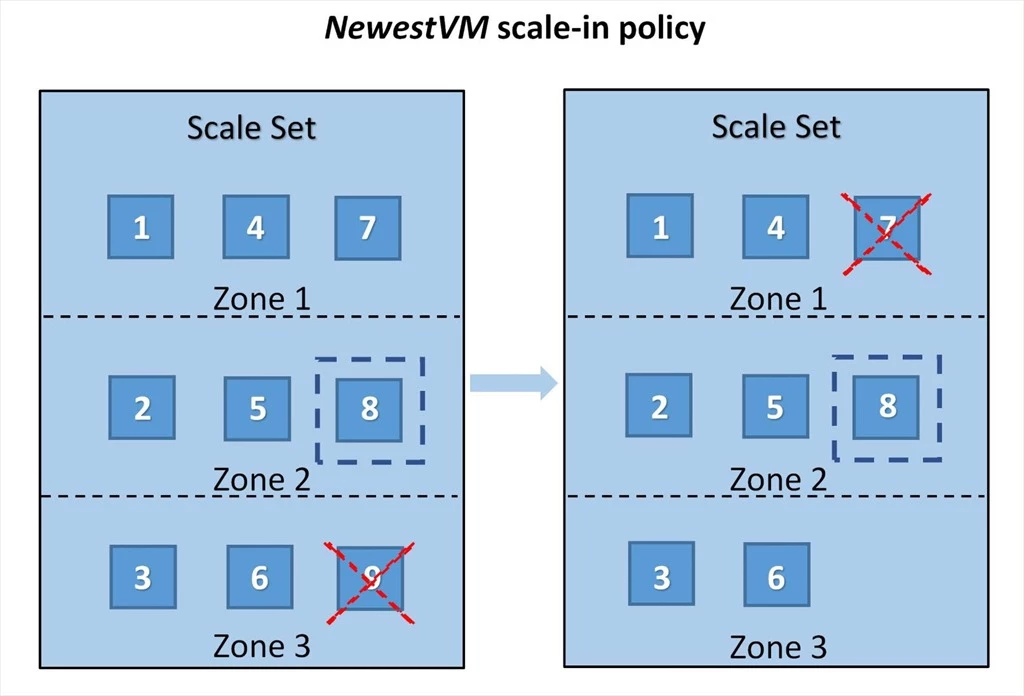
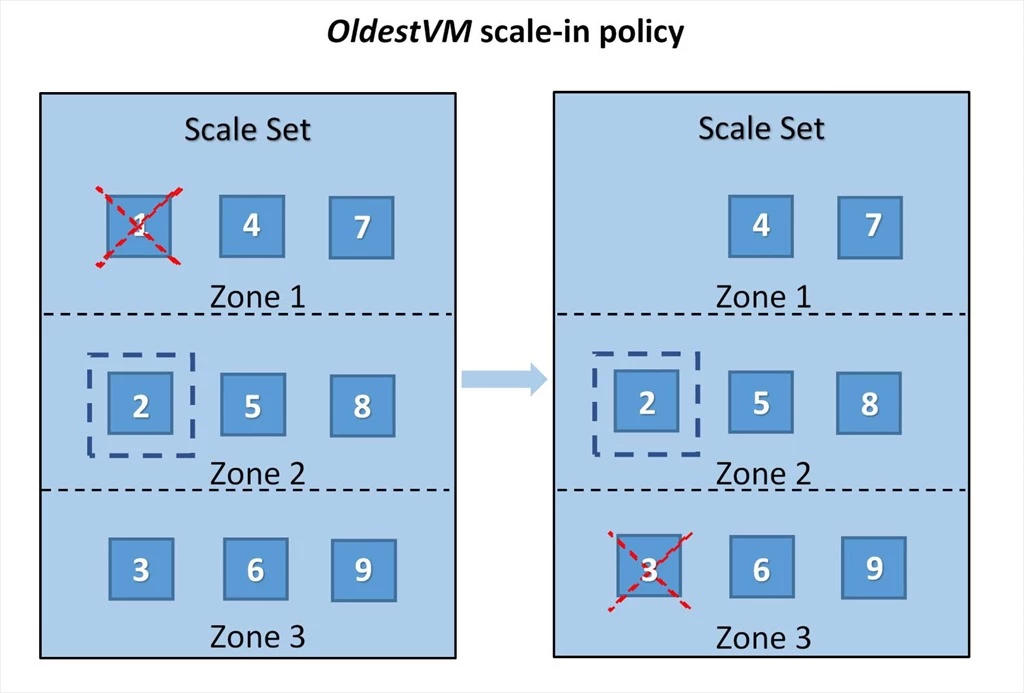
When one or more instances need to be removed form a scale set during scale-in, then instances are selected for deletion in such a way that the scale set remains balanced across availability zones and fault domains, if applicable. Custom scale-in policies allow you to further specify and control the order in which instances should be selected for deletion during scale-in. You can use the OldestVM scale-in policy to remove the oldest created instance first, or NewestVM scale-in policy to remove the newest created instance first. In both the scenarios, balancing across availability zones is given preference. If you have applied either of the protection policies to an instance, then it will not be picked up for deletion during scale-in.
Below are a couple examples of the scale-in order for a scale set with three availability zones and initial instance count 9. These examples assume that the VM with smallest instance ID was created first and that the VM associated with highest instance ID was created last. The VM instance enclosed in a dotted square represents that it has been protected using one of the instance protection policies. The cross indicates that the VM instance will be selected for deletion during scale-in.
Terminate notification—receive in-VM notification of instance deletion
When an instance is about to be deleted from a scale set, you may want to perform certain custom actions on the instance. Examples of these actions could be de-registering from the load balancer, or copying the logs, among others. When instance deletions are triggered by the platform, for example due to a scale-in, then these actions need to be programmatically performed to ensure that application does not get interrupted or useful logs are properly retained. With the terminate notification feature, you can configure your instances to receive in-VM notifications about upcoming instance deletion and pause the delete operation for 5 to 15 minutes to perform such custom actions on the instance.
The terminate notifications are sent through the Azure metadata service—Scheduled events—and can be received using a REST endpoint accessible from within the VM instance. Specific actions or scripts can be configured to run when an instance receives the terminate notification at the configured endpoint. Once these actions are completed and you do not want to wait for the pre-configured pause timeout to finish, then you can approve the deletion by issuing a POST call to the metadata service. This will allow deletion of the instance to continue.
Get started
You can enable these features for your scale set using REST API, Azure CLI, Azure PowerShell or Azure Portal. Below are the links to the documentation pages for detailed instructions.