Now more than ever, developers need agility to meet rapidly increasing demands from customers. Containerization is one key way to increase agility. Containerized applications are built in a more consistent and repeatable way, by way of defining desired infrastructure, dependencies, and configuration as code for all stages of the lifecycle. Applications often start and stop faster at runtime too, which often helps quickly start, stop, scale out, and update in the cloud.
With this in mind, we announced a new partnership earlier today between Microsoft and Docker to integrate Docker Desktop more closely with Microsoft Azure and the Visual Studio line of products.
Docker Desktop built-in tools, features, and command-line utilities will provide a way to natively set Azure as a context to run containers in the cloud with context and run in Azure containers in a few simple commands. The product integration begins with the ability to create Azure Container Instances (ACI), which is a solution for any scenario that can operate in isolated containers, without orchestration.
Let’s take a look at new product integrations using an example. We have a simple TCP-based Python game server app that is already building and running on the local developer machine using Docker Desktop. The app depends on a slim version of Linux and other dependencies in requirements.txt. The Docker tools extension in Visual Studio Code provides easy commands to do builds and runs on Docker Desktop, and then a push to a private container registry in Docker Hub. The experience is particularly fast using the new release of WSL2.
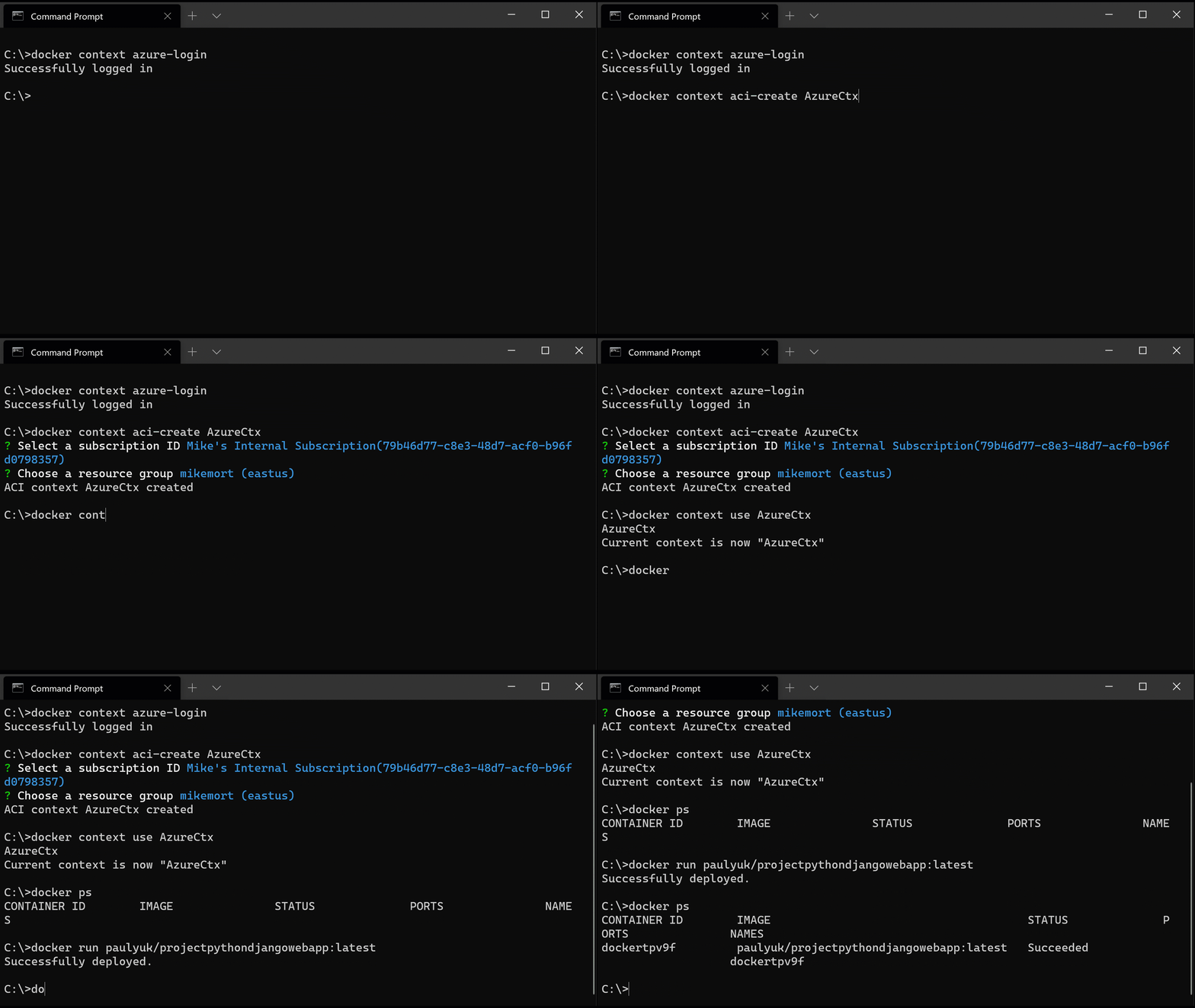
With the updated version of Docker Desktop, coming later this year, we see native commands for creating a docker context for Azure Container Instances:
$ docker context aci-create paulyuk/webapp-dev

$ docker context use paulyuk/webapp-dev
Contexts are useful to easily swap between one or more environments that have a Docker host. As an example, I can have contexts for local (the default), myapp-dev, myapp-qa. The entire Docker tools chain (including Docker.exe CLI) honors the context. This makes running a container in Azure easy and consistent with running locally, just using the same familiar command:
$ docker run paulyuk/pythontcpgame:1.1
Deploying a container to Azure is as simple as that, using the standard tools in Docker Desktop. Plus, you can bring the whole experience together using Docker Desktop + Visual Studio + WSL2 + GitHub to have a cloud-optimized desktop. I go into more detail about the integrations in this DockerCon LIVE 2020 session.
We are thrilled about expanding our collaboration with Docker and continuing to make the developer experience better for developers.
Learn more
To learn more about the partnership, you can read this press release and blog post from Docker. You can leverage the current VS Code Docker Extension with docker contexts, Docker Desktop with WSL2 integration today. The preview with the ACI integration in Docker Desktop will follow later this year.