In our previous blog we discussed what mutual transport layer security (mTLS) is and what some of its use cases are. In this blog I want to discuss two of those use cases. First, how to send client certificate to the backend application server and validate the setup by curl command and second how to set up OCSP validation and do verification by openssl commands.
Insert client certificate as HTTP header
In some cases, backend applications may need a client certificate that is received by Application Gateway. Client certificates can serve different purposes as per the need of the backend applications. Some backend servers may need client certificate information for audit purposes or may want to issue token or cookie to a client certificate. In that case we may have to supply the client certificate to the backend. One way to solve this is by supplying the certificate in base64 encoded format within a nonstandard HTTP (Hypertext Transfer Protocol) header. Please note, for security purposes and to prevent header injections, backend server must accept the custom header from trusted Application Gateway. Let’s discuss first how to send client certificate to backend application as custom http header. To achieve that you can set up a rewrite rule to send client certificate as HTTPS header.
Find more details on how to set up a rewrite rule in our rewrite URL and query string with Azure Application Gateway documentation.
Below is the rewrite rule that you can create to send client certificate to the backend as an HTTP header. Setup rewrite action as below.

Above is screenshot of Create rewrite set explaining values that need to be populated for Rewrite rule.
Once a rewrite rule is created you can verify if the backend server is receiving client certificate in the HTTP header. To test the setup prerequisite is to have openssl and curl tool installed in your machine. You should have access to the client certificate and client private key.
Verification steps to check client certificate in custom HTTP header:
Capture the client certificate output.
- more client.crt
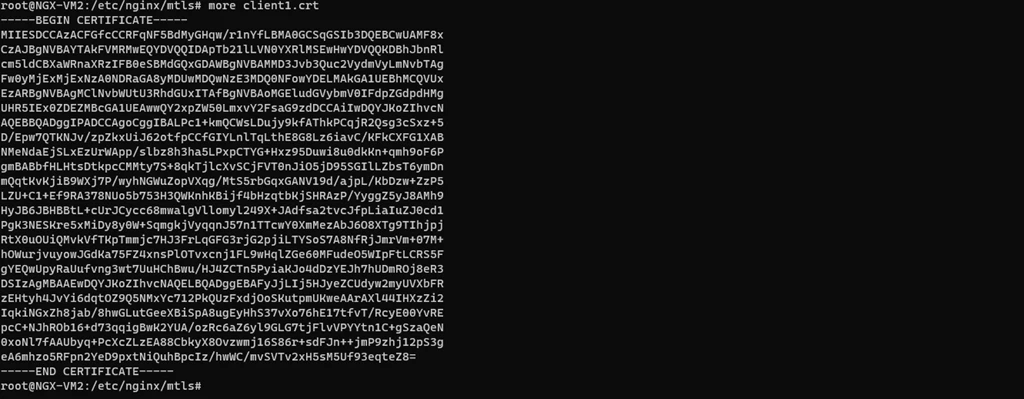
Above is screen shot showing client certificate output.
Run the following commad to send a request to Application Gateway:
- curl -vk HTTPS:// –key client.key –cert client.crt
In the backend server you should see the header you created in the Application gateway rewrite rule. You will have to run network capturing tools like tcpdump at the backend server.
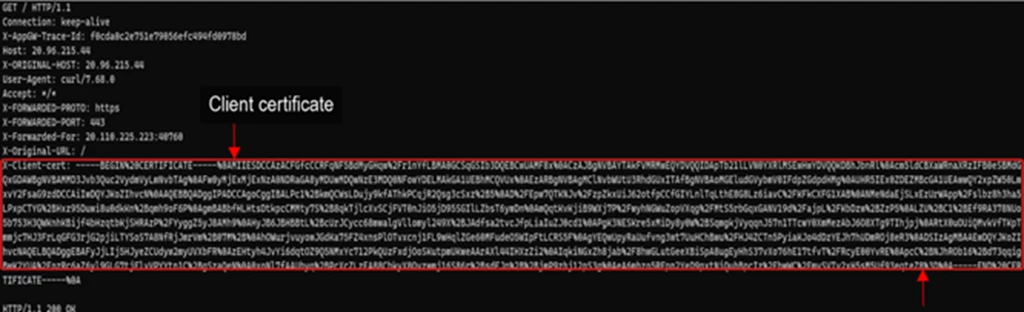
Above screenshot shows Client certificate that backend has received.
Above you can see the X-Client-cert header received by backend that we have created in the rewrite rule. This header has the client certificate that we have sent. The backend server can extract this value and use it based on the desired use case.
OCSP
Online certificate status protocol (OCSP) is now supported by Application gateway. Let’s discuss here how to setup OCSP and validate the setup with openssl command. With OCSP support you can verify the status of the client certificate in real time. This can prevent man-in-the-middle attacks by ensuring that the certificate being present is still valid and has not been compromised. You can get more details about OCSP in RFC 2560. It is easy to setup. When a client initiates a connection to an Application Gateway configured with mutual TLS authentication, not only can the certificate chain and issuer’s distinguished name be validated, but revocation status of the client certificate can be checked with OCSP (Online Certificate Status Protocol). During validation, the certificate presented by the client will be looked up via the defined OCSP responder defined in its Authority Information Access (AIA) extension. In the event the client certificate has been revoked, the application gateway will respond to the client with an HTTP 400 status code and reason. If the certificate is valid, the request will continue to be processed by application gateway and forwarded on to the defined backend pool.
Please check this OCSP link to enable this capability. I have summarized the PowerShell command to setup OCSP.
$AppGw = Get-AzApplicationGateway -Name “ApplicationGateway01” -ResourceGroupName “ResourceGroup01”
$profile = Get-AzApplicationGatewaySslProfile -Name “SslProfile01” -ApplicationGateway $AppGw
Set-AzApplicationGatewayClientAuthConfiguration -SslProfile $profile -VerifyClientCertIssuerDN -VerifyClientRevocation OCSP
Once you have set up OCSP, you can verify your client certificate with the OCSP endpoint using openssl command.
- openssl ocsp -issuer -cert client.crt -text -url <HTTP://FQDN>
Ca-bundle-certificate authority (CA) that has issued the certificate (uploaded per the link step 8 from our previous blog)
Client.crt-Client certificate
url-This will be OCSP endpoint URL address. If you do not know what the URL is you can find the OCSP endpoint of client certificate by using following command:
- openssl x509 -in client.crt -text | grep -I OCSP
OCSP-URL:HTTP://ocsp.sectigo.com
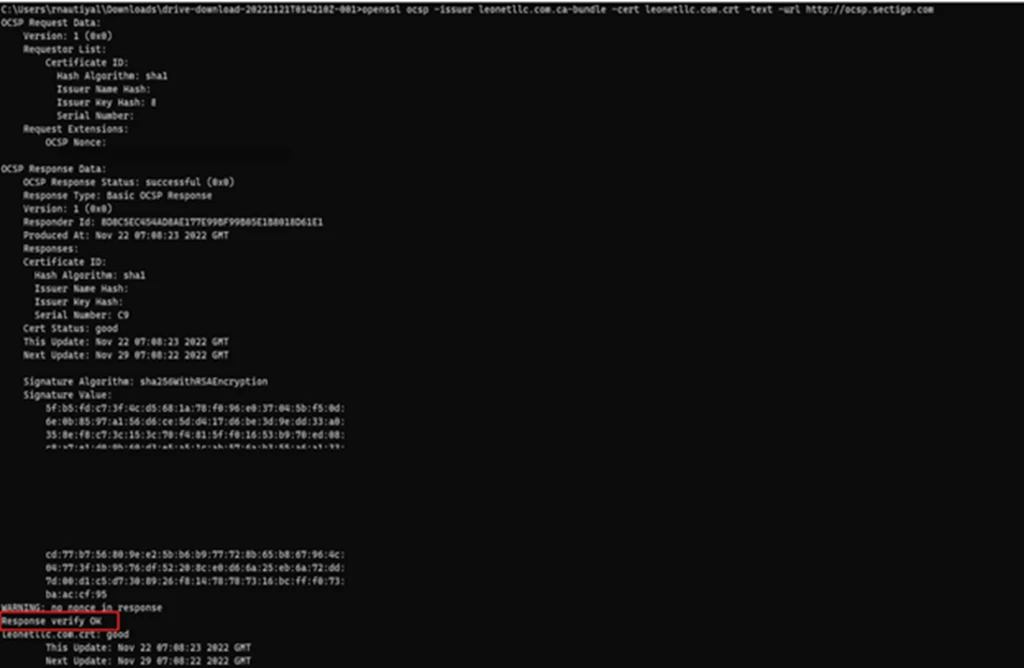
Above is screen shot of openssl command showing status of client certificate verification.
You should see the following response if certificate is valid:
Response verify OK
client.crt: good
After verification of your client certificate through OCSP endpoint, you can verify the traffic by sending a request to Application Gateway that has OCSP check-enabled.
- curl -vk HTTPS://yourdomain.com –key client. Key –cert client.crt
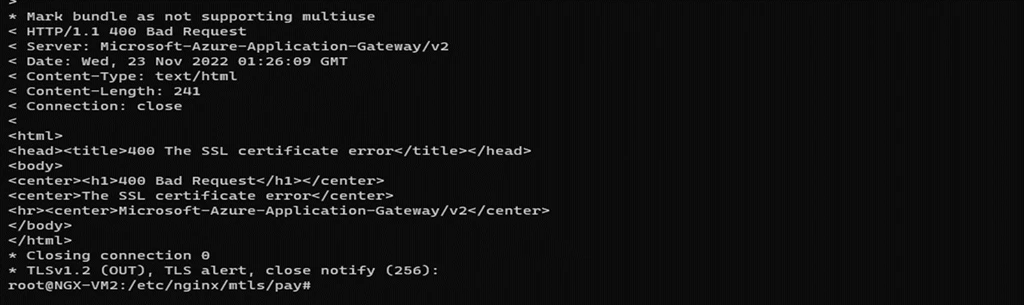
In case the certificate is not a valid client certificate, OCSP will respond with either “revoked” or “unknown”. Below is the error for “unknown” certificate.
Conclusion
In this blog we have discussed two cases that application gateway supports. You have learned how to send client certificate to backend as HTTP header and verify the setup by using curl command. Also, you have learned how to set up OCSP and verify the setup by openssl command line.