Azure Virtual Network (VNet) is the fundamental building block for any customer network. VNet lets you create your own private space in Azure, or as I call it your own network bubble. VNets are crucial to your cloud network as they offer isolation, segmentation, and other key benefits. Read more about VNet’s key benefits in our documentation, “What is Azure Virtual Network?”
With VNets, you can connect your network in multiple ways. You can connect to on-premises using Point-to-Site (P2S), Site-to-Site (S2S) gateways or ExpressRoute gateways. You can also connect to other VNets directly using VNet peering.
Customer network can be expanded by peering Virtual Networks to one another. Traffic sent over VNet peering is completely private and stays on the Microsoft Backbone. No extra hops or public Internet involved. Customers typically leverage VNet peering in the hub-and-spoke topology. The hub consists of shared services and gateways, and the spokes comprise business units or applications.
Gateway transit
Today I’d like to do a refresh of a unique and powerful functionality we’ve supported from day one with VNet peering. Gateway transit enables you to use a peered VNet’s gateway for connecting to on-premises instead of creating a new gateway for connectivity. As you increase your workloads in Azure, you need to scale your networks across regions and VNets to keep up with the growth. Gateway transit allows you to share an ExpressRoute or VPN gateway with all peered VNets and lets you manage the connectivity in one place. Sharing enables cost-savings and reduction in management overhead.
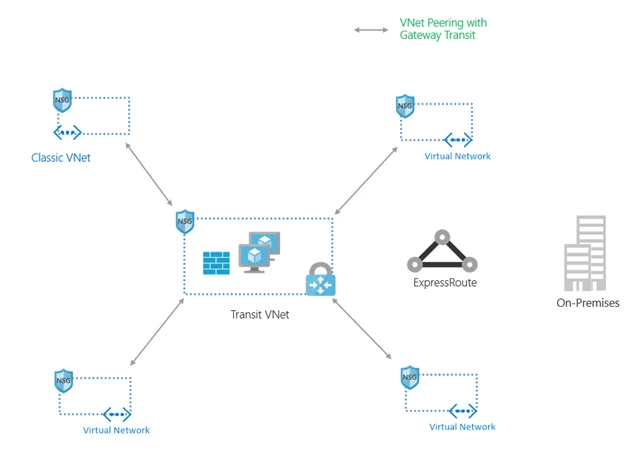
With Gateway transit enabled on VNet peering, you can create a transit VNet that contains your VPN gateway, Network Virtual Appliance, and other shared services. As your organization grows with new applications or business units and as you spin up new VNets, you can connect to your transit VNet with VNet peering. This prevents adding complexity to your network and reduces management overhead of managing multiple gateways and other appliances.
VNet peering works across regions, across subscriptions, across deployment models (classic to ARM), and across subscriptions belonging to different Azure Active Directory tenants.
You can create a Transit VNet like one shown below.
Easy to set up – just check a box!
To use this powerful capability, simply check a box.
Create or update the virtual network peering from Hub-RM to Spoke-RM inside the Azure portal. Navigate to the Hub-RM VNet or the VNet with the gateway you’d like to use for gateway transit, and select Peerings, then Add:
- Set the Allow gateway transit option
- Select OK
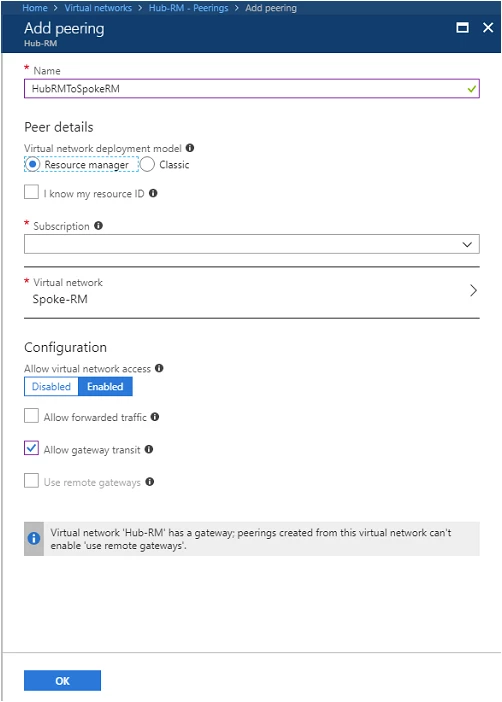
Create or update the virtual network peering from Spoke-RM to Hub-RM from the Azure portal. Navigate to the Spoke-RM VNet, select on Peerings, then Add:
- Select the Hub-RM virtual network in the corresponding subscription
- Set the Use remote gateways option
- Select OK
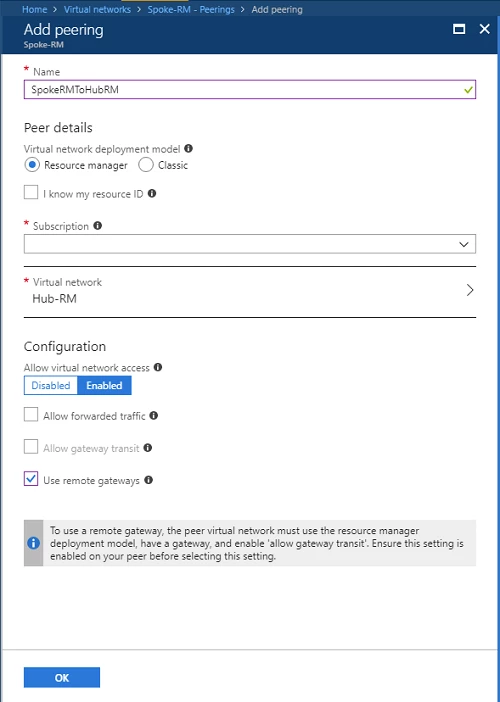
You can learn more in this detailed step by step guide on how to configure VPN gateway transit for virtual network peering.
Security
You can use Network Security Groups and security rules to control the traffic between on-premises and your Azure VNets. Security policies can be centralized in the Hub or transit VNet. A network virtual appliance (NVA) can inspect all traffic going on-premises as well as into Azure. Since there policy is set in a central VNet, you can set it up just once.
Routing
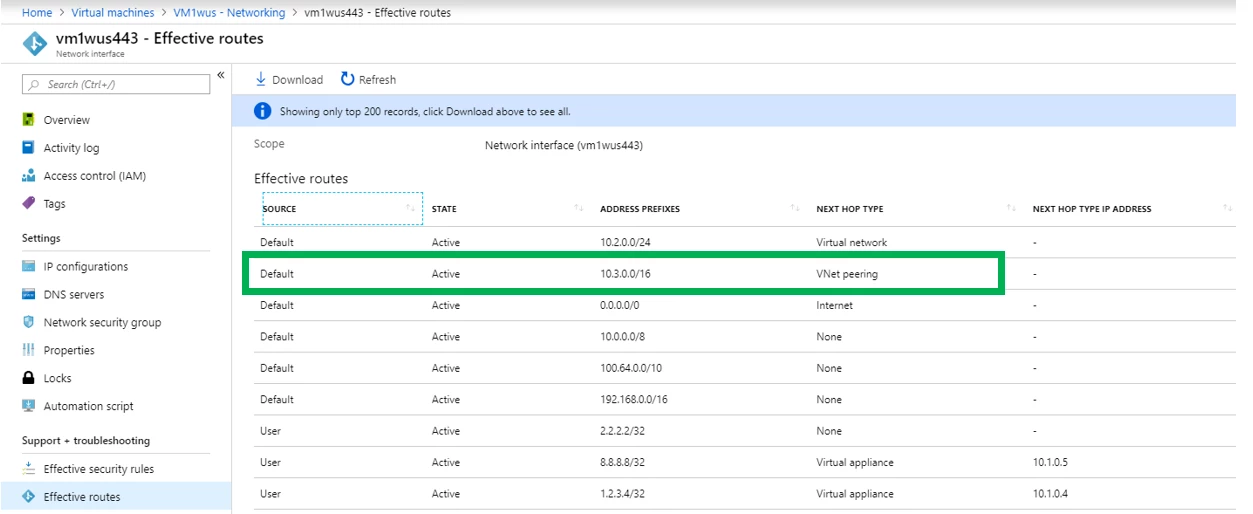
We plumb the routes, so you don’t have to. Each Azure Virtual Machine (VM) you deploy will benefit with the routes being plumbed automatically. To confirm a virtual network peering, you can check effective routes for a network interface in any subnet in a virtual network. If a virtual network peering exists, all subnets within the virtual network have routes with next hop type VNet peering, for each address space in each peered virtual network.
Monitoring
You can check the health status of your VNet Peering connection in the Azure portal. Connected means you are all peered and good to go. Initiated means a second link needs to be created. Disconnected means the peering has been deleted from one side.
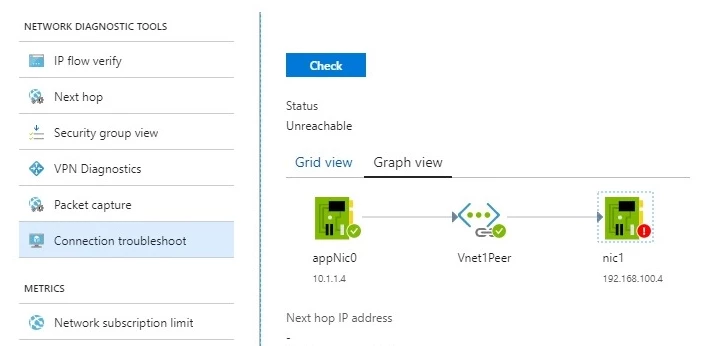
You can also troubleshoot connectivity to a virtual machine in a peered virtual network using Network Watcher’s connectivity check. Connectivity check lets you see how traffic is routed from a source virtual machine’s network interface to a destination virtual machine’s network interface as seen below.
Limits
You can peer with 500 other VNets. We’ve increased limits by 10 times and as our customers scale in Azure we will continue to increase these limits. Stay updated with limits by visiting our documentation, “Azure subscription and service limits, quotas, and constraints.”
Pricing
Traffic passing through a remote gateway in this scenario does incur VNet peering charges.
Availability
VNet peering with gateway transit works across classic Azure Service Management (ASM) and Azure Resource Manager (ARM) deployment models. Your gateway should be in your ARM VNet. It also works across subscriptions and subscriptions belonging to different Azure Active Directory tenants.
Gateway transit has been available since September 2016 for VNet peering in all regions and will be available for global VNet peering shortly.
Gateway Transit with VNet peering enables you to create a transit VNet to keep your shared services in a central location. To keep up with your growing scale, you can scale your VNets and use your existing VPN gateway saving management overhead, cost, and time. We developed a template you can use to get started. Try it out today!