Earlier this month, we announced Azure Stack expanding availability to 92 countries/regions. Today, we are announcing the capability to backup files and applications data using Microsoft Azure Backup Server. Azure Stack tenants can now take app consistent backup of their data in Azure Stack VMs, store them on the stack for operational recoveries, and send the data to Azure for long-term retention and offsite copy needs.
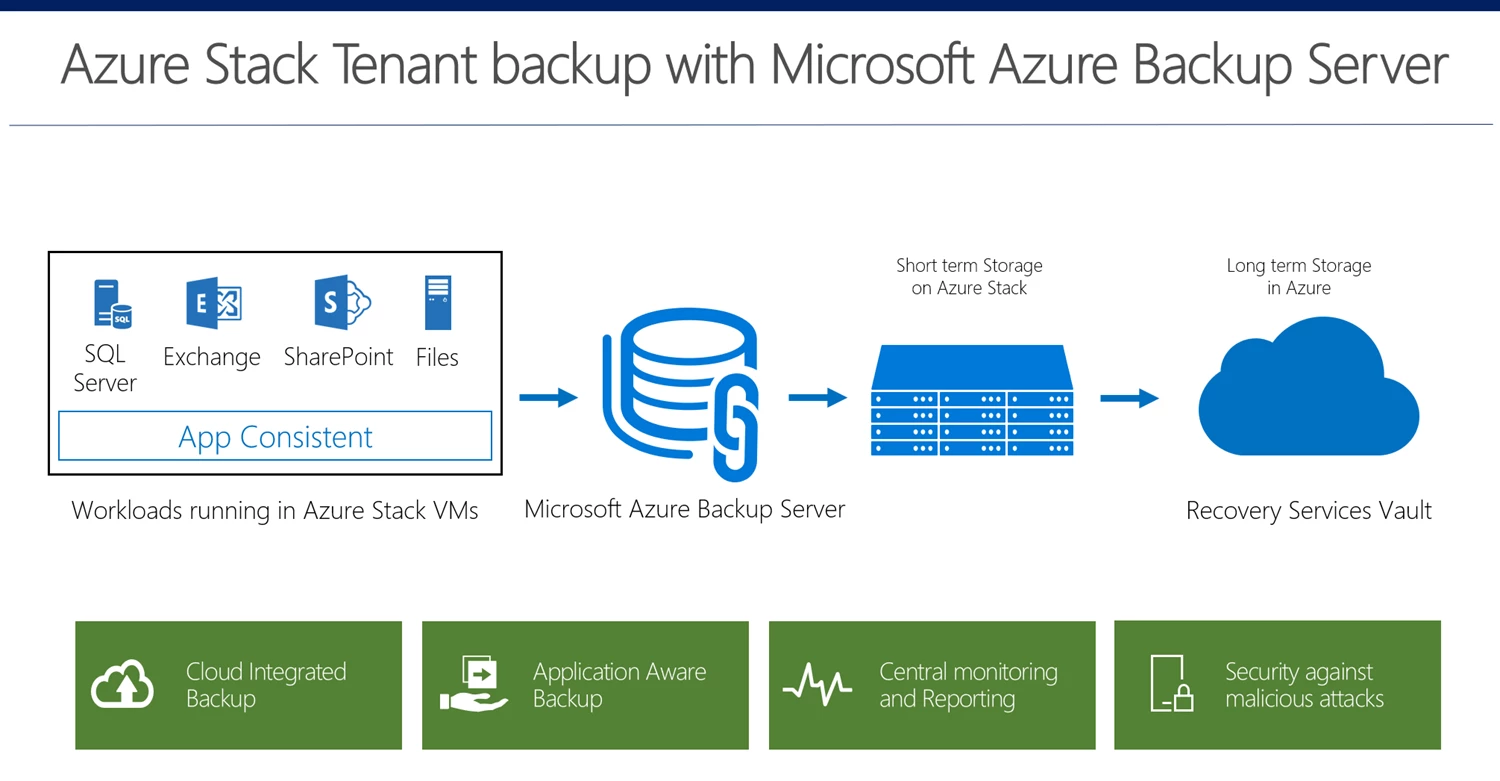
Key benefits
Application consistent backups for SQL, SharePoint, and Exchange
App consistent backups mean that Azure Backup makes sure that while taking a backup, the memory is flushed, and no IOs are pending. This means that in addition to being recoverable, your applications being completely consistent at the time of backups. With Azure Backup Server, you can take App consistent backups of your applications, ensuring that the data, when recovered, is valid and consistent.
Item Level Recovery for local recovery points
Quick operation recoveries can be triggered directly from the Microsoft Azure Backup Server running on your stack, with Item Level Recovery. This means that you can recover a single file from a 50GB volume backed up, without having to recover the whole volume at a staging location.
Long term retention of offsite copies in Azure
Most organizations today have a requirement to have an offsite copy of the data which could be recovered in cases as a datacentre going down. In addition, long term retention is often a legal requirement as well. Seamless integration with Azure means that you do not need to worry about managing cumbersome tapes, and that you have the power to recover the data with a click whenever needed.
Centralized view in Azure Portal
With Azure Backup, you can view all your Microsoft Azure Backup Servers, the items they are protecting, the storage they consume and the cloud recovery points centrally in an Azure Portal. This enables you to get information about all your Azure Backup entities, including the Azure VMs, systems protected with MARS agent, and SQL in Azure VMs from one central place.
Security features
Azure backup protects your data from malicious attacks and helps you recover by the three-pronged strategy of Prevention, Alerting, and Recovery. This means that critical operations as change of passphrase require multi factor authentication. Further, operations as stop protection with deletion of cloud data trigger an alert, and the data is retained for 14 days even after delete data is triggered, allowing you to recover the data from your cloud backups.
Download Microsoft Azure Backup Server now! Find more details about how to plan and install your Microsoft Azure Backup Server. You can also find more information about Microsoft Azure Backup Server pricing.
Related links and additional content
- Learn more about Azure Backup
- Sign up for a free Azure trial subscription
- Want more details? Check out Azure Backup documentation
- Need help? Reach out to Azure Backup forum for support
- Tell us how we can improve Azure Backup by contributing new ideas and voting up existing ones
- Follow us on Twitter @AzureBackup for the latest news and updates