
This blog post was co-authored by Rotem Lurie, Program Manager, Azure Security Center.
Azure Security Center provides you with a bird’s eye security posture view across your Azure environment, enabling you to continuously monitor and improve your security posture using secure score in Azure. Security Center helps you identify and perform the hardening tasks recommended as security best practices and implement them across your machines, data services, and apps. This includes managing and enforcing your security policies and making sure your Azure Virtual Machines, non-Azure servers, and Azure PaaS services are compliant.
Today, we are announcing two new capabilities—the preview for remediating recommendations on a bulk of resources in a single click using secure score and the general availability (GA) of just-in-time (JIT) virtual machine (VM) access for Azure Firewall. Now you can secure your Azure Firewall protected environments with JIT, in addition to your network security group (NSG) protected environments.
Single click remediation for bulk resources in preview
With so many services offering security benefits, it’s often hard to know what steps to take first to secure and harden your workload. Secure score in Azure reviews your security recommendations and prioritizes them for you, so you know which recommendations to perform first. This helps you find the most serious security vulnerabilities so you can prioritize investigation. Secure score is a tool that helps you assess your workload security posture.
In order to simplify remediation of security misconfigurations and to be able to quickly improve your secure score, we are introducing a new capability that allows you to remediate a recommendation on a bulk of resources in a single click.
This operation will allow you to select the resources you want to apply the remediation to and launch a remediation action that will configure the setting on your behalf. Single click remediation is available today for preview customers as part of the Security Center recommendations blade.
You can look for the 1-click fix label next to the recommendation and click on the recommendation:
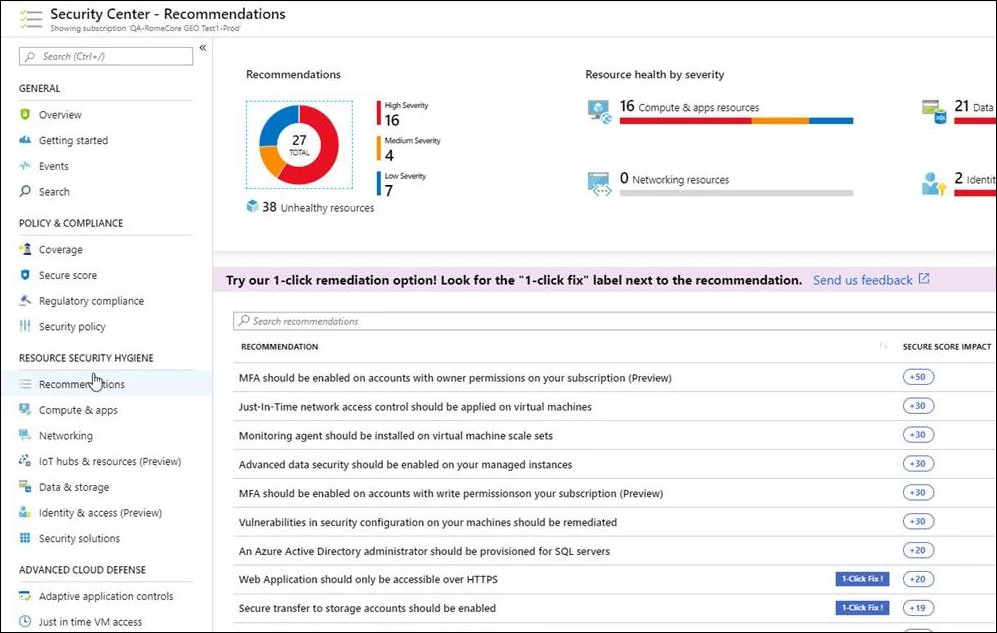
Once you choose the resources you want to remediate and select Remediate, the remediation takes place and the resources move to the Healthy resources tab. Remediation actions are logged in the activity log to provide additional details in case of a failure.
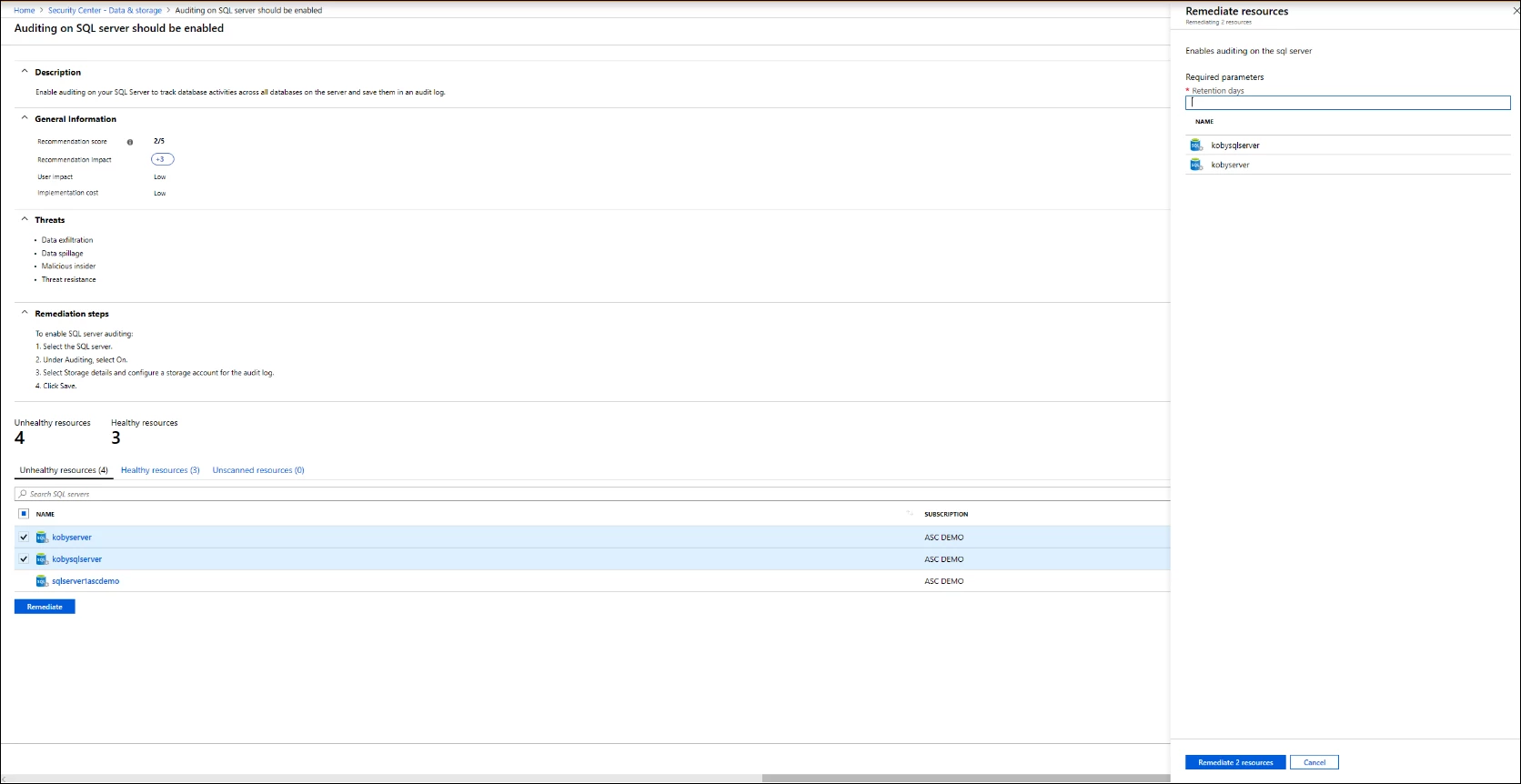
Remediation is available for the following recommendations in preview:
- Web Apps, Function Apps, and API Apps should only be accessible over HTTPS
- Remote debugging should be turned off for Function Apps, Web Apps, and API Apps
- CORS should not allow every resource to access your Function Apps, Web Apps, or API Apps
- Secure transfer to storage accounts should be enabled
- Transparent data encryption for Azure SQL Database should be enabled
- Monitoring agent should be installed on your virtual machines
- Diagnostic logs in Azure Key Vault and Azure Service Bus should be enabled
- Diagnostic logs in Service Bus should be enabled
- Vulnerability assessment should be enabled on your SQL servers
- Advanced data security should be enabled on your SQL servers
- Vulnerability assessment should be enabled on your SQL managed instances
- Advanced data security should be enabled on your SQL managed instances
Single click remediation is part of Azure Security Center’s free tier.
Just-in-time virtual machine access for Azure Firewall is generally available
Announcing the general availability of just-in-time virtual machine access for Azure Firewall. Now you can secure your Azure Firewall protected environments with JIT, in addition to your NSG protected environments.
JIT VM access reduces your VM’s exposure to network volumetric attacks by providing controlled access to VMs only when needed, using your NSG and Azure Firewall rules.
When you enable JIT for your VMs, you create a policy that determines the ports to be protected, how long the ports are to remain open, and approved IP addresses from where these ports can be accessed. This policy helps you stay in control of what users can do when they request access.
Requests are logged in the activity log, so you can easily monitor and audit access. The JIT blade also helps you quickly identify existing virtual machines that have JIT enabled and virtual machines where JIT is recommended.
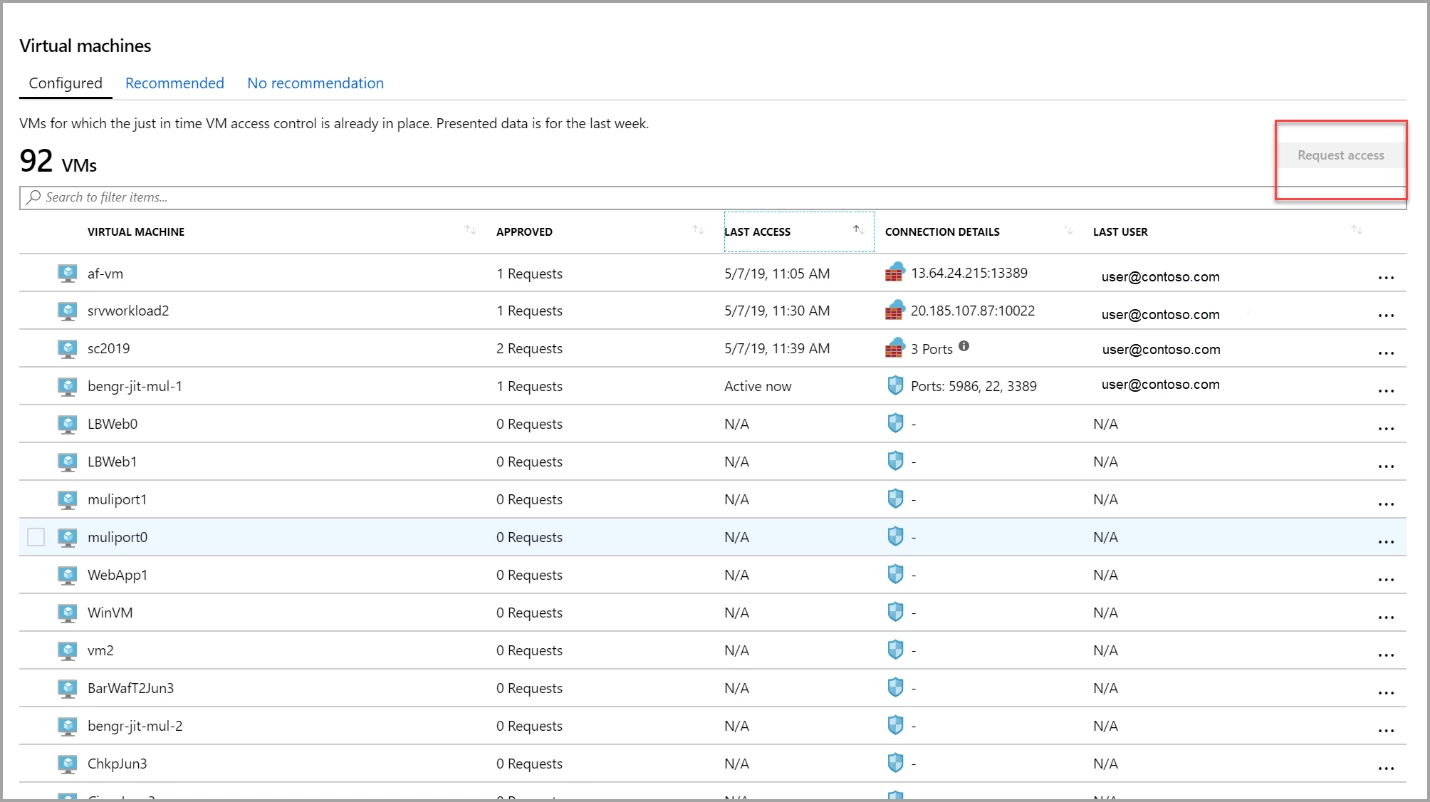
Azure Security Center displays your recently approved requests. The Configured VMs tab reflects the last user, the time, and the open ports for the previous approved JIT requests. When a user creates a JIT request for a VM protected by Azure Firewall, Security Center provides the user with the proper connection details to your virtual machine, translated directly from your Azure Firewall destination network address translation (DNAT).
This feature is available in the Standard pricing tier of Security Center, which you can try for free for the first 30 days.
To learn more about these features in Security Center, visit “Remediate recommendations in Azure Security Center,” just-in-time VM access documentation, and Azure Firewall documentation. To learn more about Azure Security Center, please visit the Azure Security Center home page.






